Vue Grid Not Showing Arrow Icon When Sorting

I've noticed when using the data grid syncfusion component for VueJS that when I choose to sort my grid, there is not a current indicator to let the client know which way the data is being sorted. The React version of the component can show the icon but for some reason the Vue component won't follow that functionality.


This is the Vue version of the component filtering the results in descending order: https://ej2.syncfusion.com/vue/documentation/grid/getting-started/#enable-sorting



And this is the React version of the exact same component:https://ej2.syncfusion.com/react/documentation/grid/sorting/
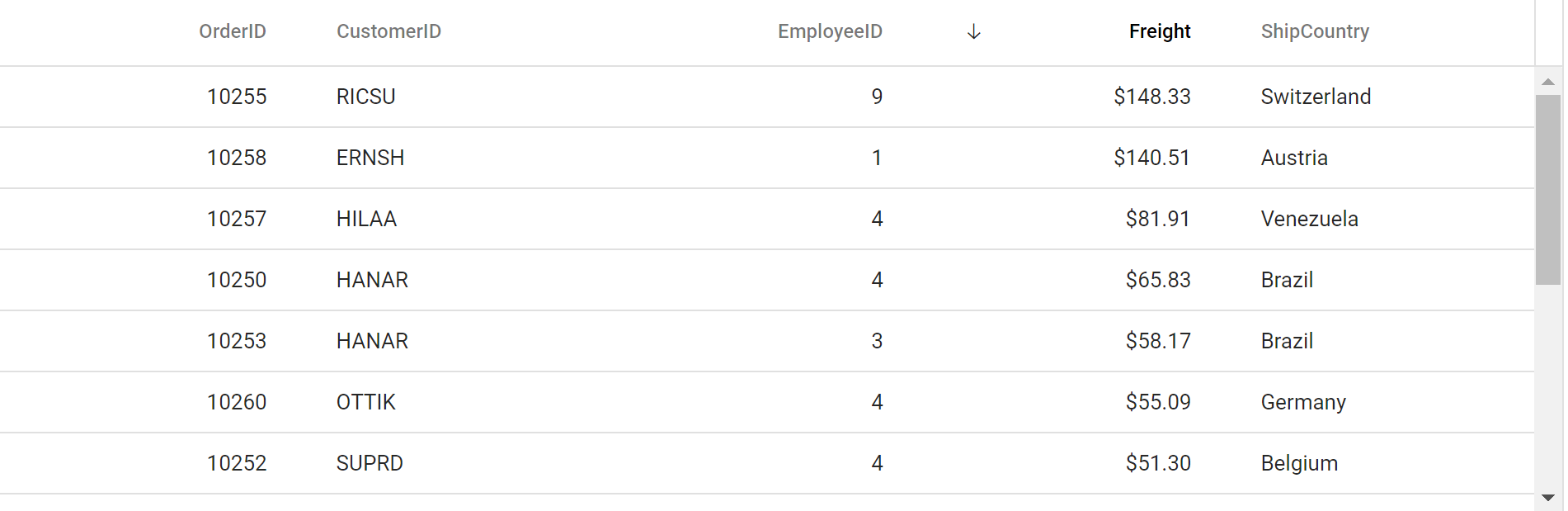


Would it at all be possible for the same functionality of indicating on the grid the ascending/descending order of columns towards Vue? Or if it can already be done, can I ask for help in showing that indication? Thanks so much in advance


4 Replies 1 reply marked as answer

SK Sujith Kumar Rajkumar Syncfusion Team August 26, 2021 10:24 AM UTC

Hi Khalipha, 
 
Greetings from Syncfusion support. 
 
We checked the reported problem by creating an individual sample(since currently the documentation preview samples are not running for which we have logged an internal task to check and resolve it) but unfortunately were unable to reproduce it as the sort icon was properly displayed in the Grid header. You can check the below sample for reference, 
 
 
So please share us the following information to validate further on this, 
 
  • Share us the Grid code file.
  • Share us a video demonstration of the problem.
  • Share us the package.json file of your application.
  • If possible share us a simple sample to replicate the problem or try reproducing it in the above provided sample.
 
Regards, 
Sujith R 


Marked as answer

KT Khalipha Thomas August 26, 2021 03:48 PM UTC

This is the the code that when I run in app.vue that will not show the grid arrows showing ascending/descending order


<template>
  <div id="app">
    <ejs-grid
      :dataSource="data"
      allowSorting="true"
      ref="grid"
      :allowPaging="true"
    >
      <e-columns>
        <e-column
          field="OrderID"
          headerText="Order ID"
          textAlign="Right"
          width="90"
        ></e-column>
        <e-column
          field="CustomerID"
          headerText="Customer ID"
          width="120"
        ></e-column>
        <e-column
          field="Freight"
          headerText="Freight"
          textAlign="Right"
          format="C2"
          width="90"
        ></e-column>
      </e-columns>
    </ejs-grid>
  </div>
</template>
<script>
import Vue from "vue";
import { GridPlugin, Page, Sort } from "@syncfusion/ej2-vue-grids";

Vue.use(GridPlugin);

export default {
  data() {
    return {
      data: [
        { OrderID10248CustomerID"VINET"Freight32.38 },
        { OrderID10249CustomerID"TOMSP"Freight11.61 },
        { OrderID10250CustomerID"HANAR"Freight65.83 },
        { OrderID10251CustomerID"VICTE"Freight41.34 },
        { OrderID10252CustomerID"SUPRD"Freight51.3 },
        { OrderID10253CustomerID"HANAR"Freight58.17 },
        { OrderID10254CustomerID"CHOPS"Freight22.98 },
        { OrderID10255CustomerID"RICSU"Freight148.33 },
        { OrderID10256CustomerID"WELLI"Freight13.97 },
      ],
    };
  },
  provide: {
    grid: [Page, Sort],
  },
};
</script>
<style>
@import "../node_modules/@syncfusion/ej2-vue-grids/styles/material.css";
</style>

{% endraw %}


KT Khalipha Thomas August 26, 2021 04:31 PM UTC

Actually an update on the bug I was able to fix it by adding in the style import link that was provided in your earlier example. Thank you for responding and I appreciate the support team for logging the internal task to investigate the issue with not being able to display the documentation preview samples as I was running into trouble using that which was one of the reason


SK Sujith Kumar Rajkumar Syncfusion Team August 27, 2021 07:44 AM UTC

Hi Khalipha, 
 
You’re welcome and thanks for the appreciation. We are glad to hear that your query has been resolved. 
 
Regards, 
Sujith R 


Loader.
Up arrow icon