The legend overlap when Series Name is Chinese characters 18.4.0.48
Hi,

I found the sfchart legend overlap when Series Name is Chinese characters 18.4.0.48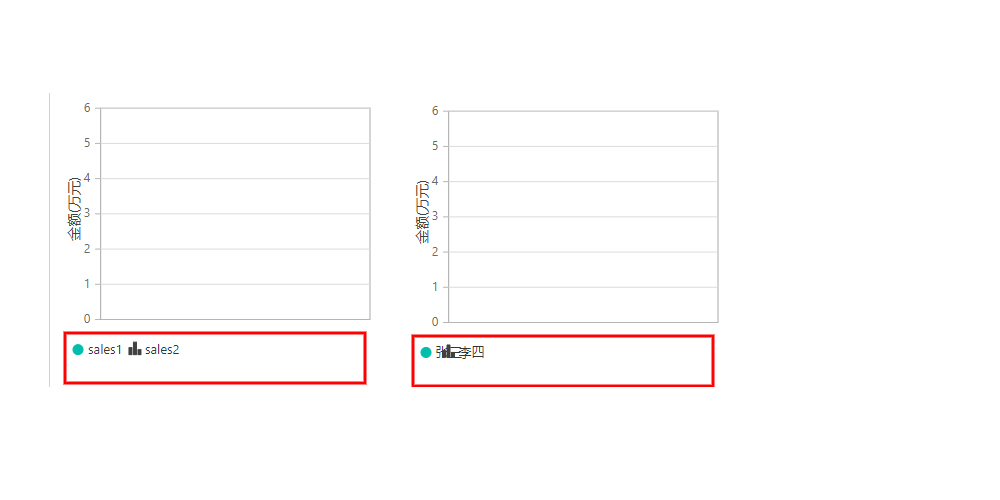
SIGN IN To post a reply.
7 Replies
1 reply marked as answer
SM
Srihari Muthukaruppan
Syncfusion Team
March 19, 2021 09:17 AM UTC
Hi Hugo,
Sorry for the inconvenience caused. Legend needs to be rendered fine for all language. We have considered this scenario as a bug and logged a bug request on this and you can keep track of it from the below feedback portal link.
Feedback Link: https://www.syncfusion.com/feedback/23500/legend-get-overlapped-with-each-other-while-using-chinese-text
This fix will be available in our weekly patch release which is scheduled to be rolled out on or before 6 April 2021. We appreciate your patience until then
Regards,
Srihari M
HZ
Hugo Zhao
April 7, 2021 02:54 AM UTC
Hello Srihari,
Sorry to brother you, but 19.1.0.55 didn't fix the error
BP
Baby Palanidurai
Syncfusion Team
April 8, 2021 02:36 PM UTC
Hi Hugo,
Thanks for your patience.
While processing text's dimension, that is, height and width in C#, we are encountering some alignment issues and inconsistencies across various system resolutions. As a result, we intend to process the same in scripts via Microsoft JSInterop. We need to consider multiple cases and behaviors to provide a consistent solution, so we'll need another couple of weeks to finish this on our end.
We appreciate your patience until then.
Regards,
Baby.
SM
Srihari Muthukaruppan
Syncfusion Team
April 20, 2021 01:32 PM UTC
Hi Hugo,
We are working on the reported scenario and this fix will be included in our upcoming weekly patch release which is scheduled to be rolled out on or before April 27 2021. We appreciate your patience until then.
Regards,
Srihari M
SM
Srihari Muthukaruppan
Syncfusion Team
April 27, 2021 06:30 PM UTC
Hi Hugo,
Sorry for the inconvenience.
Due to complexity in implementation. We will include the fix in our weekly patch release which is expected to be rolled out on or before 11 May 2021. We appreciate your patience until then.
Regards,
Srihari M
SM
Srihari Muthukaruppan
Syncfusion Team
May 13, 2021 10:54 AM UTC
Hi Hugo,
We have fixed the reported issue. Since it is in testing stage, we have generated whole custom nugget package. and this fix will be available in our upcoming volume release which is scheduled to be rolled out by the end of June 2021. We appreciate your patience until then. Please add this local nugget in your application and install Syncfusion.Blazor package to get rid of reported issue.
Custom Nugget : https://www.syncfusion.com/downloads/support/directtrac/general/ze/CustomNuget21593992919.zip
Screenshot :

Please follow the below steps to install the nugget in your application.
1.Open your application and right click Dependencies, then choose Manage Nuget Packages.

2. In Manage Nuget Packages window, choose settings icon on top right corner.

3. In pop up window, choose Add icon on top right corner and specify the name in Name textbox and Nuget location available in folder in Source textbox, then choose Update button on right and click Ok.

4. Now custom nugget is added in package source, then choose the specified name under package source dropdown.

5. Choose nugget package and click install

Now nugget is installed successfully, and you can ensure it.
Let us know if you still faces any issues
Regards,
Srihari M
SM
Srihari Muthukaruppan
Syncfusion Team
May 13, 2021 01:11 PM UTC
Hi Hugo,
We also suggest to use the below mentioned script on the Host.cshtml page to get rid of the reported scenario. We also suggest to place the provided the min file in the wwwroot folder. Based on that we have also prepared a sample for your reference. Please find the sample, code snippet and screenshot below.
Custom Nugget : https://www.syncfusion.com/downloads/support/directtrac/general/ze/CustomNuget21593992919.zip
Code Snippet:
|
// add your additional code here
<head>
<script src="~/syncfusion-blazor-base.min.js"></script>
</head>
// add your additional code here |
We have also attached the documentation link for custom nugget installation for further reference.
Kindly revert us if you are still facing any issues.
Regards,
Srihari M
Marked as answer
SIGN IN To post a reply.
- 7 Replies
- 3 Participants
- Marked answer
-
HZ Hugo Zhao
- Mar 18, 2021 05:29 AM UTC
- May 13, 2021 01:11 PM UTC

