- Home
- Forum
- Xamarin.Forms
- How to make the schedule customized
How to make the schedule customized
I am developing an application for security alarm turn on /off. I am including a scheduler for that which can be scheduled to Turn on/off on the days. I refered to your document but I am worried I didn't anything similar on that the Scheduler should contain only days and Calender without a date.
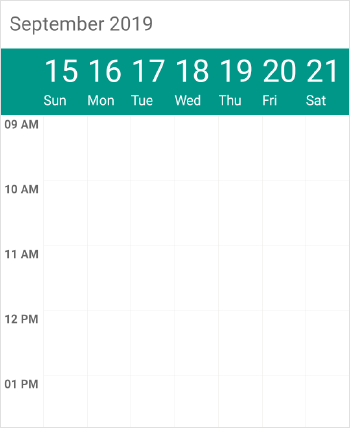
I need this.
------------------------------------------------------
Time Mon Tue Wed Thur Fri Sat Sun
------------------------------------------------------
12 am
1 am
2 am
.
.
.
11 pm
not like
please help me with any sample.
Thank you.Regards.
-Arshad
SIGN IN To post a reply.
5 Replies
1 reply marked as answer
MS
Muniappan Subramanian
Syncfusion Team
January 18, 2021 07:25 AM UTC
Hi Arshad,
Thank you for contacting Syncfusion support.
we have checked your requirement “How to make the schedule customized”. You can customize the date and day format of schedule ViewHeader by using “DateFormat” and “DayFormat” properties of “WeekLabelSettings” and by setting the " FirstDayOfWeek " property of SfSchedule, you can change the first day of week. we have prepared a sample for the same, please find the sample by the following link.
Code Snippet:
|
WeekViewSettings weekViewSettings = new WeekViewSettings();
WeekLabelSettings weekLabelSettings = new WeekLabelSettings();
weekLabelSettings.DateFormat = "";
weekLabelSettings.DayFormat = Device.OnPlatform("EEE", "EEE", "ddd");
weekViewSettings.WeekLabelSettings = weekLabelSettings;
this.schedule.WeekViewSettings = weekViewSettings;
this.schedule.FirstDayOfWeek = 2; |
Sample: https://www.syncfusion.com/downloads/support/directtrac/general/ze/ScheduleXamarin-576362212
Please refer our UG documents to know more details about FirstDayofWeek and customizing view header in schedule,
We hope this helps. Kindly revert us if you have any concern.
Regards,
Muniappan S.
AR
Arshad
January 18, 2021 08:55 AM UTC
Thanks for replying, but I need scheduling for based on days not on dates. Only changing the appearance doesn't works
MS
Muniappan Subramanian
Syncfusion Team
January 19, 2021 09:59 AM UTC
Hi Arshad,
Thank you for the update.
We would like to inform you that the scheduling was done based on the dates, not on days, as per the implementation of the SfSchedule and we are not clear with your requirement. Can you please explain your use case in detail. So that we could analyze your query better and provide you better solution at the earliest.
Regards,
Muniappan S.
AR
Arshad
January 19, 2021 01:49 PM UTC
Thanks for the quick reply, I needed a scheduler based on days not on a date as you mention there is no option in your kit. Is their any other option to archive this?
MS
Muniappan Subramanian
Syncfusion Team
January 20, 2021 01:15 PM UTC
Hi Arshad,
Thanks for the update.
we have checked your requirement “I needed a scheduler based on days not on a date”. You can achieve the appearance like in the attached screenshot by customizing the schedule week view. By using the "CellTapped" schedule event, you can get the day and date details from the "DateTime" event argument property, and you can disable the navigation by setting the “EnableNavigation” property to false. You can use the “HeaderHeight” property to customize the height for the header in the Schedule. we have prepared a sample for the same, please find the sample by the following link.
Sample: https://www.syncfusion.com/downloads/support/directtrac/general/ze/ScheduleXamarin-1287190475
If the shared information does not meet your requirement, could you please explain how this appearance doesn’t work and your use case in detail, So that we could analyze your query better and provide you better solution at the earliest.
Regards,
Muniappan S
Marked as answer
SIGN IN To post a reply.
- 5 Replies
- 2 Participants
- Marked answer
-
AR Arshad
- Jan 17, 2021 03:02 AM UTC
- Jan 20, 2021 01:15 PM UTC

