- Home
- Forum
- Xamarin.Forms
- When user text matches a data source item but user taps outside of control, selected item is set to first item of data source
When user text matches a data source item but user taps outside of control, selected item is set to first item of data source
When the user types text that matches an existing item from the data source (but does not select/tap it) and then taps outside of the control, the selected item property of the field is set to the first item in the original data source (regardless of the filtered contents). For example:
Given a SfAutoComplete field named "myField" and the bound dataset:
- AAA
- AAB
- AAC
- EEE
If the user types "EEE", "AAC", or "AAB" and then taps outside the myField control without selecting from the dropdown, the selected item of myField will be set incorrectly to "AAA" and the user's text will be lost.
If the user types any non-matching text (e.g. "AA", "EE", "TEST", "DDD", etc.) and then taps outside the myField control, the selected item of myField will remain null and the user's text remains as expected.
The reason is that when there is a match in the data source, a SelectionChange event happens (before the focus change events fire) that sets the selected item to the first item in the data source. If there is no match in the data source, the SelectionChange event is not triggered before the focus change events.
Is there any way to prevent this behavior? I do not want anything to be selected unless the user explicitly selects an item from the dropdown.
Thank you!
SIGN IN To post a reply.
15 Replies
SS
Suganya Sethuraman
Syncfusion Team
January 8, 2021 12:47 PM UTC
Hi J,
Greetings from Syncfusion.
We have analyzed the reported issue and fixed the reported issue. Please find the custom assemblies from below link.
Custom Assemblies: https://www.syncfusion.com/downloads/support/directtrac/general/ze/CustomAssembly2073212330
Assembly version : 18.4.0.33
Since 18.4.0.33 is a weekly NuGet release, we are not able to generate patch in 18.4.0.33 version. We can generate patch only for Main release and SP1 release versions, so we have provided the custom assemblies in 18.4.0.33.
Disclaimer:
Please note that we have created custom assembly for version 18.4.0.33 specifically to resolve the issue reported in this incident. If you have received other patches for the same version for other products, please apply all patches in the order received.
Please refer the below link for how to apply custom assemblies.
Greetings from Syncfusion.
We have analyzed the reported issue and fixed the reported issue. Please find the custom assemblies from below link.
Custom Assemblies: https://www.syncfusion.com/downloads/support/directtrac/general/ze/CustomAssembly2073212330
Assembly version : 18.4.0.33
Since 18.4.0.33 is a weekly NuGet release, we are not able to generate patch in 18.4.0.33 version. We can generate patch only for Main release and SP1 release versions, so we have provided the custom assemblies in 18.4.0.33.
Disclaimer:
Please note that we have created custom assembly for version 18.4.0.33 specifically to resolve the issue reported in this incident. If you have received other patches for the same version for other products, please apply all patches in the order received.
Please refer the below link for how to apply custom assemblies.
https://www.syncfusion.com/kb/8279/how-to-apply-the-custom-assemblies-when-configured-the-project-with-syncfusion-nuget
The Fix for the reported issue will be included in our upcoming weekly NuGet release, which will be available on January 19, 2021.We appreciate your patience until then.
Regards,
Suganya Sethuraman.
The Fix for the reported issue will be included in our upcoming weekly NuGet release, which will be available on January 19, 2021.We appreciate your patience until then.
Regards,
Suganya Sethuraman.
J
J
January 9, 2021 09:30 AM UTC
Wow. Unexpected and awesome response :) Thank you!
I'll dig into this more later, but on first try I saw some errors regarding "core" assemblies after I applied these custom ones. Will let you know or just wait until the official nuget. Thanks again.
SS
Suganya Sethuraman
Syncfusion Team
January 11, 2021 05:12 AM UTC
Hi J,
Thanks for the update.
As we said earlier, the Fix for the reported issue will be included in our upcoming weekly NuGet release, which will be available on January 19, 2021.We appreciate your patience until then.
Regards,
Suganya Sethuraman.
Thanks for the update.
As we said earlier, the Fix for the reported issue will be included in our upcoming weekly NuGet release, which will be available on January 19, 2021.We appreciate your patience until then.
Regards,
Suganya Sethuraman.
J
J
January 19, 2021 11:22 PM UTC
Hi Suganya!
I upgraded to 18.4.0.35 today
(the 19th) and I am still seeing the issue as described above. Can you
confirm if this fix was included in this update? Thanks!
SS
Suganya Sethuraman
Syncfusion Team
January 20, 2021 07:16 AM UTC
Hi J,
Sorry for the inconvenience.
We have not included the fix in our Yesterday weekly NuGet release(v18.4.0.35). We will include the fix in our upcoming weekly NuGet release without delay, which is available on January 26, 2021. We appreciate your patience until then.
Regards,
Suganya Sethuraman.
Sorry for the inconvenience.
We have not included the fix in our Yesterday weekly NuGet release(v18.4.0.35). We will include the fix in our upcoming weekly NuGet release without delay, which is available on January 26, 2021. We appreciate your patience until then.
Regards,
Suganya Sethuraman.
Hi J,
Sorry for the inconvenience.
We have not included the fix in our Yesterday weekly NuGet release(v18.4.0.35). We will include the fix in our upcoming weekly NuGet release without delay, which is available on January 26, 2021. We appreciate your patience until then.
Regards,
Suganya Sethuraman.
Hi Suganya!
I've updated to the newly released 18.4.0.39 and am still seeing the same issue. Can you confirm if the fix was included in this release? Thanks!
SS
Suganya Sethuraman
Syncfusion Team
January 29, 2021 05:34 AM UTC
Hi J,
Sorry for the continuous delay.
The Fix for the reported issue is not included in this release due to having some pending test cases to ensure that fix, we were unable to move this fix into our Volume 4 SP1 release. We have completed all the test cases and moved this fix in our next weekly NuGet which is expected to be rolled out on February 2, 2021.
We appreciate your patience until then.
Regards,
Suganya Sethuraman.
Sorry for the continuous delay.
The Fix for the reported issue is not included in this release due to having some pending test cases to ensure that fix, we were unable to move this fix into our Volume 4 SP1 release. We have completed all the test cases and moved this fix in our next weekly NuGet which is expected to be rolled out on February 2, 2021.
We appreciate your patience until then.
Regards,
Suganya Sethuraman.
J
J
February 10, 2021 07:10 PM UTC
Hi Suganya!
There wasn't any change in last week's 18.4.0.41 release, but I do see that this week's 18.4.0.42 release, the behavior is different. Instead of selecting the first entry in the entire dataset, it now appears to select the first result in the filtered dataset, so that's definitely an improvement :)
However, the bug that the SelectionChange fires when the user unfocuses without making a selection still exists. I think the expected behavior is that it should leave the Entry contents alone and not change the selection on unfocus.
Do you know if this issue is still to be resolved?
Thanks!
SP
Sakthivel Palaniyappan
Syncfusion Team
February 11, 2021 11:30 AM UTC
Hi J,
Thanks for the update.
Query 1: When text matches an existing item from the data source and then taps outside, the selected item property of the field is set to the first item in the original data source
We have fixed the reported issue and included the fix in our 18.4.0.42 weekly NuGet release.
Query 2 : SelectionChange fires when the user unfocuses without making a selection still exists
We have checked the reported issue and we would like to know that this is the default behavior of SfComboBox control. If you type the any correct item in data source and unfocused the control, in default that item will select.
Please let us know if you have any other queries.
Regards,
Sakthivel P.
Thanks for the update.
Query 1: When text matches an existing item from the data source and then taps outside, the selected item property of the field is set to the first item in the original data source
We have fixed the reported issue and included the fix in our 18.4.0.42 weekly NuGet release.
Query 2 : SelectionChange fires when the user unfocuses without making a selection still exists
We have checked the reported issue and we would like to know that this is the default behavior of SfComboBox control. If you type the any correct item in data source and unfocused the control, in default that item will select.
Please let us know if you have any other queries.
Regards,
Sakthivel P.
J
J
February 11, 2021 06:49 PM UTC
Is there any way to change that behavior as I don't want a selection to be made unless the user actually selects an item.
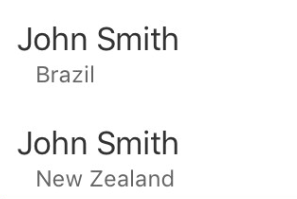
In my use case, I have duplicate items in my dropdown list (that are displayed with secondary information to differentiate them), so selecting the first one doesn't make sense as the user may have intended the second one.
For example, in the below screenshot, there are two "John Smith" entries that display when the user types "John Smith" You can see that each item has a subtext below, making each unique. If the user removes focus, the control will select the first entry, but the user may have meant to select the second and this results in confusion.
SP
Sakthivel Palaniyappan
Syncfusion Team
February 12, 2021 12:34 PM UTC
Hi J,
Thanks for the update.
We can achieve your requirement by setting SelectionType as OnTap as like below code snippet.
XAML:
Thanks for the update.
We can achieve your requirement by setting SelectionType as OnTap as like below code snippet.
XAML:
|
<combobox:SfComboBox HeightRequest="40" IsEditableMode="True" DataSource="{Binding EmployeeCollection}" DisplayMemberPath="Name" SelectionType="OnTap" SelectionChanged="comboBox_SelectionChanged" /> |
Please let us know if you have any other queries.
Regards,
Sakthivel P.
J
J
February 12, 2021 09:05 PM UTC
Thanks Sakthivel. I did try that. Unfortunately, the selection change event still triggers when the user taps outside of the control and it still selects the first item.
SP
Sakthivel Palaniyappan
Syncfusion Team
February 15, 2021 12:02 PM UTC
Hi J,
Thanks for the update.
We have checked the reported issue with SelectionType as OnTap, but we could not reproduce the issue when use SelectionType. We have recorded video for this and please find the video from below.
Video:
https://www.syncfusion.com/downloads/support/directtrac/general/ze/SelectedItemComboBox1083172808.zip
Please find the sample, which we have tried to reproduce the issue from below link
Sample:
https://www.syncfusion.com/downloads/support/directtrac/general/ze/ComboBoxSample1590318316.zip
Could you please check the issue with the attached sample and let us know whether it is reproduced or not? If the issue was not reproduced in this sample, please revert us by modifying the sample based on your application along with replication procedure or provide the sample. This will be helpful for us to investigate further and provide you a better solution at the earliest.
Regards,
Sakthivel P.
Thanks for the update.
We have checked the reported issue with SelectionType as OnTap, but we could not reproduce the issue when use SelectionType. We have recorded video for this and please find the video from below.
Video:
https://www.syncfusion.com/downloads/support/directtrac/general/ze/SelectedItemComboBox1083172808.zip
Please find the sample, which we have tried to reproduce the issue from below link
Sample:
https://www.syncfusion.com/downloads/support/directtrac/general/ze/ComboBoxSample1590318316.zip
Could you please check the issue with the attached sample and let us know whether it is reproduced or not? If the issue was not reproduced in this sample, please revert us by modifying the sample based on your application along with replication procedure or provide the sample. This will be helpful for us to investigate further and provide you a better solution at the earliest.
Regards,
Sakthivel P.
J
J
February 24, 2021 01:48 AM UTC
Thank you for the reply and example. I can confirm that this is all working as expected and the OnTap solves the issue as you mentioned. I had a rogue selection change in my code that was making it look as if the OnTap wasn't working. Much appreciated!
SP
Sakthivel Palaniyappan
Syncfusion Team
February 24, 2021 05:10 AM UTC
Hi J,
Thanks for the update.
We are glad to know that reported issue has been resolved at your end. Please let us know if you need any other assistance on this.
Regards,
Sakthivel P.
Thanks for the update.
We are glad to know that reported issue has been resolved at your end. Please let us know if you need any other assistance on this.
Regards,
Sakthivel P.
SIGN IN To post a reply.
- 15 Replies
- 3 Participants
-
J J
- Jan 8, 2021 03:44 AM UTC
- Feb 24, 2021 05:10 AM UTC

