SfGantt - Open tasks and anchestors by ID
How can we open a specific task by only knowing it's ID, e.g. Task ID 4048?
We tell our blazor app the desired task ID, using either a parameter in the URL (https://localhost:44384/projects/4048), or alternatively by clicking a button, if that is easier...
- first thing we have to to is to open the Blazor page
- then the Gantt-diagram must be drawn initially
- row 4048 must be high-lighted (blue)
- all it's anchestors up to the root (3025, 3024) must be opened
- all other parent-tasks (3015, 3042, 4049 and 3029) must stay closed, so that the diagram remains clear if there are lots of child-tasks.

Cheers,
Volker
|
[Index.razor]
<SfTextBox @ref="Input" Placeholder='Type Task ID' Width="400px" ValueChange="ValueChange"></SfTextBox>
<SfGantt ID="GanttContainer" @ref="Gantt" CollapseAllParentTasks="true"
//…
</SfGantt>
@code{
//…
public void ValueChange(ChangedEventArgs args)
{
var data = this.Gantt.DataSource.ToList();
var selectedData = data.Where(y => y.TaskId == int.Parse(args.Value)).ToList();
var index = data.IndexOf(selectedData[0]);
this.Gantt.ExpandByID(selectedData[0].ParentId);
var parentData = data.Where(y => y.TaskId == selectedData[0].ParentId).ToList();
if(parentData.Count > 0)
{
this.expandParent(parentData);
}
this.Gantt.ExpandByID(selectedData[0].ParentId);
this.Gantt.SelectRow(index);
}
public void expandParent(List<TaskData> data)
{
this.Gantt.ExpandByID(data[0].ParentId);
var parentData = this.Gantt.DataSource.ToList().Where(y => y.TaskId == data[0].ParentId).ToList();
if (parentData.Count > 0)
{
this.expandParent(parentData);
}
}
} |
your work-around to get the correct line (index number by id on Blazor Server) to highlight the selected task doesn't work when using a CustomAdapter/component like:

Have a look: https://www.syncfusion.com/forums/158665/sfgantt-query-sorting-in-sfdatamanager
Any idea?
Cheers,
Volker
|
public void ConfigureServices(IServiceCollection services)
{
services.AddSyncfusionBlazor();
services.AddRazorPages();
services.AddServerSideBlazor();
services.AddSingleton<WeatherForecastService>();
} |
Hi Monisha,
Have a look at the attached example.
Press "populate", then "select task 105".
How can we expand all the parent tasks of child task (in this example it's just one) when selecting the task, so that it gets visible?
Any ideas how to expand/collapse a specific parent task nowadays?
Cheers,
Volker
Attachment: GanttTest_27515a1.zip
Hi Monisha,
Thats great to hear, we really need this feature again.
Populate a Gantt, close all its parents, select child-task by an external call (e.g. button outside the gantt).
Then the child must be selected, all it's parent must be expanded, all other parents must stay collapsed, and the selected child task must be scrolled into viewport ( autofocus).
In previous versions, autofocus was an option, now it's debricated and gone.
It is still featured on your website, but since v19.xx the Gantt-component doesn't react like that any more. Why?
https://www.syncfusion.com/aspnet-core-ui-controls/gantt-chart 
Cheers,
Volker
|
Sl.No. |
Query |
Syncfusion Comments
|
|
1 |
Populate a Gantt, close all its parents, select child-task by an external call (e.g. button outside the gantt).
Then the child must be selected, all it's parent must be expanded, all other parents must stay collapsed,
|
We will consider this when implementing this support. |
|
2 |
In previous versions, autofocus was an option, now it's debricated and gone.
It is still featured on your website, but since v19.xx the Gantt-component doesn't react like that anymore. Why?
|
We do not have built-in support to Auto Scroll to tasks in latest versions.
However, we can also achieve this requirement by a work-around. We will provide you with further details within one business day(December 4, 2021). |
|
public async Task RowSelected(RowSelectEventArgs<TaskData> args)
{
System.DateTime projectstartdate = ProjectStart;
System.DateTime taskstartdate = args.Data.StartDate;
System.TimeSpan diff = taskstartdate.Subtract(projectstartdate);
var days = diff.Days;
var ele = await JSRuntime.InvokeAsync<int>("getTargetElement", days);
}
|
|
window.getTargetElement = (days) => {
var chartElement = document.getElementsByClassName("e-chart-scroll-container")[0];
var scrollLeft = 33 * days;
chartElement.scrollLeft = scrollLeft;
return scrollLeft;
};
|
Hi Monisha,
I don't want to be rude, but your website says "auto focus tasks" as a key-feature of the current version.
Have a look here:
The GIF shows exactly how it should behave:
https://www.syncfusion.com/aspnet-core-ui-controls/gantt-chart
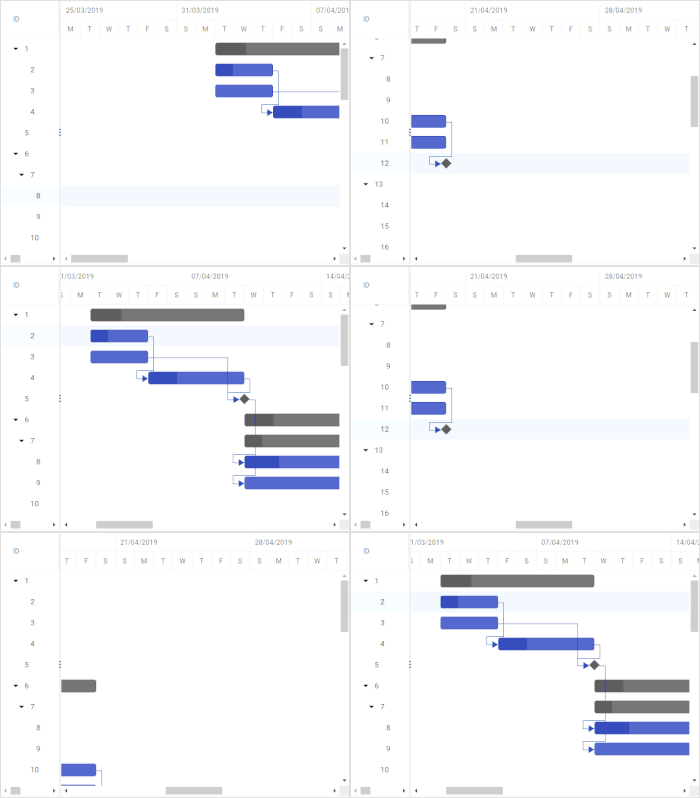

Again to the history: up to the version V18.xx this worked wonderfully, since V19.xx the function was deleted, now "auto focus" is switched on permanently as standard for the GANNT.
But in fact this basic feature does not work since V19.x and now we are all supposed to implement this javascript work-around, in Blazor Server?
Please confirm that you are serious about this.
Cheers,
Volker
- 12 Replies
- 4 Participants
- Marked answer
-
VO Volker
- Jul 10, 2020 12:24 PM UTC
- Dec 7, 2021 03:26 PM UTC

