Show ToolTip in Suggestion Box
Hi!
Is there a way to show a ToolTip for each element in the suggestion box?
I tried this but I seem to have the wrong Type:
<syncfusion:SfTextBoxExt AutoCompleteMode="Suggest"
SuggestionMode="StartsWith"
ShowSuggestionsOnFocus="True"
VerticalContentAlignment="Center"
AutoCompleteSource="{Binding ProductHierarchies}"
SearchItemPath="Name_Short"
SelectedItem="{Binding SelectedItem_ProductHierarchy, Mode=TwoWay}"
TextHighlightMode="FirstOccurrence"
HighlightedTextColor="Red"
SuggestionBoxPlacement="Top"
Height="27">
<syncfusion:SfTextBoxExt.AutoCompleteItemTemplate>
<DataTemplate>
<StackPanel Orientation="Horizontal">
<TextBlock Text="{Binding Name_Short}" Margin="5 2"/>
</StackPanel>
</DataTemplate>
</syncfusion:SfTextBoxExt.AutoCompleteItemTemplate>
<syncfusion:SfTextBoxExt.ToolTip>
<ToolTip DataContext="{Binding PlacementTarget, RelativeSource={RelativeSource Self}}">
<StackPanel Orientation="Vertical">
<TextBlock Text="{Binding SelectedItem.Name_Long}" FontWeight="Bold" />
<StackPanel Orientation="Horizontal">
<TextBlock Text="de" FontSize="8" FontWeight="Bold" Background="AliceBlue" Width="10"/>
<TextBlock Text="{Binding SelectedItem.Description_DE}" />
</StackPanel>
<StackPanel Orientation="Horizontal">
<TextBlock Text="en" FontSize="8" FontWeight="Bold" Background="AliceBlue" Width="10"/>
<TextBlock Text="{Binding SelectedItem.Description_EN}" />
</StackPanel>
<StackPanel Orientation="Horizontal">
<TextBlock Text="fr" FontSize="8" FontWeight="Bold" Background="AliceBlue" Width="10"/>
<TextBlock Text="{Binding SelectedItem.Description_FR}" />
</StackPanel>
</StackPanel>
</ToolTip>
</syncfusion:SfTextBoxExt.ToolTip>
<syncfusion:SfTextBoxExt.SuggestionBoxStyle>
<Style TargetType="{x:Type syncfusion:AutoComplete}">
<Setter Property="ToolTip" Value="{StaticResource ResourceKey=comboBoxToolTip}" />
<Setter Property="IsHitTestVisible" Value="{Binding IsChecked, Converter={StaticResource negateBoolConverter}, ElementName=ckbConfirmProductManager}" />
<Setter Property="IsTabStop" Value="{Binding IsChecked, Converter={StaticResource negateBoolConverter}, ElementName=ckbConfirmProductManager}" />
</Style>
</syncfusion:SfTextBoxExt.SuggestionBoxStyle>
</syncfusion:SfTextBoxExt>
With this as template:
<StackPanel x:Key="comboBoxToolTip">
<StackPanel Orientation="Vertical">
<TextBlock Text="{Binding Name_Long}" FontWeight="Bold" />
<StackPanel Orientation="Horizontal">
<TextBlock Text="de" FontSize="8" FontWeight="Bold" Background="AliceBlue" Width="10"/>
<TextBlock Text="{Binding Description_DE}" />
</StackPanel>
<StackPanel Orientation="Horizontal">
<TextBlock Text="en" FontSize="8" FontWeight="Bold" Background="AliceBlue" Width="10"/>
<TextBlock Text="{Binding Description_EN}" />
</StackPanel>
<StackPanel Orientation="Horizontal">
<TextBlock Text="fr" FontSize="8" FontWeight="Bold" Background="AliceBlue" Width="10"/>
<TextBlock Text="{Binding Description_FR}" />
</StackPanel>
</StackPanel>
</StackPanel>
Is this even possible?
Thank you very much :-)
Victor
SIGN IN To post a reply.
3 Replies
HM
Hemalatha Marikumar
Syncfusion Team
December 5, 2019 12:13 PM UTC
Hi Victor Dienstbier,
Greetings from Syncfusion.
We have analyzed your requirement “Show ToolTip in SuggestionBox” in SfAutoComplete and you can achieve your requirement by using AutoCompleteItemTemplate as per in below code snippet
Code Snippet[XAML]
|
<editors:SfTextBoxExt HorizontalAlignment="Center"
VerticalAlignment="Center"
Width="400"
SearchItemPath="Name"
AutoCompleteMode="Suggest"
AutoCompleteSource="{Binding Employees}" >
<editors:SfTextBoxExt.AutoCompleteItemTemplate>
<DataTemplate>
<StackPanel Orientation="Horizontal">
<TextBlock Text="{Binding Name}" Margin="5 2">
<TextBlock.ToolTip>
<StackPanel>
<TextBlock Text="{Binding Email}"/>
</StackPanel>
</TextBlock.ToolTip>
</TextBlock>
</StackPanel>
</DataTemplate>
</editors:SfTextBoxExt.AutoCompleteItemTemplate>
</editors:SfTextBoxExt> |
Sample Link:
https://www.syncfusion.com/downloads/support/directtrac/general/ze/AutoComplete_ToolTip-70970340
Output:
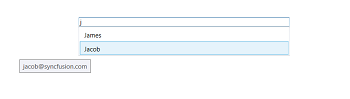
Please check the sample and let us know whether your requirement meets with that sample if not please share more details like any video / pictorial representation check further and provide a possible workaround.
Regards,
Hemalatha M.
VD
Victor Dienstbier
December 5, 2019 03:35 PM UTC
That worked perfectly :-)
Thank you very much!
Victor
HM
Hemalatha Marikumar
Syncfusion Team
December 6, 2019 06:46 AM UTC
Hi Victor Dienstbier,
Thanks for your update.
We glad to hear that given solution works.
Please let us know if you need any further assistance.
Regards,
Hemalatha M.
SIGN IN To post a reply.
- 3 Replies
- 2 Participants
-
VD Victor Dienstbier
- Dec 4, 2019 02:48 PM UTC
- Dec 6, 2019 06:46 AM UTC

