- Home
- Forum
- Xamarin.Android
- Working example of a Sflinesparkline graph
Working example of a Sflinesparkline graph
Hi there
I am using vs 2017 and trying to create an app that visually displays data in a graph format.
This data originates from a Mqtt client subscribed to a broker. I've managed to get the data
and display it in a table. However representing the data graphically is the aim.
I have downloaded many examples but none of them seam to work.
Please help
SIGN IN To post a reply.
4 Replies
RA
Rachel A
Syncfusion Team
October 14, 2019 09:19 AM UTC
Hi Matthias,
Greetings from Syncfusion.
We have prepared the simple SfLineSparkline samples in both Xamarin Forms and Xamarin.Android platforms. Please find the links from below
Xamarin.Forms sample link:
Xamarin.Android sample link:
Also, refer the below User Guide link for more information.
We hope it helps you.
Regards,
Rachel.
MA
Matthias Axt
October 15, 2019 12:14 PM UTC
Thanks Rachel for your reply. I have changed to using a sfchart with a spline type allowing me multiple series. One question I do have is, why when using range padding numericalpadding additional does it always seem to pad more at the top than at the bottom. I would like to see the series in the middle of the range. Is that possible?
HM
Hemalatha Marikumar
Syncfusion Team
October 17, 2019 10:50 AM UTC
Hi Matthias Axt,
Thanks for your update.
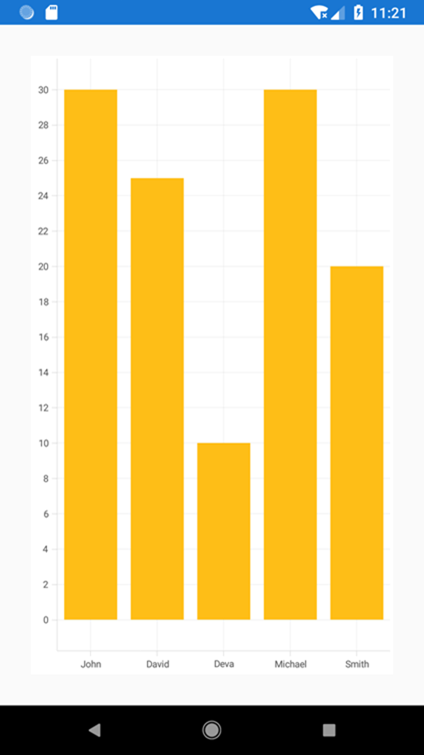
We have validated your query and you can achieve this requirement by setting the PlotOffset property to apply the padding to the plot area which is available in ChartAxis. Please refer below code snippet.
We have validated your query and you can achieve this requirement by setting the PlotOffset property to apply the padding to the plot area which is available in ChartAxis. Please refer below code snippet.
Code Snippet[Xaml]:
|
<chart:SfChart.SecondaryAxis>
<chart:NumericalAxis PlotOffset="30">
</chart:NumericalAxis>
</chart:SfChart.SecondaryAxis> |
Code Snippet[C#]:
|
chart.SecondaryAxis = new NumericalAxis()
{
PlotOffset = 30
}; |
We have prepared sample based on your requirement and you can download the sample from the below link.
Xamarin.Forms sample link:
Xamarin.Android sample link:
Screenshot:
For more details please refer below UG and KB links.
Xamarin.Forms : https://help.syncfusion.com/xamarin/sfchart/axis?cs-save-lang=1&cs-lang=xaml#offset-the-rendering
KB : https://www.syncfusion.com/kb/10785/how-to-view-corner-segments-without-cutting-in-edge-of-chart
Please let us know if need any further assistance.
Regards,
Hemalatha M.
Hemalatha M.
LA
Lavanya Anaimuthu
Syncfusion Team
October 17, 2019 11:25 AM UTC
Hi Matthias Axt,
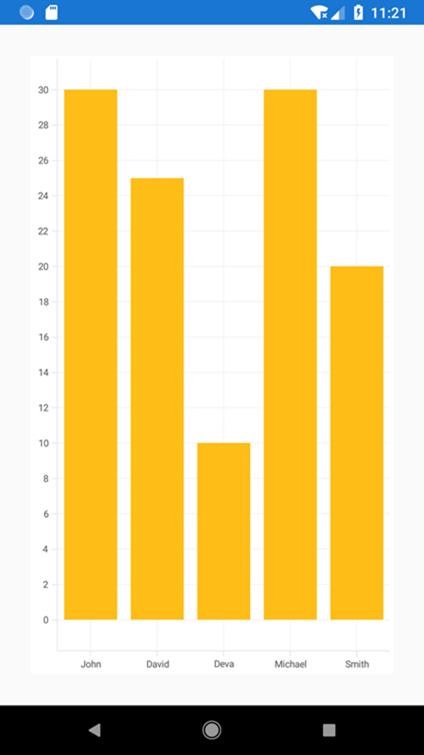
We have validated your query and you can achieve this requirement by setting the PlotOffset property to apply padding to the plot area which is available in ChartAxis. Please refer below code snippet.
Code Snippet[Xaml]:
|
<chart:SfChart.SecondaryAxis>
<chart:NumericalAxis PlotOffset="30">
</chart:NumericalAxis>
</chart:SfChart.SecondaryAxis>
|
Code Snippet[C#]:
|
chart.SecondaryAxis = new NumericalAxis()
{
PlotOffset = 30
};
|
We have prepared sample based on your requirement and you can download the sample from the below link.
Xamarin.Forms sample link:
Xamarin.Android sample link:
Screenshot:
For more details please refer below ug and kb links.
Xamarin.Forms : https://help.syncfusion.com/xamarin/sfchart/axis?cs-save-lang=1&cs-lang=xaml#offset-the-rendering
Kb : https://www.syncfusion.com/kb/10785/how-to-view-corner-segments-without-cutting-in-edge-of-chart
Please let us know if need any further assistance.
Thanks,
Lavanya A.
SIGN IN To post a reply.
- 4 Replies
- 4 Participants
-
MA Matthias Axt
- Oct 12, 2019 02:08 PM UTC
- Oct 17, 2019 11:25 AM UTC

