- Home
- Forum
- Angular - EJ 2
- Filtering, sorting and pagination from the server
Filtering, sorting and pagination from the server
Hi, I'm trying to create and adaptor to intercept the request from the my grid to the server so everytime I send a new sorting, filtering or pagination event, it sent a request in a certain way (a GET post with URL parameters with all the necessary information) to bring the filtered data from the server to the grid.
I already tried extending UrlAdaptor but didn't find the right method to modify the request before sending it to the endpoint. I tried beforeSend but not sure if there's a property in the dataManager object that can be used for this purpose.
Thanks,
Alfredo.
SIGN IN To post a reply.
7 Replies
TS
Thavasianand Sankaranarayanan
Syncfusion Team
October 2, 2019 07:37 AM UTC
Hi Alfredo,
Greetings from Syncfusion support.
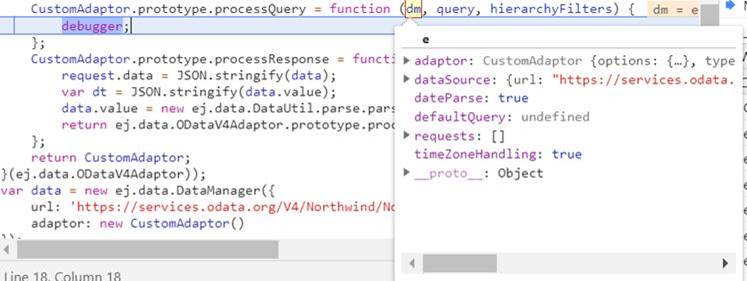
ProcessQuery: ProcessQuery is used to convert the query in property format(syntax) based on its adaptor. Also it send the request to the server.
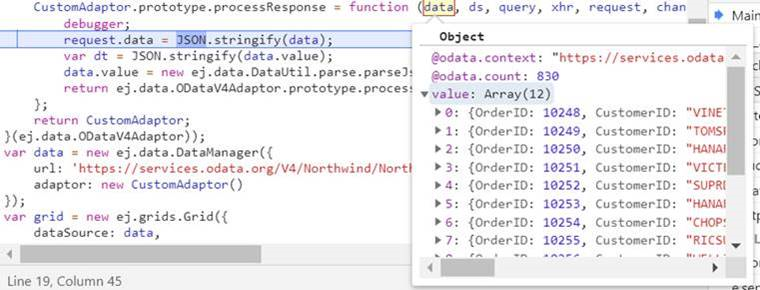
ProcessResponse: If the request gets success it returns the data(from server) to the processResponse method based on your query processing. Please refer the below screenshot and refer the below documentation link for more information.
Regards,
Thavasianand S.
AB
Alfredo Bonilla
October 8, 2019 03:38 PM UTC
Thanks for your response Thavasianand, do you think you can provide an example using angular?
TS
Thavasianand Sankaranarayanan
Syncfusion Team
October 9, 2019 04:49 PM UTC
Hi Alfredo,
Thanks for your update.
Based on your request, we have prepared a sample with custom adaptor. You can create your own adaptor by extending the built-in adaptors. Here, we have shown how to add a serial number for the records by overriding the built-in response processing using the processResponse method of the ODataAdaptor.
[code snippets]
|
...
class SerialNoAdaptor extends ODataAdaptor {
processResponse() {
let i = 0;
//calling base class processResponse function
let original = super.processResponse.apply(this, arguments);
//Adding serial number
original.result.forEach((item) => item['Sno'] = ++i);
return { result: original.result, count: original.count };
}
}
@Component({
selector: 'app-container',
template: `<ejs-grid [dataSource]='data'>
<e-columns>
<e-column field='Sno' headerText='SNO' textAlign='Right' width=150></e-column>
...
</e-columns>
</ejs-grid>`
})
export class AppComponent implements OnInit {
public data: DataManager;
ngOnInit(): void {
this.data = new DataManager({
url: 'https://js.syncfusion.com/demos/ejServices/Wcf/Northwind.svc/Orders?$top=7',
adaptor: new SerialNoAdaptor
});
}
} |
Please get back to us if you need further assistance.
Regards,
Thavasianand S.
AB
Alfredo Bonilla
October 10, 2019 06:29 PM UTC
Hi Thavasianand,
Thanks for your answer and for the example. My problem is not with the response but with the request I need to send a request url in a certain way with custom parameters for our API. Do you think you can provide a different example but this time intercepting the request and modifying the request url?
Thanks,
Alfredo.
TS
Thavasianand Sankaranarayanan
Syncfusion Team
October 11, 2019 11:10 AM UTC
Hi Alfredo,
For modifying the request url you would need to override the processQuery method of the extended adaptor and then customize the url query as per your requirement. This processQuery method’s code is given in the below sample code,
|
class SerialNoAdaptor extends ODataAdaptor {
processQuery(dm: DataManager, query: Query, hierarchyFilters?: Object[]) {
let queries: Requests = this.getQueryRequest(query);
let singles: QueryList = Query.filterQueryLists(query.queries, ['onSelect', 'onPage', 'onSkip', 'onTake', 'onRange']);
let params: ParamOption[] = query.params;
let url: string = dm.dataSource.url;
let temp: QueryOptions;
let skip: number;
let take: number = null;
let options: RemoteOptions = this.options;
let request: Requests = { sorts: [], groups: [], filters: [], searches: [], aggregates: [] };
// calc Paging & Range
if ('onPage' in singles) {
temp = singles.onPage;
skip = DataUtil.getValue(temp.pageIndex, query);
take = DataUtil.getValue(temp.pageSize, query);
skip = (skip - 1) * take;
} else if ('onRange' in singles) {
temp = singles.onRange;
skip = temp.start;
take = temp.end - temp.start;
}
// Sorting
for (let i: number = 0; i < queries.sorts.length; i++) {
temp = DataUtil.getValue(queries.sorts[i].e.fieldName, query) as QueryOptions;
request.sorts.push(DataUtil.callAdaptorFunction(this, 'onEachSort', { name: temp, direction: queries.sorts[i].e.direction }, query));
}
// hierarchy
if (hierarchyFilters) {
temp = (<Object>this.getFiltersFrom(hierarchyFilters, query));
if (temp) {
request.filters.push(DataUtil.callAdaptorFunction(this, 'onEachWhere', (<Predicate>temp).toJson(), query));
}
}
// Filters
for (let i: number = 0; i < queries.filters.length; i++) {
request.filters.push(DataUtil.callAdaptorFunction(this, 'onEachWhere', (<Predicate>queries.filters[i].e).toJson(), query));
let keys: string[] = typeof request.filters[i] === 'object' ? Object.keys(request.filters[i]) : [];
for (let prop of keys) {
if (DataUtil.isNull((request)[prop])) {
delete request[prop];
}
}
}
// Searches
for (let i: number = 0; i < queries.searches.length; i++) {
temp = queries.searches[i].e;
request.searches.push(DataUtil.callAdaptorFunction(this, 'onEachSearch', {
fields: temp.fieldNames,
operator: temp.operator,
key: temp.searchKey,
ignoreCase: temp.ignoreCase
}, query));
}
// Grouping
for (let i: number = 0; i < queries.groups.length; i++) {
request.groups.push(DataUtil.getValue(queries.groups[i].e.fieldName, query) as QueryOptions);
}
// Aggregates
for (let i: number = 0; i < queries.aggregates.length; i++) {
temp = queries.aggregates[i].e;
request.aggregates.push({type: temp.type, field: DataUtil.getValue(temp.field, query) });
}
let req: {[key: string]: Object } = {};
(this as any).getRequestQuery(options, query, singles, request, req);
// Params
DataUtil.callAdaptorFunction(this, 'addParams', {dm: dm, query: query, params: params, reqParams: req });
// cleanup
let keys: string[] = Object.keys(req);
for (let prop of keys) {
if (DataUtil.isNull(req[prop]) || req[prop] === '' || (<Object[]>req[prop]).length === 0) {
delete req[prop];
}
}
if (!(options.skip in req && options.take in req) && take !== null) {
req[options.skip] = DataUtil.callAdaptorFunction(this, 'onSkip', skip, query);
req[options.take] = DataUtil.callAdaptorFunction(this, 'onTake', take, query);
}
let p: PvtOptions = this.pvt;
this.pvt = {};
if (this.options.requestType === 'json') {
return {
data: JSON.stringify(req),
url: url,
pvtData: p,
type: 'POST',
contentType: 'application/json; charset=utf-8'
};
}
temp = this.convertToQueryString(req, query, dm) as QueryOptions;
temp = (dm.dataSource.url.indexOf('?') !== -1 ? '&' : '/') + temp as QueryOptions;
// Here you can modify the request url as per your requirement
return {
type: 'GET', url: (<string>temp).length ? url.replace(/\/*$/,<string>temp) : url, pvtData: p
};
}
} |
The request url is highlighted in the above code snippet. You can modify this as per your requirement.
We have prepared a sample for your reference. You can find it below,
Regards,
Thavasianand S.
AB
Alfredo Bonilla
October 11, 2019 08:15 PM UTC
It works like a charm! Thanks!
TS
Thavasianand Sankaranarayanan
Syncfusion Team
October 14, 2019 05:18 AM UTC
Hi Alfredo,
Thanks for your update.
We are happy that the problem has been resolved at your end.
Regards,
Thavasianand S.
SIGN IN To post a reply.
- 7 Replies
- 2 Participants
-
AB Alfredo Bonilla
- Oct 1, 2019 11:19 PM UTC
- Oct 14, 2019 05:18 AM UTC

