Error handling
Hi,
I have a problem when I want to handle errors that comes from a server.
Could you provide me with an example for, for example, if I write a bad url for my DataManager?
This is the example where I want to handle errors:
<template>
<div>
<div class="content-wrapper">
<ejs-grid :dataSource="data"
:query='query'
:allowPaging='true'
:pageSettings='pageSettings'>
</ejs-grid>
</div>
</div>
</template>
<script>
import Vue from "vue";
import { GridPlugin, Page } from "@syncfusion/ej2-vue-grids";
import { DataManager, UrlAdaptor, Query } from "@syncfusion/ej2-data";
Vue.use(GridPlugin);
export default Vue.extend({
name: "ContractsSearch",
data() {
let SERVICE_URI = '/api/contract/contractDataTables';
return {
pageSettings: { pageSizes: true, pageSize: 10, pageCount: 4 },
data: new DataManager({
url: SERVICE_URI,
crossDomain: true,
adaptor: new UrlAdaptor,
requestType: 'json',
}),
query: new Query().addParams('dodatniPodaci', JSON.stringify(this.ServerSearchObject(this.search_params, this.schema))),
};
},
provide: {
grid: [Page]
},
});
</script>
<style>
@import "../../node_modules/@syncfusion/ej2-vue-grids/styles/material.css";
</style>
SIGN IN To post a reply.
3 Replies
VA
Venkatesh Ayothi Raman
Syncfusion Team
September 18, 2018 05:29 AM UTC
Hi Lajos,
Thanks for using Syncfusion products.
We have built-in support of actionFailure event which is triggers when any Grid action failed to achieve the desired results. Please refer to the following code example and Help documentation for more information,
Code example:
|
<ejs-grid ref='grid' :dataSource="data" :allowPaging='true' :pageSettings='pageSettings' :toolbar='toolbar' :actionFailure='actionFailure'
>
<e-columns>
. . .
</e-columns>
</ejs-grid>
export default Vue.extend({
data: () => {
return {
data: orderDetails,
. . .
};
},
methods:{
actionFailure: function (args: any) {
console.log(args.error);
}
}
}, |
Help documentation: https://ej2.syncfusion.com/vue/documentation/grid/api-gridComponent.html#actionfailure
Please let us know if you have any further assistance on this.
Regards,
Venkatesh Ayothiraman.
LD
Lajos Djerfi
September 18, 2018 10:45 AM UTC
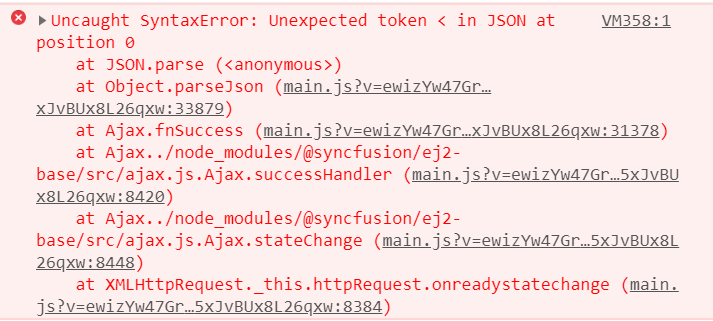
This doesn't work for me. I am still getting this error ( https://res.cloudinary.com/dqey5qwka/image/upload/v1537263116/Screenshot_4_owkwt2.png )
Attachment: Screenshot_4_b5978eb5.rar
I am interested in handling errors that occur when I have errors on the DataManager?
Attachment: Screenshot_4_b5978eb5.rar
VA
Venkatesh Ayothi Raman
Syncfusion Team
September 19, 2018 06:07 AM UTC
Hi Lajos,
Thanks for the update.
By default, Essential JavaScript 2 Grid actionFailure event will trigger if any failure occurs when server request is made. From your screenshot, we suspect that the response from the server is successfully obtained and the result is actually HTML. However, you can check whether the result from the server is valid or not by using the customAdaptor. Please refer to the below code example, Documentation link and sample link.
|
class CustomAdaptor extends ODataAdaptor {
beforeSend(a,b,ajax) {
ajax.successHandler = function (data) {
if (this.onSuccess) {
// here you can check whether the data is valid or not
console.log(this.httpRequest.response);
this.onSuccess(data, this);
}
return data;
}
super.beforeSend.call(this, a,b,ajax)
}
}
Vue.use(GridPlugin);
new Vue({
el: '#app',
template: `
<div id="app">
<ejs-grid :dataSource="data" :actionFailure='actionFailure'>
<e-columns>
<e-column field='OrderID' headerText='Order ID' textAlign='Right' width=90></e-column>
. . .
</e-columns>
</ejs-grid>
</div>
`,
data() {
return {
data: new DataManager({
url: "http://some.com/invalidUrl",
adaptor: new CustomAdaptor()
})
};
},
methods: {
actionFailure: function(args) {
// here you can handle the server side failures
alert('Server exception: 404 Not found');
}
}
}); |
Documentation : https://ej2.syncfusion.com/vue/documentation/data/adaptors.html#writing-custom-adaptor
Note: We went through your screenshot that you have share with us and found that the reported issue will be occurred when we don’t return the response as result and count object. If we use UrlAdaptor then we should return the response as result and count object. Please refer to the following help documentation for more information,
Please let us know if you have any further assistance on this.
Regards,
Venkatesh Ayothiraman.
SIGN IN To post a reply.
- 3 Replies
- 2 Participants
-
LD Lajos Djerfi
- Sep 17, 2018 12:08 PM UTC
- Sep 19, 2018 06:07 AM UTC