How to get CircularGauge diameter?

I want to set LabelFontSize depend on gauge size. Something like that:

 <sf:Scale LabelFontSize="{Binding Source={x:Reference MyCircularGauge}, Path=Diameter, Converter={converters:ValueTimesParameterConverter}, ConverterParameter='0.044'}">

Is there a way to get gauge diameter or radius? I can use Height property, but it not works perfect, because actual Diameter is Min(Height, Width). I tried to create extended SfCircularGauge class with new property exposed, but it doesn't render well, I guess because of lack of platform renderer. 

Could you advice me any solution?
1 Reply

MP Michael Prabhu M Syncfusion Team September 12, 2018 11:19 AM UTC

Hi Radoslaw, 
 
Query: How to measure the diameter of the gauge. 
 
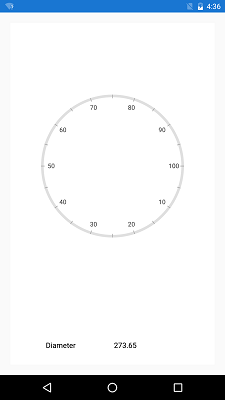
Based on your query we have prepared a sample to calculate the diameter of the gauge.  
 
We have calculated the diameter of the gauge in the SizeChanged event by accessing its minimum width and radius factor of the scale, assuming the scale placed at the outer extent (max radius factor) compared to Labels, Ticks, etc. 
 
Code snippet 
 
var gauge = sender as SfCircularGauge; 
var bounds = gauge.Bounds; 
double width = Math.Min(bounds.Size.Width, bounds.Size.Height) / 2; 
var radius = gauge.Scales[0].RadiusFactor * width; 
 
 
Please use the RadiusFactor/Offset of either Scale/ Labels/Ticks etc. whichever is placed at the outer extent, since we have separate offset property for individual elements (scales, labels, etc). 
 
You can refer the sample from the below link. 
 
 
Output screenshot: 
 
 
Thanks, 
Michael  


Loader.
Up arrow icon