- Home
- Forum
- Xamarin.Forms
- IOS text fields in SFDataForm (within SfTabView) not displaying underlines (___) under the text input fields.
IOS text fields in SFDataForm (within SfTabView) not displaying underlines (___) under the text input fields.
Hello,
Basically, I have a class with a string, date and enum, and with SfDataForm, it renders it as a text field, date picker and picker and appears to show all those fields within UWP and Android. With my iPad, only the picker and date picker is showing the underline below its input fields so I can clearly see where the fields are. However, for a normal text input field, it does not display anything, and only if by blindly click at the area of the field, it will then show a caret for me to type.
How to I make the underline appear for those text input field like the way the pickers and date pickers are showing?
Thanks.
BTW, not sure if makes any difference, but the SfDataForm is within an SfTabView.
sorry for the poor screenshot image below - but hopefully make more sense!
B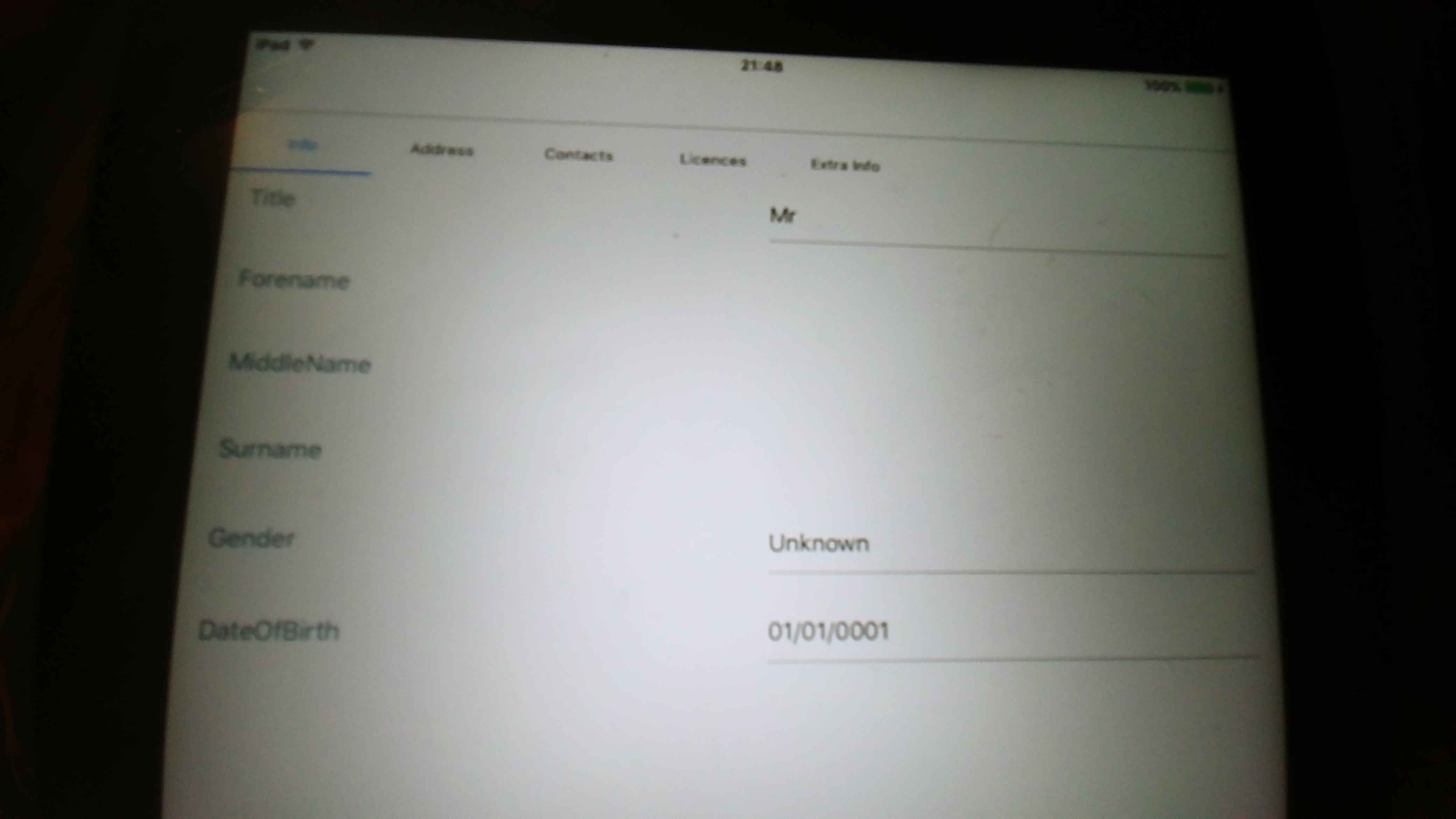
SIGN IN To post a reply.
3 Replies
VR
Vigneshkumar Ramasamy
Syncfusion Team
August 6, 2018 04:05 AM UTC
Hi Darren,
Based on the provided information, we have checked with the SfDataForm and we are not able to reproduce the issue (Bottom line doesn’t appear for text fields in Xamarin Forms iOS) from our side. We have tested in different version of iPad (iOS 10.3,11.0 and 11.3.1) also in iPhone and iPad Air simulators and attached the screenshot for the same. Could you please share us the below details,
# iPad - iOS version used
# DataForm version
Scrrenshots: Images
We have created a sample with DataForm (DataForm inside tabview) with text field, date picker and picker in the view.
Sample: TextField_BottomLine
Could you please check with the provided sample whether the mentioned issue is reproduced? If not, kindly modify the sample attached and revert us back with more details regarding your query. Such that it will be helpful for us to provide you solution.
Regards,
Vigneshkumar R
DA
darren
August 6, 2018 09:45 AM UTC
Hello again. Thanks for looking into this. My OS version of the iPad is unfortunately an older version - 9.3.5. It appears to the be latest version that is supported for my aging iPad! The dataform version is 16.2.0.42
Another thing I noticed when the dataform is read only, all the fields goes grey as expected, however, the text input field is a different shade of grey compared to the pickers.
I will try compile and build your sample on ipad. Unfortunately might take me a bit as I am still using the free apple dev which only allows me to have one app! If you get around to test your solution on a 9.3.5 OS version then let me know and would save me a hassle.
thanks once again
UPDATED: Managed to compile/build/deploy to my iPad, and does NOT show the underline. Had the change target deployment to 9.0 in the info.plist for it to work on my version of ipad.
screen shot: https://pasteboard.co/HxTEITU.png

JN
Jayaleshwari N
Syncfusion Team
August 13, 2018 12:56 PM UTC
Hi Darren,
Based on the provided information, we have checked with the DataForm for the issue (Bottom line doesn’t appear for text fields in Xamarin Forms iOS) in version iPad (iOS 9.3.5) as mentioned by you and we are able to reproduce the issue with this OS version.
As per SfDataForm implementation line has been added as sublayer of editing editors and found that issue in y positioning of sublayer (line) not placed with in that control (UITextField) Frame due to density based in older version of OS. So, bottom line doesn’t appear for UITextField. But same working fine in higher iOS OS (10 and above) version.
As of now, your requirement can be achieved in sample level using CustomEditor and use the respective Renderer to position the line with the Control Frame.
Code snippet:
| dataForm = bindable.FindByName<SfDataForm>("dataForm"); dataForm.RegisterEditor("Entry", new CustomEntryEditor(dataForm)); dataForm.RegisterEditor("MiddleName", "Entry"); dataForm.RegisterEditor("FirstName", "Entry"); dataForm.RegisterEditor("Surname", "Entry"); dataForm.IsReadOnly = true; dataForm.LayoutManager = new DataFormLayoutManagerExt(dataForm); public class DataFormLayoutManagerExt : DataFormLayoutManager { public DataFormLayoutManagerExt(SfDataForm dataForm) : base(dataForm) { } protected override View GenerateViewForLabel(DataFormItem dataFormItem) { var label = base.GenerateViewForLabel(dataFormItem); label.IsEnabled = false; (label as Label).TextColor = Color.LightGray; return (label as Label); } } public class CustomEntryEditor : DataFormEditor<CustomEntry> { CustomEntry customEntry; public CustomEntryEditor(SfDataForm dataForm):base(dataForm) { } protected override CustomEntry OnCreateEditorView() { customEntry = new CustomEntry(); if (DataForm.IsReadOnly) customEntry.IsEnabled = false; customEntry.Text = "Custom entry"; return customEntry; } DataFormItem dataItem; protected override void OnInitializeView(DataFormItem dataFormItem, CustomEntry view) { dataItem = dataFormItem; base.OnInitializeView(dataFormItem, view); } protected override void OnWireEvents(CustomEntry view) { view.TextChanged += View_TextChanged; view.Unfocused += View_Unfocused; } protected override bool OnValidateValue(CustomEntry view) { var dataFormItemView = view.Parent as DataFormItemView; return (DependencyService.Get<IDataForm>().ValidateDataFormItem(DataForm,dataItem.Name)); } private void View_Unfocused(object sender, FocusEventArgs e) { OnValidateValue(sender as CustomEntry); } private void View_TextChanged(object sender, TextChangedEventArgs e) { OnCommitValue(sender as CustomEntry); } protected override void OnCommitValue(CustomEntry view) { var dataFormItemView = view.Parent as DataFormItemView; var textValue = view.Text; this.DataForm.ItemManager.SetValue(dataFormItemView.DataFormItem, view.Text); } } public class CustomEntry : Entry { } public interface IDataForm { bool ValidateDataFormItem(SfDataForm dataForm,string propertyName); } |
Note:
In above sample we have added the sub layer as CALayer in renderer, to show the bottom line of UITextField.
| [assembly: ExportRenderer(typeof(CustomEntry), typeof(CustomEntryRenderer))] namespace GettingStarted.iOS { public class CustomEntryRenderer : EntryRenderer { protected override void OnElementChanged(ElementChangedEventArgs<Entry> e) { base.OnElementChanged(e); CALayer border = new CALayer(); float width = 1.0f; border.BorderWidth = width; border.MasksToBounds = true; border.BorderColor = UIColor.Gray.CGColor; var mainFrame = this.Control.Superview.Frame; this.Control.Layer.MasksToBounds = true; this.Control.BorderStyle = UITextBorderStyle.None; this.Control.TextColor = UIColor.LightGray; this.ClipsToBounds = true; this.Control.Layer.AddSublayer(border); //Need to set Y position value based on RowSpan and label position in DataForm. border.Frame = new CoreGraphics.CGRect(0, 40 - 1, 500, 1f); } } } |
In order to update the DataObject values when using custom editor, you should update the DataForm Item editor value manually by using OnCommitValue override method of DataFormEditor class on TextChanged event which is used to commit the customized value in DataObject.
| public class CustomEntryEditor : DataFormEditor<CustomEntry> { public CustomEntryEditor(SfDataForm dataForm) : base(dataForm) { } protected override CustomEntry OnCreateEditorView() { CustomEntry customEntry = new CustomEntry(); customEntry.Keyboard = Keyboard.Create(KeyboardFlags.None); return customEntry; } DataFormItem dataItem; protected override void OnInitializeView(DataFormItem dataFormItem, CustomEntry view) { base.OnInitializeView(dataFormItem, view); dataItem = dataFormItem; } protected override void OnWireEvents(CustomEntry view) { view.TextChanged += View_TextChanged; view.Unfocused += View_Unfocused; } protected override bool OnValidateValue(CustomEntry view) { var dataFormItemView = view.Parent as DataFormItemView; return (DependencyService.Get<IDataForm>().ValidateDataFormItem(DataForm, dataItem.Name)); } private void View_Unfocused(object sender, FocusEventArgs e) { OnValidateValue(sender as CustomEntry); } private void View_TextChanged(object sender, TextChangedEventArgs e) { OnCommitValue(sender as CustomEntry); } protected override void OnCommitValue(CustomEntry view) { var dataFormItemView = view.Parent as DataFormItemView; var textValue = view.Text; this.DataForm.ItemManager.SetValue(dataFormItemView.DataFormItem, view.Text); } } |
Screenshot:

We have created a sample with DataForm (DataForm inside tabview) with text field using custom entry renderer.Also , we have changed the text color when dataForm is IsReadOnly as per your requirement. Please find the same from below link.
Sample: UITextField_BottomLine
In the above sample we have manually did the validation in ValidateDataFormItem
internal method of native renderer of DataForm ItemManager class by using Reflection.
| assembly: Xamarin.Forms.Dependency(typeof(DataFormValidation))] public class DataFormValidation : IDataForm { public bool ValidateDataFormItem(SfDataForm dataForm, string propertyName) { var nativeObject = dataForm.GetType().GetProperty("NativeObject", BindingFlags.NonPublic | BindingFlags.Instance | BindingFlags.Public).GetValue(dataForm); if (nativeObject != null) { var nativeDataForm = (nativeObject as Syncfusion.Android.DataForm.SfDataForm); var method = nativeDataForm.ItemManager.GetType().GetMethod("ValidateDataFormItem", BindingFlags.NonPublic | BindingFlags.Instance | BindingFlags.Public); var nativedataFormItem = nativeDataForm.ItemManager.DataFormItems[propertyName]; if (nativedataFormItem != null && method != null) { var nativeValue = nativeDataForm.ItemManager.GetValue(nativedataFormItem); method.Invoke(nativeDataForm.ItemManager, new object[] { nativedataFormItem, nativeValue, true }); var isValid = nativedataFormItem.GetType().GetProperty("IsValid", BindingFlags.NonPublic | BindingFlags.Instance | BindingFlags.Public).GetValue(nativedataFormItem); return (bool)isValid; } } return true; } } |
Please let us know for further assistance.
Regards,
Jayaleshwari N.
SIGN IN To post a reply.
- 3 Replies
- 3 Participants
-
DA darren
- Aug 1, 2018 09:10 PM UTC
- Aug 13, 2018 12:56 PM UTC

