- Home
- Forum
- Xamarin.Forms
- Indoor maping : Runtime booking and release the occupancy.
Indoor maping : Runtime booking and release the occupancy.
I am creating an app with an indoor map, and booking of rooms. So for that, I am using SFMap plugin. But I have to change room's availability on map runtime. Right now I am not even able to change the colour of particular map portion, I have tried EqualColorMaping and RangeColorMaping but none of them worked.
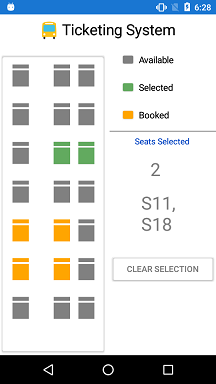
I have seen a thread 133260. Which helps me with an exact same example what I am looking for http://www.syncfusion.com/downloads/support/forum/133260/ze/MapFloorSample1098361305
Screenshot
But again that sample doesn't work properly, in that I can't book the seat, or already booked seats are not shown as booked on the map on both Android and iOS. Even when I select the seat the seat number doesn't display on the side as a display in the screenshot.
I am using Syncfusion.Xamarin.SFMaps version 16.2.042
and Xamarin.Forms version 3.1.0.583944.
I am stuck in this Indoor map, Please help me out.
Let me know if you have any query or concern.
SIGN IN To post a reply.
9 Replies
MP
Michael Prabhu M
Syncfusion Team
July 5, 2018 08:54 AM UTC
Hi Vivek,
Thanks for contacting us, we have analyzed your query and your requirement can be achieved by following the below steps
1. You need to set EnableSelection="True" for the ShapeFileLayer in order to select the shape.
2. Since you need to select multiple rooms(shapes) you have to set the SelectionMode="Multiple".
3. In order to set a color to a selected shape you have to set SelectedShapeColor to your desired color
4. If you want to show some predefied colors to a any shapes you can set EqualColorMapping with respect to the Value of the shape.
For your reference I have added the code snippet below.
Code Snippet XAML
|
<maps:ShapeFileLayer Uri="Custom.shp" SelectionMode="Multiple" ShapeIDPath="SeatNumber" ShapeIDTableField ="seatno" EnableSelection="true" GeometryType="Points">
<maps:ShapeFileLayer.ShapeSettings>
<maps:ShapeSetting ShapeFill="Gray" SelectedShapeColor="#62AA5F" ShapeColorValuePath="SeatNumber" ShapeValuePath="SeatNumber" >
<maps:ShapeSetting.ColorMappings>
<maps:EqualColorMapping Value="9" Color="#FFA500"/>
<maps:EqualColorMapping Value="8" Color="#FFA500"/>
<maps:EqualColorMapping Value="1" Color="#FFA500"/>
<maps:EqualColorMapping Value="2" Color="#FFA500"/>
</maps:ShapeSetting.ColorMappings>
</maps:ShapeSetting>
</maps:ShapeFileLayer.ShapeSettings>
</maps:ShapeFileLayer> |
We have also prepared a sample based on your requirement and it can be downloaded from the link below.
Sample: TicketBooking
Note: The old sample from the old thread is not working because we have made some significant changes in our new releases.
Hope this helps
Thanks,
Michael
VS
Vivek Shah
July 11, 2018 02:19 PM UTC
Hey Michael,
Thanks for your reply, it's really a great help for me.
MP
Michael Prabhu M
Syncfusion Team
July 12, 2018 03:56 AM UTC
Hi Vivek,
Thanks for the update, glad we could help, let us know if you need any other assistance on this.
Thanks,
Michael
VS
Vivek Shah
July 12, 2018 05:20 PM UTC
Hi Michael,

Query: 1) Can we have text on a polygon?
2) Can different polygons which have different border colours?
The sample code is working fine and as expected, but I am making a meeting room booking system for my workplace.
So in that case, I have tried to create .shp file as same as in the sample file using MultiPolygon. Now I have created multiple a polygon for meeting rooms but with that, I also want to show meeting room name on that polygon as text.
Secondly, I want to show other cabins, pantry and washroom area with a polygon which can't be booked and marked as a different colour and with a different border.
Lastly, I want to show my workplace map and inside that all that polygons and which is transparent in colour and can't be booked.
Now I am working on this stuff and achieved some of it, like multiple colours of the room and can't be booked, I have attached the screenshot for the same.
Can you please help me with other parts?
Screenshot: https://ibb.co/j2rQ2T
MP
Michael Prabhu M
Syncfusion Team
July 13, 2018 11:23 AM UTC
Hi Vivek,
Query 1: Is it possible to have text on a polygon?
By enabling the ShowMapItems property in the shape file layer, text can be displayed on the polygon.
Text displayed on the polygon depends on the ShapeIDTableField and ShapeValuePath properties in the ShapeFileLayer and ShapeSettings class respectively.
ShapeIDTableField property should take the filed specified in the data files (.dbf). Ex : seatno
ShapeValuePath can be mapped to property in the view model (SeatNumber) whose values should match the values in the data files filed (seatno).
Code snippet
|
<maps:ShapeFileLayer Uri="Custom.shp" ShapeIDPath="SeatNumber" ShowMapItems="True"
ShapeIDTableField ="seatno" GeometryType="Points">
<maps:ShapeFileLayer.ShapeSettings>
<maps:ShapeSetting ShapeFill="Gray" ShapeColorValuePath="SeatNumber"
ShapeValuePath="SeatNumber" >
</maps:ShapeSetting>
</maps:ShapeFileLayer.ShapeSettings>
</maps:ShapeFileLayer> |
Query 2: Can different polygons have different border colors?
Currently we do not have support for varied border colors but instead the fill color can be varied for every shape.
This can be differentiated by equal color mapping.
Code snippet
|
<maps:ShapeFileLayer.ShapeSettings>
<maps:ShapeSetting ShapeFill="Gray" SelectedShapeColor="#62AA5F" ShapeColorValuePath="SeatNumber"
ShapeValuePath="SeatNumber" ShapeStroke="Green">
<maps:ShapeSetting.ColorMappings>
<maps:EqualColorMapping Value="9" Color="#FFA500"/>
<maps:EqualColorMapping Value="8" Color="#FFA500"/>
<maps:EqualColorMapping Value="1" Color="#FFA500"/>
<maps:EqualColorMapping Value="2" Color="#FFA500"/>
</maps:ShapeSetting.ColorMappings>
</maps:ShapeSetting>
</maps:ShapeFileLayer.ShapeSettings> |
Based on the Value property in color mapping, specified color will appear for the shape that matches the value.
Query 3: Polygons that can’t be booked.
This can be achieved with help of ShapeSelected event. You can skip the required operations in the SelectedItems collection changed for the required shapes as in below snippet.
Code snippet:
|
if (data.SeatNumber == "1" || data.SeatNumber == "2" || data.SeatNumber == "8" || data.SeatNumber == "9")
{
} |
Refer the below screenshot

Please find the pictorial representation below

You can download the sample from the below link
Sample link : http://www.syncfusion.com/downloads/support/directtrac/138491/ze/TicketBooking-986146198
VS
Vivek Shah
July 16, 2018 01:43 PM UTC
Hi Michael,
Thanks for your reply. It's really very helpful. Here again, I have put some new query. I have attached my demo project here. This project is for iPads and android tablet only and in landscape mode.
Query:
1) Can we manage text size or text wrap which is on a polygon? As my meeting room name is larger so it's not showing properly.
2) Now all the rooms are in different directions, so the office map which I added in a project. I need to rotate (Have added rotate button on a screen's right side) it depends on its location. So in that case map rotates and text as well, so it doesn't look properly, take a look of screenshots.
Screenshots:
3) The demo was working fine with iOS but not with android (no room selection on android), I don't know if it's something .shp file generation related issue or what. As I am generating shp file from the JSON file. All the files are included in a project.
Please let me know if you have any query.
MP
Michael Prabhu M
Syncfusion Team
July 18, 2018 08:37 AM UTC
Hi Vivek,
Thanks for updating us the sample and screenshots, please find the response for your queries.
Query 1: Can we manage text size or text wrap which is on a polygon?
Response: Currently we do not have support to wrap and customize the data label in maps. Currently we are implementing this feature and it will be available in our upcoming Volume 3 release which is scheduled to be rolled out at end of September 2018.
Query 2: Now all the rooms are in different directions, so the office map which I added in a project. I need to rotate (Have added rotate button on a screen's right side) it depends on its location. So, in that case map rotates and text as well, so it doesn't look properly, take a look of screenshots.
Response: Currently We do not have support to rotate the map and we are considering this as a feature request and logged a feature report on this. This feature will be available in any of our upcoming releases.
Query 3: The demo was working fine with iOS but not with android (no room selection on android), I don't know if it's something .shp file generation related issue or what. As I am generating shp file from the JSON file. All the files are included in a project.
Response: We are able to reproduce this issue and logged a defect report on this and the fix for the issue will be available in our Volume 2 SP1 release which is scheduled to be rolled out at the last week of July 2018.
Thanks,
Michael
VS
Vivek Shah
July 18, 2018 12:33 PM UTC
Hi Michael,
Thanks for the update. Please let me know when updates are available for the listed task.
MP
Michael Prabhu M
Syncfusion Team
July 19, 2018 05:07 AM UTC
Hi Vivek,
Yes, we will update you once our volume 2 SP1 is rolled out and also we request you to visit our website periodically for feature related updates.
Thanks,
Michael
SIGN IN To post a reply.
- 9 Replies
- 2 Participants
-
VS Vivek Shah
- Jul 3, 2018 07:31 AM UTC
- Jul 19, 2018 05:07 AM UTC

