- Home
- Forum
- ASP.NET Web Forms
- Grid
Grid
My grid is based on dynamic data so I can't set up the columns before hand.
<ej:Grid ID="Grid1" runat='server' MinWidth="400" Width="1700" Height="500" AllowScrolling="true" OnServerEditRow="EditEvents_ServerEditRow" AllowTextWrap="true" AllowResizing="true" IsResponsive="true">
<EditSettings AllowEditing="True"></EditSettings>
<ToolbarSettings ShowToolbar="True" ToolbarItems="edit,update,cancel"></ToolbarSettings>
</ej:Grid>
1. How can I set CssClass Dynamically based on the data in the first row.
e.g. if the first column has "Comp" as the data then I want to set the CssClass="orange"
2. How can I make the first column which is the ID not show e.g. make the width =0; and make it the primary key dynamically. since I'm not setting up columns.
3. Is it possible to turn the row selector off and make it so you can only select entire columns?
4. How can I make all the text in column 1 Bold?
SIGN IN To post a reply.
3 Replies
TS
Thavasianand Sankaranarayanan
Syncfusion Team
May 23, 2018 12:13 PM UTC
Hi David,
Thanks for contacting Syncfusion support.
Query 1: How can I set CSS Class Dynamically based on the data in the first row.
We have analyzed your query and we suspect that you want to set CSS dynamically based on the value in Grid. So, we suggest you to use the queryCellInfo event of ejGrid control. In this event we have set the CSS for a particular cell value in Grid.
We have already discuss about the above mention query in the following knowledge base documentation.
If we misunderstood your query then provide the following details for better assistance.
- If you want apply a CSS for whole Grid when it have a value ‘comp’ ?
- If you want apply the CSS for the row which has the value ‘comp’ ?
Query 2: How can I make the first column which is the ID not show in Grid and make it the primary key dynamically.
We can achieve your requirement using the create event of ejGrid control. In this event we have set the isPrimaryKey and visible property of that columns and passed those modified columns to the columns() method of ejGrid control.
Visible property is used to hide the columns in Grid.
For an example we have set the visible property and isPrimaryKey property to the first column in the Grid.
|
<ej:Grid ID="FlatGrid" runat="server" AllowPaging="True" AllowSelection="true">
<SelectionSettings SelectionMode="column" />
<ClientSideEvents Create="GridCreateEvent" />
</ej:Grid>
<script type="text/javascript">
function GridCreateEvent(args) {
var gridObj = $('#<%= FlatGrid.ClientID %>').ejGrid("instance");
args.model.columns[0]['visible'] = false;
args.model.columns[0]['isPrimaryKey'] = true;
gridObj.columns(args.model.columns)
}
</script>
|
Refer the help documentation.
Query 3: Is it possible to turn the row selector off and make it so you can only select entire columns?
We have analyzed your query and we suspect that you want to disable the row selection but need to enable column selection in ejGrid control. We can achieve your requirement by enabling the column selectionMode in the selectionSettings property of ejGrid control.
Refer the below code example.
|
<ej:Grid ID="FlatGrid" runat="server" AllowPaging="True" AllowSelection="true" EnableRowHover="false">
<SelectionSettings SelectionMode="column" />
</ej:Grid>
|
Refer the help documentation.
Query 4: How can I make all the text in column 1 Bold?
We have analyzed your query and we suspect that you want to set bold font weight for a particular column in Grid. So, we suggest you to use queryCellInfo event of ejGrid control and set the bold font-weight to particular column in Grid.
In the below code example we have set the bold font-weight to the CustomerID column in Grid.
|
<ej:Grid ID="FlatGrid" runat="server" AllowPaging="True" AllowSelection="true">
<SelectionSettings SelectionMode="column" />
<ClientSideEvents Create="GridCreateEvent" QueryCellInfo="GridQueryCellInfoEvent" />
</ej:Grid>
<script type="text/javascript">
function GridQueryCellInfoEvent(args) {
if (args.column.field == "CustomerID")
$(args.cell).css('font-weight', 'bold');
}
</script>
|
Refer the help documentation.
We have prepared a sample with the four query’s solution included and it can be downloadable from the below location.
Regards,
Thavasianand S.
DP
David Price
May 29, 2018 09:03 AM UTC
Hi,
In regards to Query 1,
if (args.column.field == "ColumnName") {
$(args.cell).css('font-weight', 'bold');
$($(args.cell).parent()).css("backgroundColor", "#6291cc").css("color","#fff");
}
This is making the entire row a different colour. I actually want to control it as columns so I only want the column "ColumnName" to have the background #6291cc for example.
TS
Thavasianand Sankaranarayanan
Syncfusion Team
May 30, 2018 10:02 AM UTC
Hi David,
To apply the custom background color for the particular column in Grid, we suggest you to use the cell (args.cell) in the arguments of queryCellInfo event.
In the below code example we have apply custom background color to a particular column.
|
<ej:Grid ID="FlatGrid" runat="server" AllowPaging="True" AllowSelection="true">
<SelectionSettings SelectionMode="column" />
<ClientSideEvents QueryCellInfo="GridQueryCellInfoEvent" />
</ej:Grid>
<script type="text/javascript">
function GridQueryCellInfoEvent(args) {
if (args.column.field == "CustomerID") {
$(args.cell).css('font-weight', 'bold');
$(args.cell).css("backgroundColor", "#6291cc").css("color", "#fff"); // we have applied the background color and color to particular column instead of setting to row
}
}
</script>
|
Refer the below screen shot.
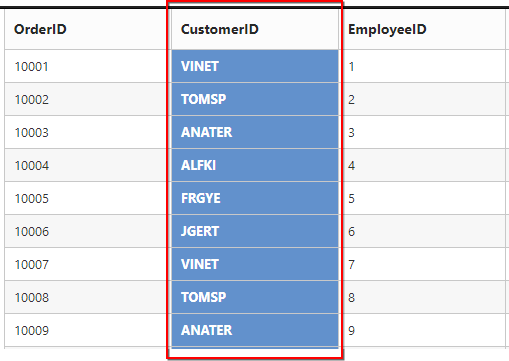
We have prepared a sample and it can be downloadable from the below location.
Refer the help documentation.
Regards,
Thavasianand S.
SIGN IN To post a reply.
- 3 Replies
- 2 Participants
-
DP David Price
- May 22, 2018 12:13 PM UTC
- May 30, 2018 10:02 AM UTC

