Change inner color on piechart

Hello.
I'm working with piechart control on javascript. How can i change the color of the pie? The examples of the pie & doughnut documentation dont work correctly.
Thanks.

3 Replies

BP Baby Palanidurai Syncfusion Team April 6, 2018 08:54 AM UTC

Hi Sergio, 

Thanks for using syncfusion products, 

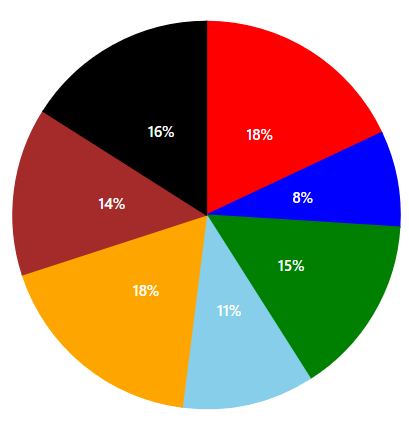
  We have analyzed your query. We can achieve your requirement by using pointColorMapping property in series options. The fill color in the data source can be mapped to the chart using pointColorMapping in series. For more information on color changes for pie, you can refer from below link, 

Please find the code snippet below to achieve this requirement. 


series: [ 
            { 
                dataSource: [ 
                  {  x:  'Labour',  y:  18,  text:  '18%'  , color: 'red'},  
                  {  x:  'Legal',  y:  8,  text:  '8%'  , color: 'blue'}, 
                  {  x:  'Production',  y:  15,  text:  '15%'  , color: 'green'},  
                  {  x:  'License',  y:  11,  text:  '11%'  , color: 'skyblue'}, 
                  {  x:  'Facilities',  y:  18,  text:  '18%'  , color: 'orange'},  
                  {  x:  'Taxes',  y:  14,  text:  '14%'  , color: 'brown'}, 
                  {  x:  'Insurance',  y:  16,  text:  '16%'  , color: 'black'} 
                  ], 
                pointColorMapping: 'color', 
            } 
        ], 

Screenshot: 
 

Sample for your reference can be find from below link, 

Kindly revert us, if you have any concerns. 

Thanks, 
Baby. 


SE Sergio April 6, 2018 10:24 AM UTC

Hello. 

It works, thank you a lot!


BP Baby Palanidurai Syncfusion Team April 9, 2018 04:22 AM UTC

Hi Sergio, 

Thanks for your update, 

Please let us know, if you need any further assistance on this. 

Regards, 
baby 


Loader.
Up arrow icon