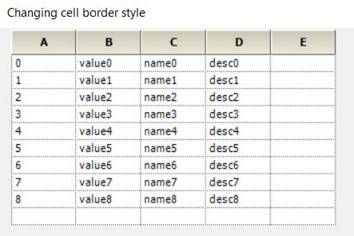
Gridlines do not apply to the left side of the first column when row headers are hidden, why not?

Good day,

In working with this control I have noticed that the Gridlines do not apply to the far left side of the grid when row headers are hidden. To get around this initially i set borders to that side to make it appear that the gridlines are drawn there. However, when i filter the grid's data it will take away or add new rows as needed, and these new rows will no longer have the borders. Is there a way to force the gridlines to be included on the left side?

1 Reply

AR Arulpriya Ramalingam Syncfusion Team October 13, 2017 12:53 PM UTC

Hi Travis,   
   
Thanks for using Syncfusion products.   
   
As per the Grid architecture, the right and bottom borders for a cell has been drawn and the left and top borders are adjacent cells border. So, when removing the RowHeader cells, the left borders will not be drawn for the first column. In order to the borders for a cell or entire column, the Borders property can be used. Please make use any of the below suggestion to set the borders,   
   
Suggestion 1   
The border for a cell can be drawn by using the QueryCellStyleInfo event. In that event, the Borders property of GridStyleInfo can be used to set the border. 
 
Code example  
   
//Event Triggering   
this.gridControl1.QueryCellInfo += new GridQueryCellInfoEventHandler(QueryCellInfoHandler);   
//Event Customization   
private void QueryCellInfoHandler(object sender, GridQueryCellInfoEventArgs e)   
{   
    if (e.ColIndex == 1)   
    {   
        //To draw the left border of the 1st column   
        e.Style.Borders.Left = new GridBorder(GridBorderStyle.Dotted, SystemColors.WindowFrame,GridBorderWeight.Thin);   
    }   
}   
   
Suggestion 2   
   
The borders can draw for the entire column by using the ColStyles property.   
Code example  
   
//By using ColStyles   
this.gridControl1.ColStyles[1].Borders.Left = new GridBorder(GridBorderStyle.Dotted,SystemColors.WindowFrame, GridBorderWeight.Thin);   
   
Screenshot   


Note    
If still the issue occurs, please provide us with the below details that will be helpful for us to provide you a better solution at the earliest?   
  • The customization of drawing the border in your sample.
  • The customization code part of enabling the Filtering if any,
   
Regards,   
Arulpriya   


Loader.
Up arrow icon