- Home
- Forum
- ASP.NET MVC
- Linked Grids with BatchDataSource
Linked Grids with BatchDataSource
Thanks for contacting Syncfusion support.
We can achieve this requirement by using rowSelected event and query property. While selecting the row in parent grid, we need to bound the filtered datasource to child grid using dataManager option in rowSelected event.
Please refer to the code example and sample,
| <h2>Master Grid</h2> @(Html.EJ().Grid<object>("MasterGrid") .Datasource(ds => ds.URL("/Home/EmployeeDataSource").Adaptor("UrlAdaptor").BatchURL("/Home/EmployeeUpdate")) .SelectedRowIndex(0) .ClientSideEvents(c => c.RowSelected("rowSelected")) .AllowPaging() .Columns(col => { . . . .
}))
<h2>Detail Grid1</h2> @(Html.EJ().Grid<object>("ChildGrid") .AllowPaging() .Columns(col => { . . . . }) ) <script type="text/javascript"> $(function () { window.rowSelected = function (args) { var dataManger = ej.DataManager({ url: "/Home/OrderDataSource", batchUrl: "/Home/OrderUpdate", adaptor: new ej.UrlAdaptor() }); $("#ChildGrid").ejGrid({ dataSource: dataManger, query: new ej.Query().addParams("EmployeeID", args.data.EmployeeID) }); } });
|
The addParams in query option will helps to send the additional parameter in server side,
| public ActionResult OrderDataSource(DataManager dm, int EmployeeID) { var DataSource = OrderRepository.GetAllRecords().Where(e => e.EmployeeID == EmployeeID); DataResult result = new DataResult(); result.result = DataSource.Skip(dm.Skip).Take(dm.Take).ToList(); result.count = DataSource.Count(); return Json(result, JsonRequestBehavior.AllowGet); |
Sample: https://www.syncfusion.com/downloads/support/directtrac/general/ze/Sample_121830MasterGrid-1095806778504863246.zip
Refer to the online help documentation for dataManager, rowSelected event,
Document for Datamanager: https://help.syncfusion.com/js/datamanager/overview
Document for rowSelected: https://help.syncfusion.com/api/js/ejgrid#events:rowselected
Regards,
Sellappandi R
- One page load how do I make the first row selected and hence show the related records on the second linked grid
- Second grid is also uses BatchUrl / UrlAdaptor to retrieve and edit data so on the Update ActionResult controller method currently I have no way of finding the selected/current employee id, I am just passing empty string to retrieve the orders (data = OrderData.Orders(manager, "");) at this stage it doesn't seems to create any issues, probably I haven't tested thoroughly. Mind you I kind of copied the code from sample solutions on the web
public ActionResult OrderDataUpdate(List<order> changed, List<order>added, List<order> deleted) { var manager = new Models.DataManager(); if (changed != null) { manager.OrderData.Update(changed); } //if (deleted != null) // OrderData.Delete(deleted); if (added != null) manager.OrderData.Add(added); var data = OrderData.Orders(manager, ""); return Json(data, JsonRequestBehavior.AllowGet); } |
Query #1: One page load how do I make the first row selected and hence show the related records on the second linked grid
We can set the default selected row while the grid is initially rendered using the SelectedRowIndex property of the Grid. Please refer to the below api reference documentation.
https://help.syncfusion.com/api/js/ejgrid#members:selectedrowindex
Query #2: Second grid is also uses BatchUrl / UrlAdaptor to retrieve and edit data so on the Update ActionResult controller method currently I have no way of finding the selected/current employee id
We can get the modified record details in the parameter of the BatchUpdate controller action. Please refer the below screenshot.
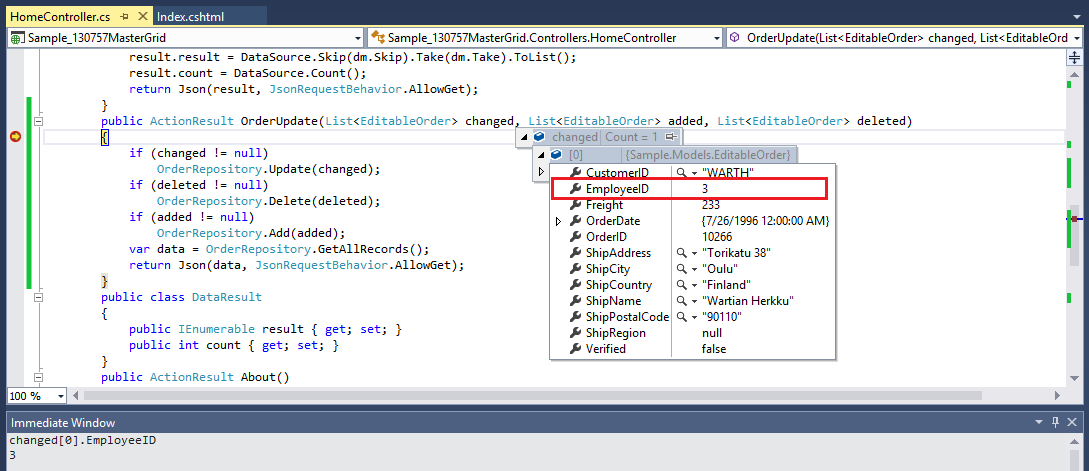
But since the controller action (to obtain dataSource) will be triggered by default with the EmployeeID bound to it after the update action, it is not necessary to pass the employeeID and obtain the data explicitly as in the code snippets that you have shared.
| public ActionResult OrderDataUpdate(List<order> changed, List<order>added, List<order> deleted) { var manager = new Models.DataManager();
if (changed != null) { manager.OrderData.Update(changed); } //if (deleted != null) // OrderData.Delete(deleted); if (added != null) manager.OrderData.Add(added); var data = OrderData.Orders(manager, ""); return Json(data, JsonRequestBehavior.AllowGet); } |
For your convenience, we have created a sample which can be downloaded from the below location.
Sample Link: https://www.syncfusion.com/downloads/support/directtrac/general/ze/MasterDetailsGrid-11166665561570164833.zip
Regards,
Ragavee U S.
- 3 Replies
- 3 Participants
-
PR Prasanth
- Jan 29, 2016 11:00 AM UTC
- Feb 15, 2016 12:36 PM UTC

