Accelerate Enterprise App Development
with Syncfusion MCP Servers
Integrate Syncfusion MCP Servers directly into your favorite IDE to generate, configure, and troubleshoot Syncfusion component code with ease — powered by official Syncfusion APIs, documentation, and intelligent, context-aware guidance.
Quick Setup for Instant MCP-Powered Development
Add Syncfusion MCP Servers to your development workflow in minutes. Whether you're using VS Code, Cursor, Code Studio, or JetBrains IDEs with React, Angular, Blazor, or other platforms, our guided setup ensures your AI client is ready to generate component code immediately.
Other supported IDE’s :
Configure the Syncfusion MCP Servers
1. Create a `.vscode/mcp.json` file in your workspace with the MCP Servers configuration. For example, the React MCP Servers can be installed as follows:
{
  "servers": {
    "sf-react-mcp": {
      "type": "stdio",
      "command": "npx",
      "args": ["-y", "@syncfusion/react-mcp@latest"],
      "env": {
        "Syncfusion_API_Key": "YOUR_API_KEY"
      }
    }
  }
}
2. Get your Syncfusion API key and replace YOUR_API_KEY in the server configuration with your actual key.
3. In the mcp.json file, inline Start actions will be visible. You can click Start to install and launch the MCP Servers, and the tools will be added.
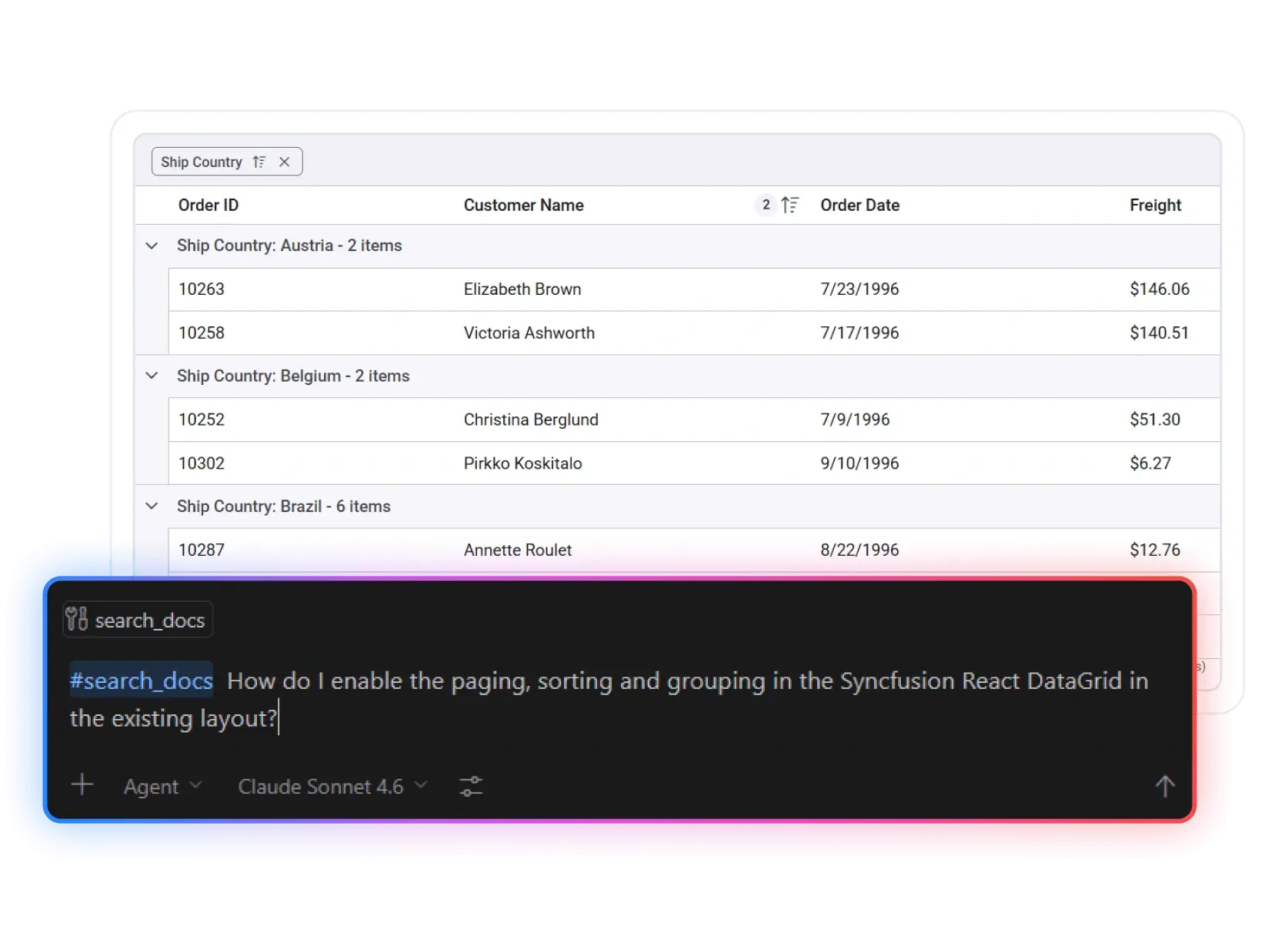
4. Activate the MCP tools in your IDE by using the #search_docs command followed by your query:
#search_docs How do I enable paging and sorting in the Syncfusion React Grid?
Other supported IDE’s :
Other supported IDE’s :
Configure the Syncfusion MCP Servers
1. Create a `.vscode/mcp.json` file in your workspace with the MCP Servers configuration. For example, the Angular MCP Servers can be installed as follows:
{
  "servers": {
    "sf-angular-mcp": {
      "type": "stdio",
      "command": "npx",
      "args": ["-y", "@syncfusion/angular-mcp@latest"],
      "env": {
        "Syncfusion_API_Key": "YOUR_API_KEY"
      }
    }
  }
}
2. Get your Syncfusion API key and replace YOUR_API_KEY in the server configuration with your actual key.
3. In the mcp.json file, inline Start actions will be visible. You can click Start to install and launch the MCP Server, and the tools will be added.
4. Activate the MCP tools in your IDE by using the #search_docs command followed by your query:
#search_docs How do I enable paging and sorting in the Syncfusion Angular Grid?
Other supported IDE’s :
Other supported IDE’s :
Configure the Syncfusion MCP Servers
1. Create a `.vscode/mcp.json` file in your workspace with the MCP Servers configuration. For example, the Blazor MCP Servers can be installed as follows:
{
  "servers": {
    "sf-blazor-mcp": {
      "type": "stdio",
      "command": "dnx",
      "args": ["-y", "Syncfusion.Blazor.MCP", "--yes"],
      "env": {
        "Syncfusion_API_Key": "YOUR_API_KEY"
      }
    }
  }
}
2. Get your Syncfusion API key and replace YOUR_API_KEY in the server configuration with your actual key.
3. In the mcp.json file, inline Start actions will be visible. You can click Start to install and launch the MCP Servers, and the tools will be added.
4. Activate the MCP tools in your IDE by using the #search_docs command followed by your query:
#search_docs How do I enable paging and sorting in the Syncfusion Blazor Grid?
Other supported IDE’s :
Other supported IDE’s :
Configure the Syncfusion MCP Servers
1. Create a `.vscode/mcp.json` file in your workspace with the MCP Servers configuration. For example, the JavaScript MCP Servers can be installed as follows:
{
  "servers": {
    "sf-javascript-mcp": {
      "type": "stdio",
      "command": "npx",
      "args": ["-y", "@syncfusion/javascript-mcp@latest"],
      "env": {
        "Syncfusion_API_Key": "YOUR_API_KEY"
      }
    }
  }
}
2. Get your Syncfusion API key and replace YOUR_API_KEY in the server configuration with your actual key.
3. In the mcp.json file, inline Start actions will be visible. You can click Start to install and launch the MCP Servers, and the tools will be added.
4. Activate the MCP tool in your IDE by using the #search_docs command followed by your query:
#search_docs How do I enable paging and sorting in the Syncfusion JavaScript Grid?
Other supported IDE’s :


AI-Powered Development Across Modern Frameworks
Build faster across modern frameworks with AI-powered coding assistance. Generate, customize, and integrate UI and document solutions seamlessly while maintaining consistency and scalability in your applications.
How It Works
Get started in minutes with our simple, 4-step process.
Connect
Set up the Syncfusion MCP Servers in your AI-enabled IDE.
Ask
Describe what you want - features, components, or issues.
Generate
Receive accurate, ready-to-use code based on Syncfusion APIs.
Apply
Use the generated code directly in your application.
Your intelligent codeveloper
MCP-powered guidance means having instant access to Syncfusion expertise directly within your development workflow. Access relevant documentation, component knowledge, and API guidance without leaving your IDE.
Do more with less effort
Let your AI assistant leverage Syncfusion MCP servers to streamline development tasks while you focus on your application. You can:
-
Automate component creation and configuration tasks.
-
Get instant answers from Syncfusion documentation and APIs.
-
Resolve issues faster with context-aware guidance.
-
Accelerate development by reducing time spent searching documentation.
Powered by Syncfusion MCP Servers
The Syncfusion MCP Servers, available as an add-on to Syncfusion Essential Studio®, are powered by Syncfusion’s official documentation, component APIs, and knowledge base, providing accurate, context-aware coding guidance directly within your development environment.
Why Use Syncfusion MCP Servers
Generic AI coding tools often rely on training data that may be incomplete or outdated. Syncfusion MCP Servers connect your AI assistant directly to trusted Syncfusion documentation, examples, and 1,600+ component APIs, helping you build applications with greater accuracy and confidence.

Context-Aware Guidance
Get answers based on Syncfusion component knowledge.

Accurate Code Suggestions
Generate reliable Syncfusion component implementations.

Reduced Development Time
Avoid manual searching through documentation.

Minimal Learning Curve
Understand component APIs and usage quickly.
Start Coding with AI Assistance
Accelerate development with AI-powered guidance for Syncfusion components.
- Gain 30% to 50% extra productivity
- Works with your existing IDE
- No additional charges
Frequently Asked Questions
You need either Node.js 18 or later (for React, Angular, JavaScript, TypeScript, and Vue MCP Servers) or the .NET SDK 8 or later (for ASP.NET MVC, ASP.NET Core, Blazor, Document SDK, MAUI, WinForms, WinUI, and WPF MCP Servers), a compatible MCP client (VS Code, Cursor, Code Studio, etc.), a Syncfusion API key, and an active Syncfusion license (Commercial, Community, or Trial).
Syncfusion MCP Servers are free with unlimited usage. The MCP Server connects your development environment to Syncfusion’s enterprise component library and documentation. All code generation happens through your IDE’s AI assistant (like Claude in Cursor or the GitHub Copilot), so there are no additional charges, token limits, or request caps from Syncfusion. You’ll only pay for your AI provider’s service if you’re using a paid IDE or LLM subscription.
The tools don't access project files or workspace contents directly. User prompts are not stored or used for training. The MCP Servers act as a knowledge bridge while respecting your privacy.
Syncfusion MCP Servers provide context, code suggestions, and implementation guidance based on your project's structure and coding conventions. Through your IDE's AI assistant, you can review suggested changes before applying them. You maintain full control over your codebase, as any code generation or modification requires your review and approval within the IDE. The MCP Server supplies relevant context and recommendations, but it does not make changes to your code automatically.
For optimal results, use high-performance models like Claude Sonnet 4.5 (recommended), GPT-5, or Gemini 3 Pro. These models better understand complex component relationships.
Absolutely! Syncfusion MCP Servers integrate seamlessly with any existing React, Angular, or Blazor project. Simply install the required MCP Server in your IDE, and you’ll have instant access to intelligent component suggestions, implementation patterns, and best practices for Syncfusion components.
Yes, you can deploy an application that uses Syncfusion components to unlimited clients. We only license on a per-developer basis and do not charge any runtime, royalty, or deployment fees. More about licensing.