1M+ Developers Trust Us
Blazor DataGrid - Fast and Powerful
Transform your data display with a fully responsive grid that supports extensive editing, adaptive layouts, powerful filtering, and seamless export options to Excel, CSV, and PDF formats.
4.5/5 (580+ Reviews)


Trusted by the world’s leading companies
Overview
The Blazor DataGrid, also known as the Blazor Grid is a feature-rich component useful for displaying data in a tabular format. Its wide range of functionalities include data binding, adaptive UI layout for all devices, editing, Excel-like filtering, custom sorting, aggregating rows, selection, and support for Excel, CSV, and PDF formats.
Blazor DataGrid
Getting Started Video
Learn to set up the Blazor DataGrid in minutes. Watch to understand its key features and customization options, so you can create a responsive, high-performance grid!
Why choose Syncfusion® Blazor DataGrid?
The Blazor DataGrid is a high-performance, ready-to-use component designed for modern web development. It handles complex data operations with ease, cuts down development time, and helps you build fast, scalable, enterprise-grade applications effortlessly.
High performance
Well thought out efforts, and focuses mainly on fast paced performance to load millions of records in just a second.
Seamless data binding
Bind data seamlessly with various local and remote data sources, such as IEnumerable/List, RESTful services, OData services, WCF services, Observable Collection, ExpandoObject, and DynamicObject.
Flexible editing
The Blazor Grid performs create, read, update, and delete operations (CRUD) easier with list of business objects or remote data service with the help of data manager.
Adapts to any resolution
DataGrid has a highly responsive layout and an optimized design for desktops, touch screens, and smart phones. It works well on all mobile phones that use iOS, Android, or Windows OS.
Create your own template designs
Allows users to create custom user experiences in the Blazor Grid based on their application need using a wide range of template options.
Attractive customizable themes
Cutting-edge design with 5+ built-in themes such as Fluent, Tailwind CSS, Bootstrap, Material, Fabric, and more. Utilize the online Theme Studio tool to customize themes easier.
Easy export and printing
Export the Data Grid in various file formats, including Excel, PDF, and CSV. Print all of the rows, regardless of the number of pages, as well as the currently viewed page.
Globalization and localization
Enables users from different locales to use them by formatting dates, currency, and numbering to suit preferences.
Other Highlighted Key Features
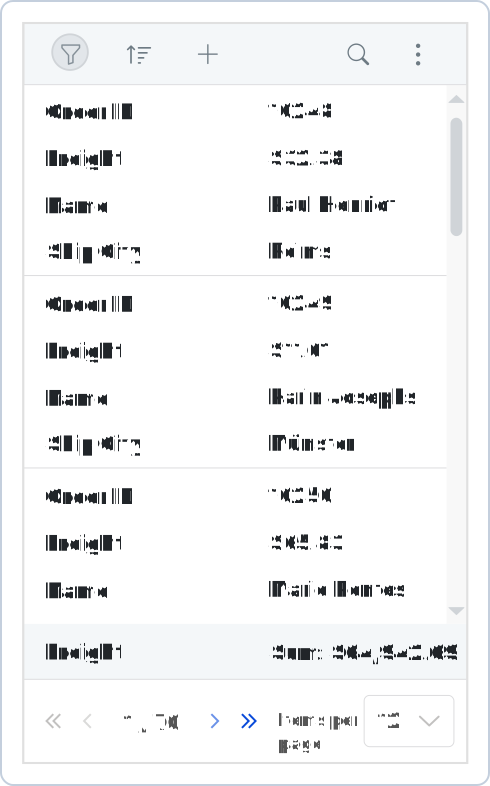
Adaptive UI layout
The Blazor Data Grid user interface is customized and redesigned for great views and usability on small screens. Its features include filter, sort, search, column chooser, column menu, pager dropdown, and edit dialogs that are adaptive to the screen size and render row elements in a vertical direction.
Column
Columns define the schema of the data source in Blazor DataGrid component. It supports formatting, auto-generating columns, column definitions, freezing rows and columns, column spanning, text wrapping, column chooser, column menu, and other features.
Paging
Through paging, a segment of data can be viewed from the assigned data source. The Blazor DataGrid offers a built-in pager UI with options to customize its entire UI. It also has an on-demand paging mode for effective data retrieval from remote web services.
Sorting
Sort rows either in ascending or descending order against a column by simply clicking the header. Sort multiple columns’ data by holding the Ctrl key + header click. In addition, you can define your own custom sorting logic based on the application needs in Blazor DataGrid.
Filtering
Filtering helps view particular or related records that meet a given criteria in the data grid. The Blazor DataData supports various filter types, including powerful Excel-like filters. Choose the appropriate filter type, define your own custom filtering logic, and customize the filtering UI based on the application’s needs. Diacritic characters can also be filtered.
Selection
The Blazor DataGrid allows selecting rows or cells. One or more rows or cells can also be selected by holding Ctrl or Command, or programmatically.
Editing
The Blazor DataGrid provides full supports create, read, update, and delete operations (CRUD). In addition to built-in editor components to edit a particular column value, custom editor components can be created using templates according to the application’s needs. With the help of a data manager, you can perform editing operations with array collection or remote data service.
Grouping
Group rows to display the data in an organized hierarchical structure in ascending or descending order to facilitate easier expansion and collapse of records. There is an option to group records of the desired column by simple drag and drop of that column in an interactive drop area.
Aggregation
Aggregates for column values can easily be displayed using the aggregate feature. Aggregates can be customized to show values in individual summary rows, individual group summary rows, or group caption rows.
Frozen rows and columns
Frozen rows and columns are visible at the top and on the left, right, both , or fixed position, respectively, making the remaining grid content scrollable.
Sticky header
The Blazor Data Grid header has to be in a fixed position when scrolling the document vertically to visualize the data grid content along with the column header.
Row Drag and Drop
The Blazor Grid allows users to drag and drop rows to another DataGrid or custom component. Users can also drag and drop rows within the same DataGrid using the drag icon and transfer rows between different groups.
Master-detail Grid
Blazor Master Detail Grid is a use-case scenario in which a record’s details are viewed in a separate data grid by clicking a particular row.
Frequently Asked Questions
The Syncfusion Blazor Grid component supports the following features:
- Loads millions of records in just a second.
- Flexible data binding with support to use data sources such as Web API, OData, Entity Framework, and more.
- Rich UI interaction and keyboard navigation in both server-side and client-side (WebAssembly) Blazor apps.
- Packed with a bunch of features with customization options suitable for building complex, large-scale applications.
- One of the best Blazor DataGrid in the market that offers feature-rich UI to interact with the software.
- Simple configuration and API.
You can find our Blazor DataGrid demo, which demonstrates how to render and configure the DataGrid.
No, this is a commercial product and requires a paid license. However, a free community license is also available for companies and individuals whose organizations have less than $1 million USD in annual gross revenue, 5 or fewer developers, and 10 or fewer total employees.
A good place to start would be our comprehensive getting started documentation.
Our Customers Love Us
Having an excellent set of tools and a great support team, Syncfusion® reduces customers’ development time. Here are some of their experiences.
The best tool to operate grid-like data out there
Good documentation helps you with everything you need to know. What I like the most is that it takes you from configuration to usage. I have mainly used grid and toolbar options along with dashboard.
Ivan G,
Business Application Developer
Superior components:any day anytime
Essential Studio is one of a kind. The fact that they give us the community developer license has always shown how much they value the small teams creating their own startups. Essential Studio has helped a lot in my almost ready business intelligence platform for the healthcare industry. The grid and the kanban components are what made us fall in love with all the other components.
Kelvin M.
Software Development Engineer
Awards
Greatness—it’s one thing to say you have it, but it means more when others recognize it. Syncfusion® is proud to hold the following industry awards.