
 Rajendran R
TL;DR: Blazor 2025 Volume 2 delivers the performance breakthrough and Excel-like Spreadsheet component developers have been demanding. Experience up to 99% faster operations (16X faster ComboBox filtering, 2X faster TreeGrid) with zero code changes required, plus a new Spreadsheet component with 400+ formulas and full Excel compatibility. 15+ enhanced components, including DataGrid drag-and-drop, Rich Text Editor code blocks, Charts improvements, and PDF redaction capabilities, are ready for .NET 10 with enterprise-grade performance that eliminates Blazor compromises.
The Syncfusion® Blazor 2025 Volume 2 release brings powerful updates for developers, including a new spreadsheet component, up to 99% performance improvements, and enhanced DataGrid and Charts. Explore how these features can elevate your Blazor applications.
Let us dive into the exciting new features and enhancements for Blazor developers.
.NET 10 preview compatibility
Syncfusion® Blazor components are now fully compatible with .NET 10 Previews 1 through 5.
Note: .NET 10 is in preview, and features may change in the final release.
Blazor Spreadsheet component (Preview)
The most anticipated addition to the Blazor suite is the comprehensive Spreadsheet component, delivering an Excel-like experience in your web applications. This powerful component transforms how users interact with tabular data, offering familiar spreadsheet functionality with modern web performance.
Key features of the Blazor Spreadsheet
The Spreadsheet component provides an extensive feature set designed for complex data scenarios:
Core functionality:
- Formula calculations: Over 400 built-in formulas for mathematical, statistical, financial, and logical operations.
- File operations: Complete support for opening, editing, and saving Excel format files.
- Dynamic resizing: Interactive row and column resizing for optimal data presentation.
- Cell styling: Comprehensive formatting options including fonts, backgrounds, and alignment.
Advanced data management:
- Sorting and filtering: Organize data with multiple criteria and advanced filtering options.
- Clipboard operations: Full copy, cut, and paste functionality with formatting preservation.
- Autofill capabilities: Intelligent data entry with pattern recognition.
- Undo/redo support: Complete action history for flexible editing workflows.
- Sheet management: Add, insert, delete, duplicate, and move worksheets.
- Hyperlinks: Create and edit hyperlinks within cells.
- Image insertion: Insert and edit images within spreadsheet cells.
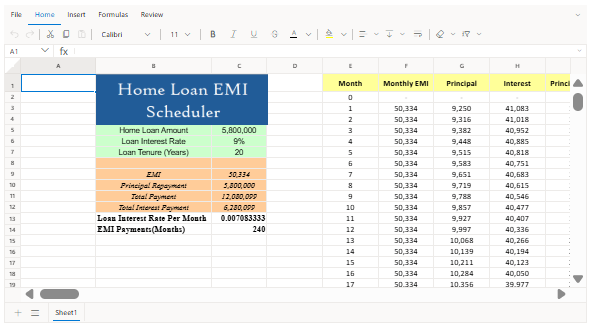
Note: For more details, refer to the Blazor Spreadsheet demo.
Massive performance improvements across Blazor components
One of the most significant improvements in this release focuses on the Dropdown component performance. The optimization efforts have resulted in dramatic speed increases across all dropdown controls through optimized code logic and removal of unnecessary DOM attributes.
Blazor Dropdown performance enhancements
The performance improvements span multiple scenarios and environments:
|
Component |
Scenario |
Performance Improvement |
|
Dropdown List |
Initial rendering |
1.2X Faster (WASM) |
|
Dropdown List |
Pop-up opening |
Significant (WASM) |
|
Dropdown List |
Filtering |
Significant (WASM) |
|
Dropdown List |
Two-way value binding |
Significant (WASM) |
|
Dropdown List |
Virtualization |
1.5X Faster (Server) |
|
ComboBox |
Initial rendering |
1.1X Faster (Server) |
|
ComboBox |
Pop-up opening |
Significant (WASM) |
|
ComboBox |
Filtering |
16X Faster (Server) |
|
ComboBox |
Two-way value binding |
5X Faster (WASM) |
|
ComboBox |
Virtualization |
4X Faster (WASM) |
|
AutoComplete |
Initial rendering |
1.2X Faster (Server) |
|
AutoComplete |
Pop-up opening |
1.7X Faster (Server) |
|
AutoComplete |
Filtering |
1.1X Faster (WASM) |
|
AutoComplete |
Two-way value binding |
1.3X Faster (Server) |
|
AutoComplete |
Virtualization |
4X Faster (WASM) |
|
MultiSelect Dropdown |
Initial rendering |
1.3X Faster (Server) |
|
MultiSelect Dropdown |
Pop-up opening |
Significant (WASM) |
|
MultiSelect Dropdown |
Filtering |
Significant (WASM) |
|
MultiSelect Dropdown |
Two-way value binding |
Significant (WASM) |
|
MultiSelect Dropdown |
Virtualization |
4X Faster (WASM) |
These improvements are particularly beneficial for applications handling large datasets and require no code changes to existing implementations.
Enhanced DataGrid with advanced features
The Blazor DataGrid provides powerful new features that enhance data manipulation and user experience.
Drag and drop anywhere in the Grid
The DataGrid now supports dropping rows into empty areas using the AllowEmptyAreaDrop property, which is enabled by default. This provides more flexible row rendering capabilities within-grid and cross-grid drag-and-drop scenarios.
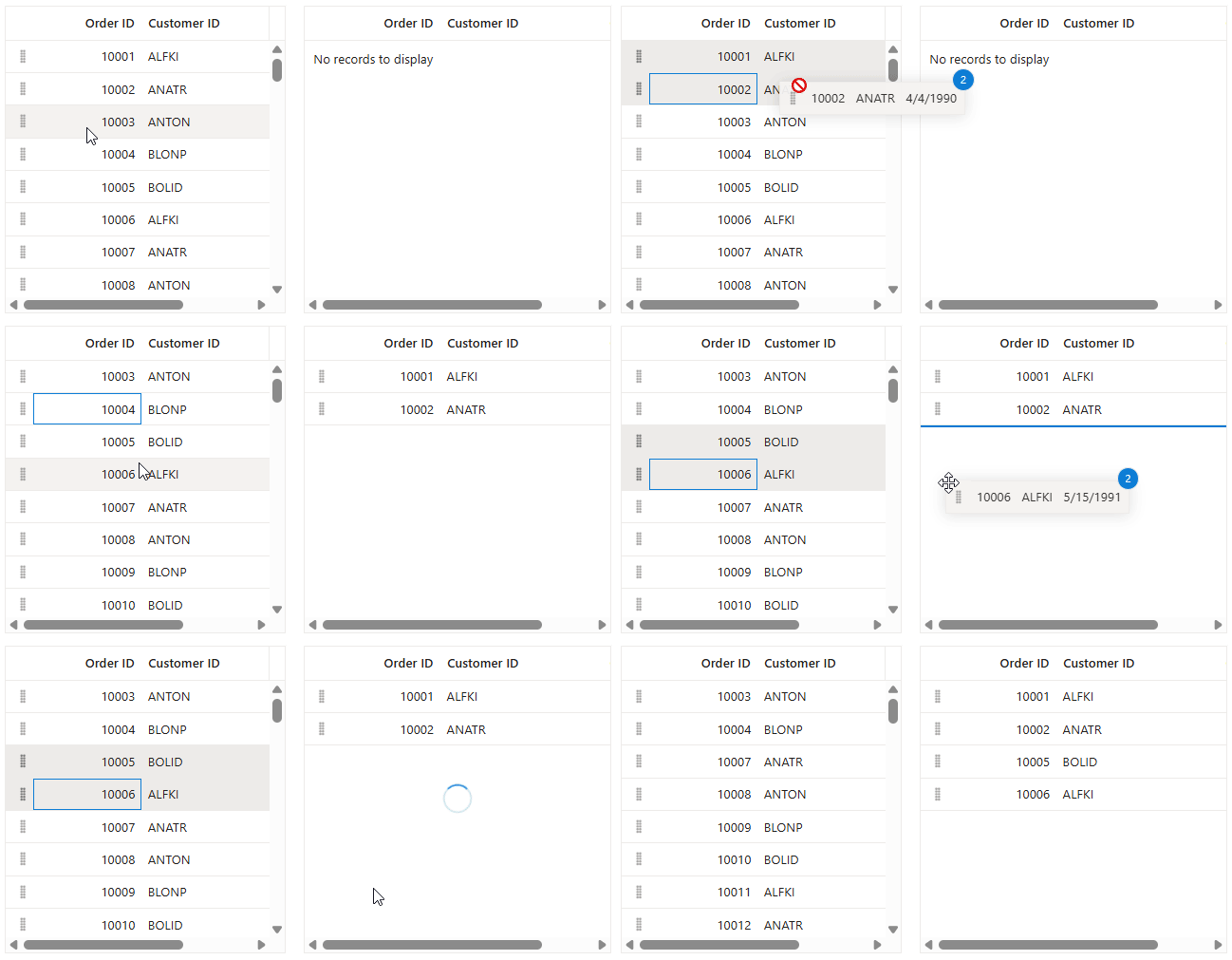
Note: For more details, refer to the Blazor DataGrid drag and drop demo.
Filter editor customization
Customize built-in filter editors using the FilterEditorSettings property on GridColumn for enhanced user experience in both filter menu and Excel filter dialogs.

Note: For more details, refer to the Blazor DataGrid filter customization demo.
Accent-insensitive search
Enhanced search functionality using the IgnoreAccent property in GridSearchSettings that ignores diacritic marks for multilingual applications when using IEnumerable data sources.
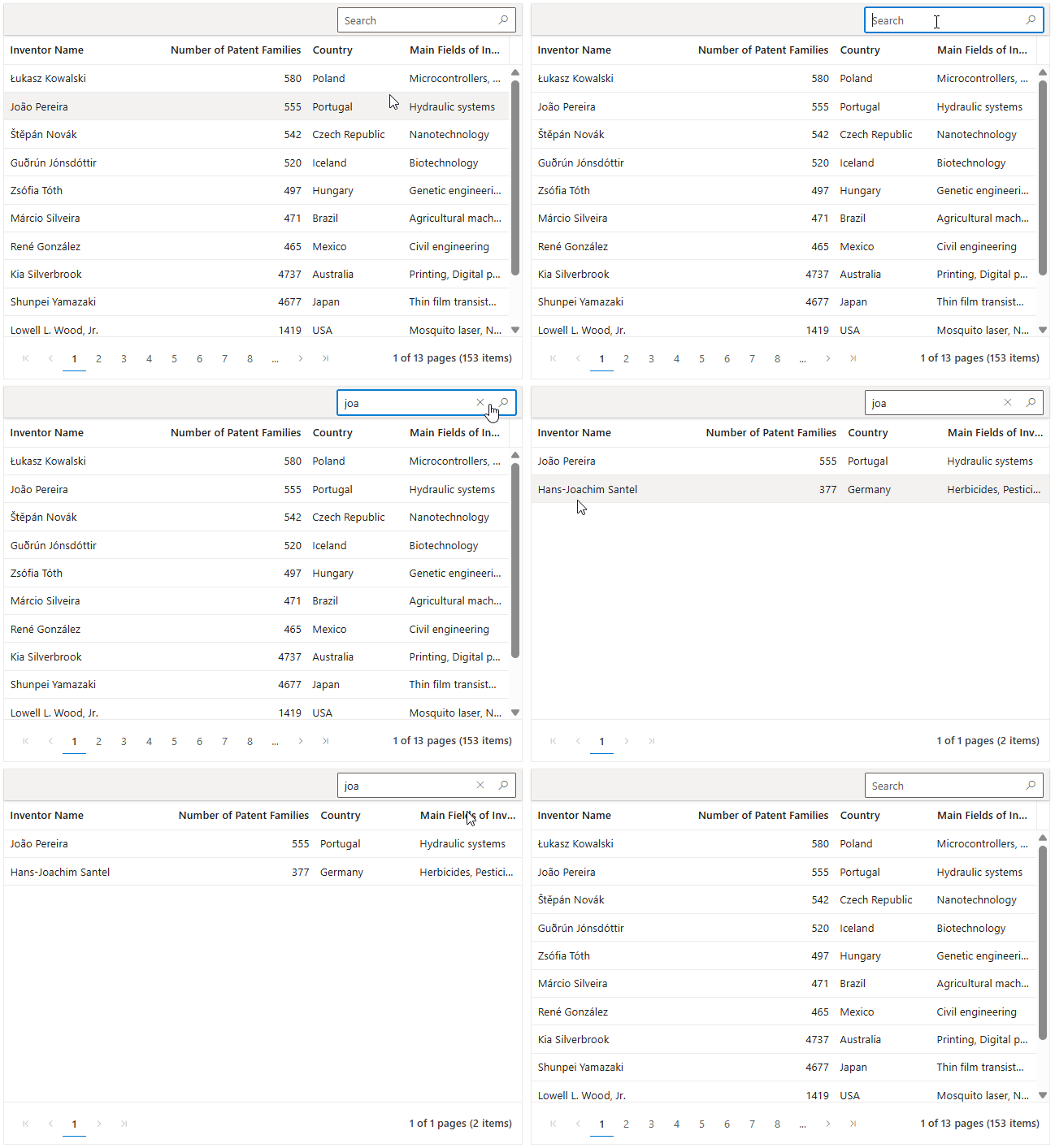
Note: For more details, refer to the Blazor DataGrid accent-insensitive search demo.
Significant Diagram performance improvements
The Blazor Diagram component receives unprecedented performance enhancements, ranging from 24% to 99% in various scenarios through optimized rendering algorithms and memory management.
Diagram performance benchmarks
The performance improvements span multiple operations and environments:
|
Operation |
Scenario |
Server Improvement |
WASM Improvement |
|
Initial Loading |
10,000 elements |
24.4% faster |
72.2% faster |
|
Resize |
5,000 elements |
73.33% faster |
64% faster |
|
Rotate |
5,000 elements |
67.65% faster |
53.13% faster |
|
Drag |
5,000 elements |
81.48% faster |
64.29% faster |
|
Selection (Keyboard) |
5,000 elements |
99.80% faster |
98.37% faster |
|
Selection (Mouse) |
5,000 elements |
99.78% faster |
98.67% faster |
|
Cut |
5,000 elements |
41.38% faster |
42.86% faster |
|
Paste |
5,000 elements |
70.68% faster |
50% faster |
|
Delete |
5,000 elements |
53.85% faster |
75.33% faster |
|
Undo/Redo |
5,000 elements |
61.70% faster |
64.67% faster |
Enhanced connector routing algorithm
The new AvoidLineOverlapping constraint in DiagramConstraints prevents connector overlapping and maintains diagram clarity by automatically adjusting connector geometry to avoid neighboring connectors.
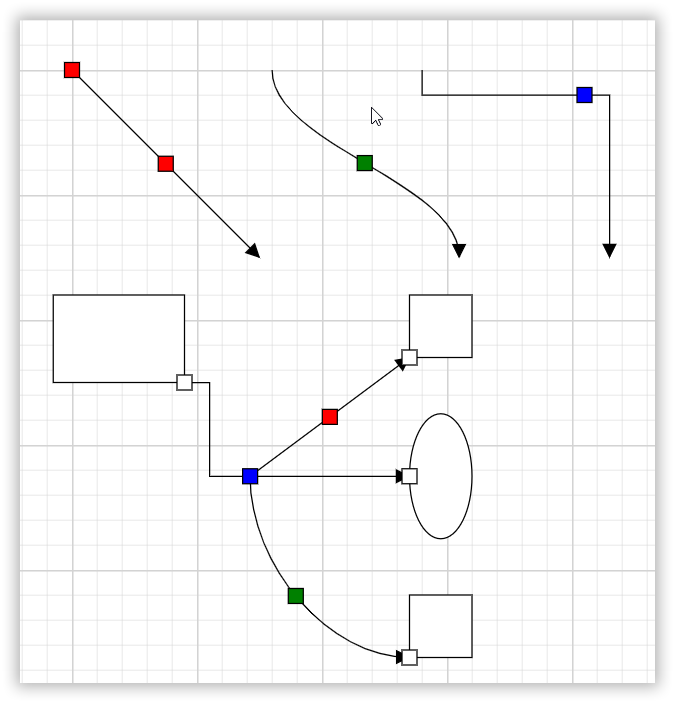
Connector ports support
The new ConnectorPort feature allows users to define precise connection points on connectors, enabling accurate connections between connectors or shapes.
UML sequence diagram generation
Automatically generate UML sequence diagrams from model data, creating lifelines, messages, and activation boxes dynamically. Includes support for importing and exporting UML sequences in Mermaid syntax.
Key features:
- Automatic diagram generation from model data.
- Mermaid syntax import/export support.
- Dynamic lifeline and message creation.
- AI assistant integration for Mermaid syntax generation.
Note: For more details, refer to the Blazor Diagram UML sequence diagram demo.
Rich Text Editor with advanced features
The Blazor Rich Text Editor provides powerful features for enhanced content creation and productivity.
Insert a code block with language selection
The Code Block feature allows users to insert formatted code snippets using the toolbar button or Ctrl+Shift+B shortcut. It also supports a language selection dropdown.
- Configure languages using the Languages property and set the default language with RichTextEditorCodeBlockSettings.DefaultLanguage.
- Supports JavaScript, Python, HTML, and other programming languages.
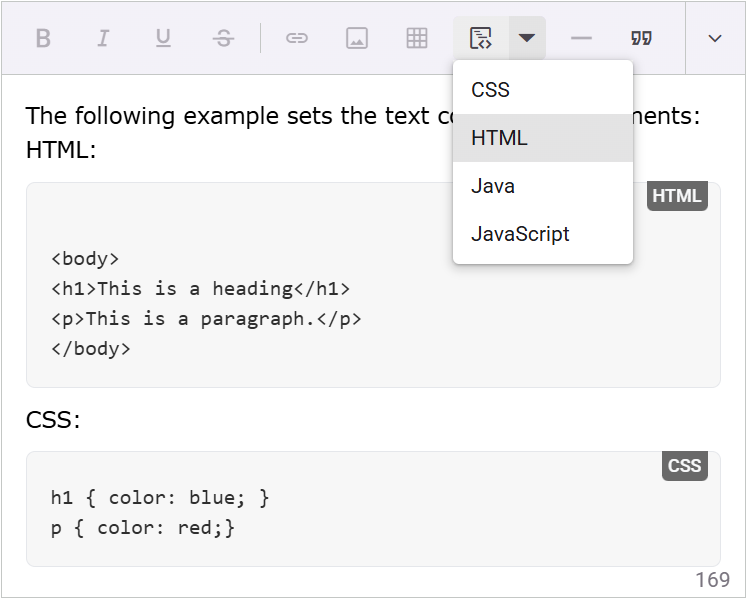
Note: For more details, refer to the Blazor Rich Text Editor code block demo.
Slash menu for quick actions
The slash command menu (triggered by) provides rapid access to formatting options and content insertion using RichTextEditorSlashMenuSettings.
- Set the Enable property to true to use this feature.
- Configure items using the Items collection.
- Customize behavior with the SlashMenuItemSelecting event.
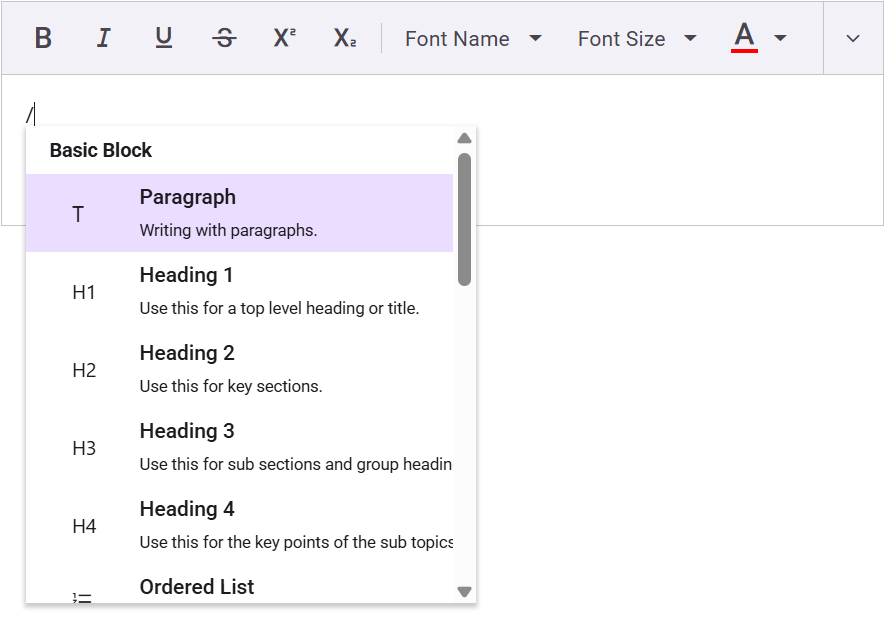
Note: For more details, refer to the Rich Text Editor slash menu demo.
Format Painter for consistent styling
The Format Painter tool enables copying formatting attributes from one text selection to another, with configurable allowed and denied formats.
- Add FormatPainter to ToolbarItems array.
- Configure with RichTextEditorFormatPainterSettings.
- Control formats using the AllowedFormats and DeniedFormats properties.
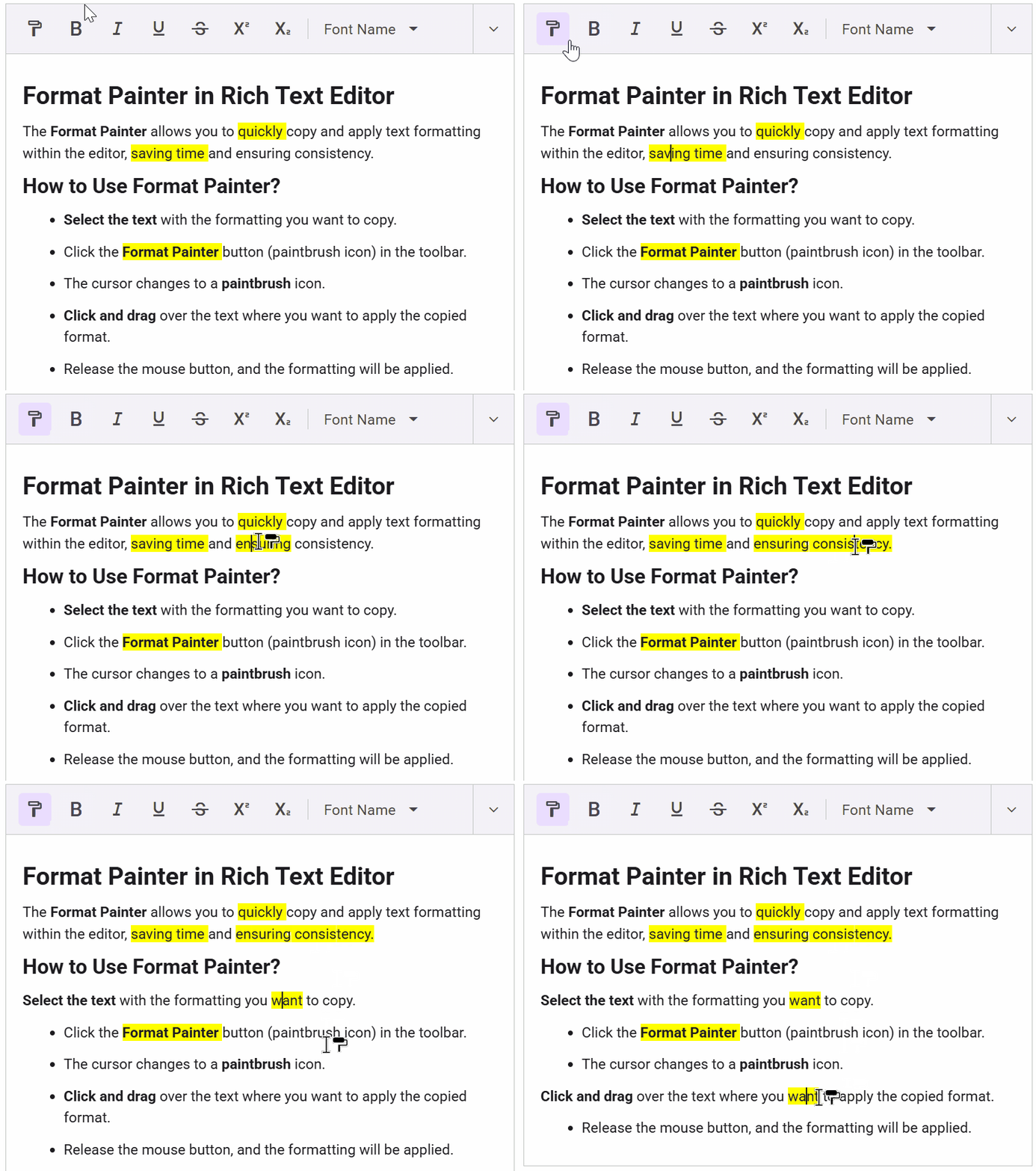
Note: For more details, refer to the Blazor Rich Text Editor Format Painter demo.
Additional features
Bottom Toolbar Support: The Bottom Toolbar feature introduces a fixed toolbar at the bottom of the Rich Text Editor, offering quick access to frequently used formatting tools.
- Configure position using Position property
- Supports Top and ToolbarPosition.Bottom enums
Popup toolbar: The Popup toolbar automatically relocates overflowing toolbar items into a popup container when there isn’t enough space to display them, making it especially useful for constrained layouts or smaller screens.
- Enable with Type set to ToolbarType.Popup
- Automatically handles overflowing toolbar items
Enhanced file upload: The MaxFileSize support feature in the Rich Text Editor allows developers to configure a maximum file size limit for uploaded media files, including images, audio, and video, helping to validate uploads and prevent oversized content.
- Configure maximum file size using MaxFileSize
- Default limit: 30MB, customizable per media type
Recent colors support: The Show Recent Color support feature in the Rich Text Editor enhances the font color and background color pickers by displaying recently used colors, allowing users to quickly access and reuse them for consistent formatting.
- Control the recent colors display with the ShowRecentColors property
- Available in font color and background color pickers
Enhanced Charts with advanced visualization
The Blazor charts component introduces new features for better data visualization and user interaction.
Border radius for Accumulation Charts
Add rounded corners to pie and donut charts using the BorderRadius property in AccumulationChartSeries for enhanced visualization.
- Property: BorderRadius
- Applies to pie and donut chart types
- Customizable radius values for different visual effects
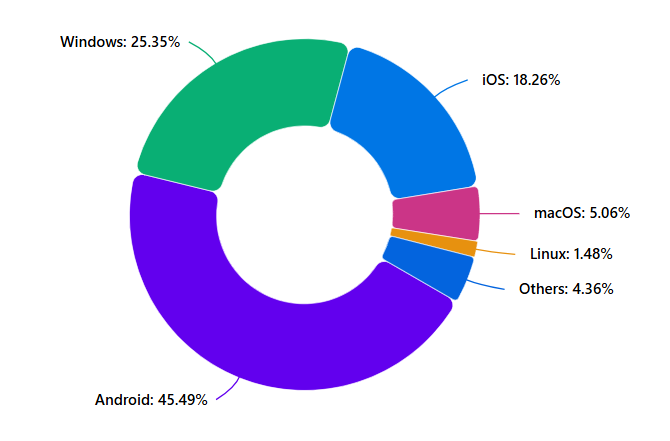
Note: For more details, refer to the Blazor Charts border radius demo.
Center label support for Pie and Donut charts
Display desired labels at the center of pie and donut charts using the AccumulationChartCenterLabel with dynamic content based on hover interactions.
- Component: AccumulationChartCenterLabel
- Dynamic updates with HoverTextFormat property
- Context-sensitive label display on data point hover
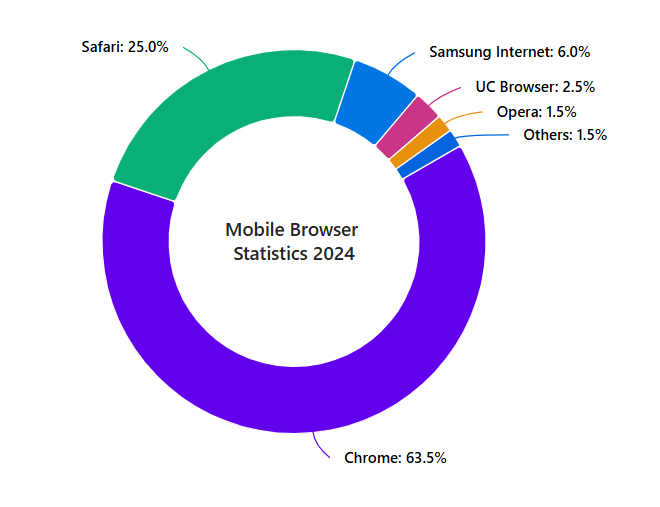
Note: For more details, refer to the Blazor Charts center label demo.
Stack labels for Stacked Charts
Display total values for each section in stacked column or bar charts using ChartStackLabelSettings for improved data readability.
- Component: ChartStackLabelSettings
- Automatic calculation and display of section totals
- Enhances data interpretation in complex datasets
Note: For more details, refer to the Blazor Charts stack labels demo.
Customizable scrollbar position
Control scrollbar placement using the Position property in ChartAxisScrollbarSettings for enhanced user interaction.
- Property: Position
- Vertical scrollbar: left or right placement
- Horizontal scrollbar: top or bottom placement
Zoom toolbar positioning
Customize the zoom toolbar location using ChartZoomToolbarPosition in ChartZoomSettings with precise offset positioning support.
- Property: ChartZoomToolbarPosition
- Positions: left, right, top, bottom
- Offset positioning for precise placement
Note: Explore the Blazor Charts with Zooming and Panning demo.
Column width in pixels
Specify exact column widths using the ColumnWidthInPixel property in ChartSeries for precise layout control.
- Property: ColumnWidthInPixel
- Exact pixel value specification
- Applies to column series types
Enhanced PDF Viewer with redaction support
The PDF Viewer now includes comprehensive redaction annotation capabilities for document security and customizable zoom controls.
Redaction annotation implementation
Key features:
- Secure content redaction with permanent removal capability
- Customizable redaction marks with color and overlay text options
- Real-time preview functionality for accuracy verification
- User-friendly interface for area selection and redaction application
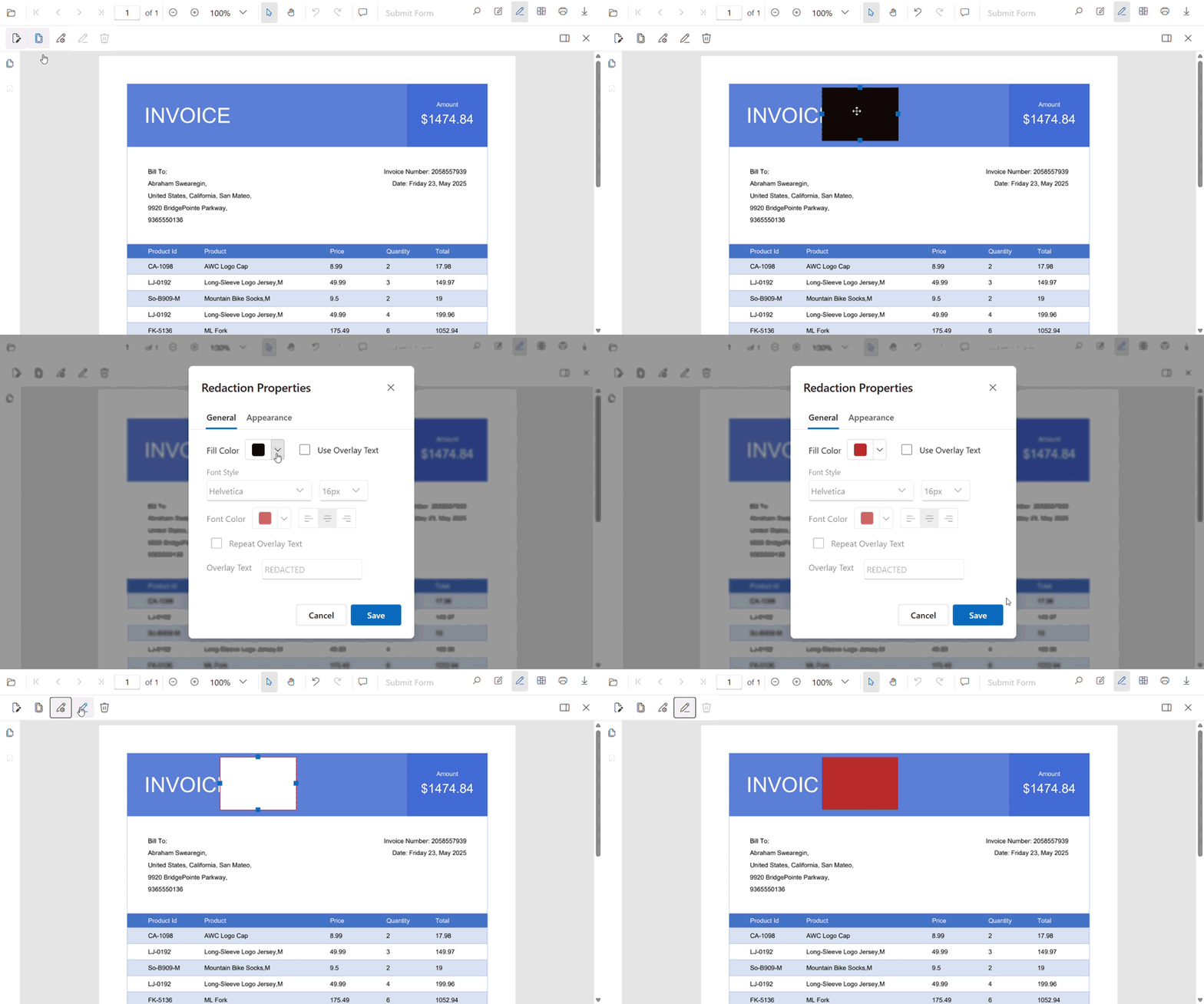
Note: Explore the Blazor PDF Viewer demo.
Zoom customization
Control zoom limits using the MinZoomValue and MaxZoomValue properties in the PDF Viewer for an enhanced viewing experience.
- Properties: MinZoomValue and MaxZoomValue
- Customizable zoom range for different document types
- Improved user control over document viewing
Enhanced TreeGrid performance for remote data
The TreeGrid component achieves remarkable performance improvements, particularly in WebAssembly environments, with optimized remote data handling and virtualization support.
TreeGrid performance benchmarks
|
Environment |
Scenario |
Performance gain |
|
WebAssembly (WASM) |
Initial rendering |
2X Faster |
|
WebAssembly (WASM) |
Child expanding |
2X Faster |
- Optimized LoadChildOnDemand feature for remote data sources
- Enhanced virtualization with hierarchical data binding
- Improved rendering performance for deeply nested structures
Enhanced Scheduler performance
The Blazor Scheduler component delivers significant performance improvements across multiple scenarios through optimized event handling and rendering algorithms.
Scheduler performance improvements
|
Scheduler – Blazor WASM |
Improved percentage (%) |
|
Day view with 2k events |
|
|
Initial load |
30% |
|
Create event |
20% |
|
Update event |
30% |
|
Delete event |
30% |
|
Timeline day view with 10k events |
|
|
Initial load |
15% |
|
Create event |
10% |
|
Update event |
25% |
|
Delete event |
20% |
These improvements ensure an efficient and streamlined user experience when managing large numbers of scheduled events.
Enhanced Image Editor with advanced features
The Image Editor receives powerful new capabilities for professional image manipulation and broader file format support.
Custom dimensions support
Open images with specified dimensions using additional parameters in the OpenAsync method for precise control over image rendering.
- Method: OpenAsync with width, height, and isAspectRatio parameters
- Precise dimension control while preserving aspect ratio
- Optimized for high-resolution images and fixed canvas requirements
Text annotation enhancements
Added Underline and Strikethrough formatting options for text annotations.
BMP format support
You can load BMP (Bitmap) image files through the file uploader UI or programmatically using the OpenAsync method, expanding file format compatibility for design professionals.
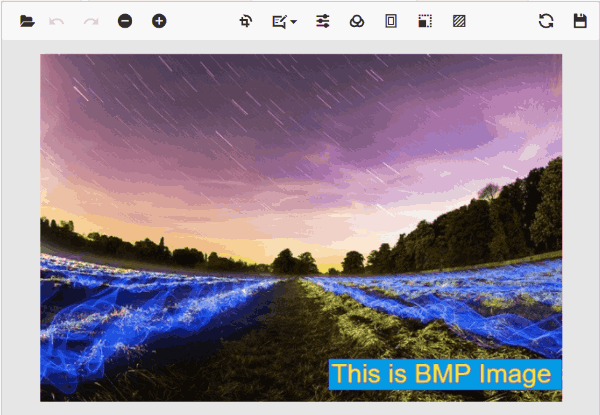
Note: Explore the Image Editor demo.
Enhanced Pivot Table with advanced analytics
The Pivot Table component introduces powerful new features for comprehensive data analysis and Excel integration.
Value sorting on both axes
Perform value sorting simultaneously on row and column axes, independent of the value axis, using enhanced sorting algorithms for flexible data analysis.
Note: Explore the Pivot Table value sorting demo.
Export as Excel Pivot Table
Export pivot tables as native Excel Pivot Tables, preserving the pivot structure for continued interaction and customization within Excel.
Enhanced export options
Headers and footers support:
- Include headers and footers during Excel export with the server-side engine
- Comprehensive document formatting preservation
Memory stream export:
- Save exported Excel documents as memory streams
- Enable further processing and customization before final export
- Flexible document handling for advanced scenarios
Enhanced Chat UI with modern features
The Chat UI component receives comprehensive updates for modern messaging experiences with enhanced user interaction capabilities.
Chat status indicators
Display user presence and activity states using the StatusIconCss property for visual representation of online, offline, busy, and away statuses.
- Property: StatusIconCss for status icon configuration
- Visual presence indicators for enhanced user experience
- Customizable status representations
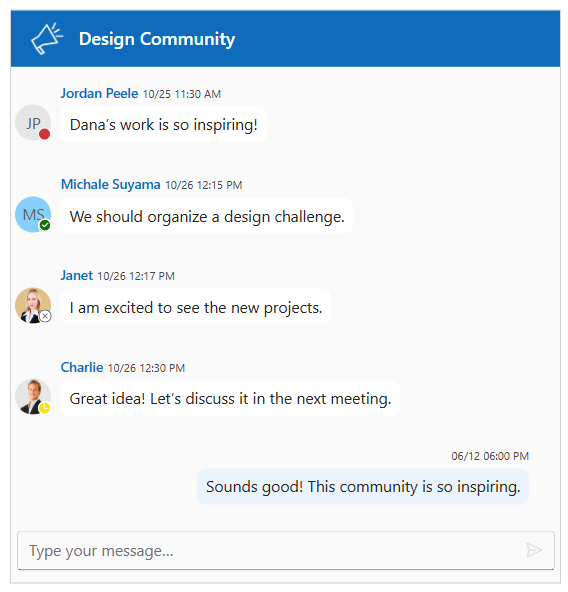
Compact mode
Enable compact layout using the EnableCompactMode property to align all messages to the left, creating streamlined interfaces ideal for group conversations.
- Property: EnableCompactMode for layout control
- Left-aligned message display regardless of sender
- Optimized for space-constrained interfaces

Message operations
Comprehensive message-level actions including IsPinned, RepliedTo, and IsForwarded properties in the message model, with customizable MessageToolbar and MessageToolbarItem components.
- Message properties: IsPinned, RepliedTo, IsForwarded
- Components: MessageToolbar and MessageToolbarItem
- Default actions: Copy, Reply, Pin, Delete, Forward
Enhanced text input
Div-based text input instead of traditional textarea for a more intuitive and flexible user experience in message composition.
Note: Explore the Chat UI Demo.
Additional component enhancements
Enhanced AI AssistView with file attachments
The AI AssistView component now supports file attachments through the AttachmentSettings configuration, enabling richer AI interactions with document and image context.
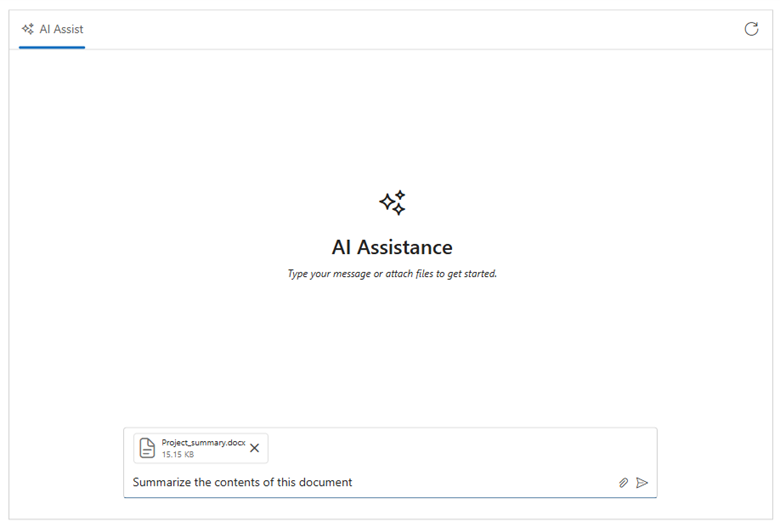
Note: Explore the Blazor AI AssistView attachments demo.
Enhanced Tooltip with dynamic element support
The Tooltip component now automatically handles dynamically created elements using the TargetContainer property, eliminating the need for manual refresh operations.
- Property: TargetContainer for CSS selector assignment
- Automatic tooltip registration for new DOM elements
- Enhanced support for real-time content updates

Gantt Chart
Dialog closing event:
- New GanttDialogClosing event for enhanced dialog control
- Triggers on Cancel, Close icon, Escape key, or Save operations
Document editor
Accessibility improvements:
- Screen reader support for better accessibility
- Enhanced content interpretation for assistive technologies

Conclusion
The 2025 Volume 2 release continues Syncfusion® commitment to providing developers with the most comprehensive, performant, and feature-rich Blazor component suite available. Whether you’re building enterprise applications, data dashboards, or modern web experiences, these enhancements will accelerate your development and delight your users.
Start exploring these powerful new features today and transform your Blazor applications with cutting-edge capabilities that set new standards for web development excellence.
To explore these new features:
- Download the latest release: Syncfusion® Blazor components
- View live demos: Blazor component demos
- Read documentation: Blazor documentation
- Join the community: Syncfusion® community forums
The Syncfusion® Blazor 2025 Volume 2 release represents a significant leap forward in web application development capabilities. With the introduction of the comprehensive Spreadsheet component, massive performance improvements across dropdown controls, and enhanced features in over 15 existing components, this release empowers developers to build more responsive, feature-rich applications.
The performance optimizations, ranging from 1.2X to an impressive 99% improvement, will dramatically enhance user experience, particularly in data-intensive applications. The new AI-powered features, advanced visualization capabilities, and enhanced security features position Blazor applications at the forefront of modern web development.
Existing customers can download the new version of Essential Studio® on the license and downloads page. If you are not a Syncfusion® customer, try our 30-day free trial to check out our incredible features.
If you have any questions, contact us through our support forums, support portal, or feedback portal. We are always happy to assist you!
FAQs
Q: What does the new Spreadsheet component offer?
A: It provides an Excel-like experience with over 400 formulas, file operations, and advanced data management for web apps.
Q: How do the performance improvements impact dropdowns?
A: Dropdowns see up to 16X faster filtering and 4X faster virtualization, ideal for large datasets.
Q: Is .NET 10 support stable?
A: It supports .NET 10 Previews 1–5, but features may change in the final release







 No spam, just valuable updates.