
 Mohammed Farook J
TL;DR: Tired of wrapper-based grids slowing you down? Discover how to build a pure React Data Grid from scratch using hooks, virtual scrolling, and modular components; no external dependencies are required.
React developers often face a common challenge: integrating a high-performance data grid without relying on bulky wrappers or non-native libraries. If you’ve worked with traditional grid components that depend on jQuery or class-based lifecycles, you know the pain: limited flexibility, bloated bundles, and inconsistent React behavior.
This blog introduces a Pure React Data Grid built from the ground up using functional components, React Hooks, and modular architecture. There are no wrappers, no legacy dependencies, just clean, scalable React code.
Why build Pure React Data Grid?
Modern React applications demand performance, modularity, and maintainability. Wrappers around non-React libraries often introduce:
- Lifecycle mismatches
- Increased bundle size
- Limited customization
- Poor integration with React state and hooks
By building a grid natively in React, you gain complete control over rendering, state management, and performance optimizations, especially when working with large datasets. Explore the Pure React Grid in detail here.
Syncfusion Pure React Data Grid
The Syncfusion Pure React Data Grid is a high-performance, feature-rich UI component tailored for React. It enables developers to efficiently display and manage tabular data, supporting local and remote data sources. With its robust capabilities, the Data Grid handles complex data operations while maintaining responsiveness, making it ideal for data-intensive applications.
Advantages of the Pure React Data Grid
Syncfusion Pure React Data Grid comes packed with features that make it a top pick for developers working on data-driven interfaces. Here’s what sets it apart:
- Seamless React integration: Built using React hooks and state management, the grid works naturally with React’s lifecycle methods.
- Modular design: You only include the needed features, which helps optimize your app’s bundle size and performance.
- Enterprise-ready: This grid is ready to handle complex use cases, whether you’re building dashboards, admin panels, or analytics platforms.
- Developer-friendly: With clear APIs and comprehensive documentation, setup is straightforward, and development time is reduced.
- Real-time data handling: The grid supports dynamic updates, ensuring that data changes are reflected instantly, without compromising performance, even with large datasets.
- Flexible navigation: Features like pagination, sorting, and filtering make it easy for users to explore and interact with data efficiently.
Let’s build it: Step-by-step guide
Step 1: Create a Vite + TypeScript project
Let’s start by setting up a new project using Vite, configured with React and TypeScript.
npm create vite@latest
cd my-project
npm install
Note: For detailed instructions on creating a React Vite application, refer to the official Vite documentation.
Step 2: Install the Syncfusion React Grid component
Run the command below to install the Syncfusion React Data Grid package in your project.
npm install @syncfusion/react-gridStep 3: Import required CSS references
To apply styles to the components, import the necessary CSS files:
App.css
@import '../node_modules/@syncfusion/react-base/styles/material.css';
@import '../node_modules/@syncfusion/react-buttons/styles/material.css';
@import '../node_modules/@syncfusion/react-inputs/styles/material.css';
@import '../node_modules/@syncfusion/react-popups/styles/material.css';
@import '../node_modules/@syncfusion/react-navigations/styles/material.css';
@import '../node_modules/@syncfusion/react-grid/styles/material.css';
@import '../node_modules/@syncfusion/react-pager/styles/material.css';
@import '../node_modules/@syncfusion/react-calendars/styles/material.css';
@import '../node_modules/@syncfusion/react-dropdowns/styles/material.css';
Then, import the Grid component into your application:
JSX
import React from 'react';
import { Grid } from '@syncfusion/react-grid';
Step 4: Configure the data source
We create a TypeScript file and define a JSON dataset for employee records. Then, import and bind the data to the Grid using the dataSource property:
employeeInformation.ts
[employeeInformation.ts]
export const employeeInformation = [
    {
        EmployeeID: 'EMP-101',
        Name: 'John Smith',
        Designation: 'Software Engineer',
        DateOfJoining: new Date(2020, 5, 12),
        Location: 'WFH',
        isLocked: false,
        EmployeeStatus: 'Available',
        Email: '[email protected]',
        PhoneNumber: '555-123-4567',
        Department: 'Web Development',
        EmploymentType: 'Full-Time',
        ReportingPerson: 'David Thompson',
        ReportingManager: 'James Wilson'
    },
    {
        EmployeeID: 'EMP-102',
        Name: 'James Miller',
        Designation: 'UI/UX Designer',
        DateOfJoining: new Date(2019, 3, 8),
        Location: 'Alpha Office',
        isLocked: false,
        EmployeeStatus: 'Available',
        Email: '[email protected]',
        PhoneNumber: '555-123-4567',
        Department: 'Design',
        EmploymentType: 'Full-Time',
        ReportingPerson: 'Emily Johnson',
        ReportingManager: 'James Wilson'
    },
    {
        EmployeeID: 'EMP-103',
        Name: 'Michael Brown',
        Designation: 'QA Engineer',
        DateOfJoining: new Date(2021, 1, 15),
        Location: 'Beta Office',
        isLocked: true,
        EmployeeStatus: 'Available',
        Email: '[email protected]',
        PhoneNumber: '555-123-4567',
        Department: 'Testing',
        EmploymentType: 'Full-Time',
        ReportingPerson: 'Ella Martin',
        ReportingManager: 'James Wilson'
    },
    {
        EmployeeID: 'EMP-104',
        Name: 'Sarah Davis',
        Designation: 'HR Specialist',
        DateOfJoining: new Date(2018, 10, 20),
        Location: 'WFH',
        isLocked: false,
        EmployeeStatus: 'Available',
        Email: '[email protected]',
        PhoneNumber: '555-123-4567',
        Department: 'HR',
        EmploymentType: 'Full-Time',
        ReportingPerson: 'William Clark',
        ReportingManager: 'James Wilson'
    },
    {
        EmployeeID: 'EMP-105',
        Name: 'James Wilson',
        Designation: 'Software Engineer',
        DateOfJoining: new Date(2017, 7, 5),
        Location: 'Alpha Office',
        isLocked: false,
        EmployeeStatus: 'Available',
        Email: '[email protected]',
        PhoneNumber: '555-123-4567',
        Department: 'UI and UX',
        EmploymentType: 'Full-Time',
        ReportingPerson: 'David Thompson',
        ReportingManager: 'David Thompson'
    },
    {
        EmployeeID: 'EMP-106',
        Name: 'Olivia Martinez',
        Designation: 'Software Engineer',
        DateOfJoining: new Date(2022, 2, 28),
        Location: 'Gamma Office',
        isLocked: false,
        EmployeeStatus: 'Available',
        Email: '[email protected]',
        PhoneNumber: '555-123-4567',
        Department: 'Finance',
        EmploymentType: 'Full-Time',
        ReportingPerson: 'Henry Jackson',
        ReportingManager: 'James Wilson'
    },
    {
        EmployeeID: 'EMP-107',
        Name: 'William Anderson',
        Designation: 'Technical Support Specialist',
        DateOfJoining: new Date(2020, 11, 10),
        Location: 'WFH',
        isLocked: true,
        EmployeeStatus: 'Not Available',
        Email: '[email protected]',
        PhoneNumber: '555-123-4567',
        Department: 'Front office',
        EmploymentType: 'Full-Time',
        ReportingPerson: 'Matthew Harris',
        ReportingManager: 'Chloe White'
    },
    {
        EmployeeID: 'EMP-108',
        Name: 'Sophia Thomas',
        Designation: 'UI/UX Designer',
        DateOfJoining: new Date(2019, 6, 18),
        Location: 'Beta Office',
        isLocked: false,
        EmployeeStatus: 'Available',
        Email: '[email protected]',
        PhoneNumber: '555-123-4567',
        Department: 'Design',
        EmploymentType: 'Full-Time',
        ReportingPerson: 'Emily Johnson',
        ReportingManager: 'James Wilson'
    },
    {
        EmployeeID: 'EMP-109',
        Name: 'Daniel Taylor',
        Designation: 'QA Engineer',
        DateOfJoining: new Date(2021, 4, 22),
        Location: 'Alpha Office',
        isLocked: false,
        EmployeeStatus: 'Available',
        Email: '[email protected]',
        PhoneNumber: '555-123-4567',
        Department: 'Testing',
        EmploymentType: 'Full-Time',
        ReportingPerson: 'Ella Martin',
        ReportingManager: 'James Wilson'
    },
    {
        EmployeeID: 'EMP-110',
        Name: 'Grace Moore',
        Designation: 'HR Specialist',
        DateOfJoining: new Date(2018, 9, 30),
        Location: 'WFH',
        isLocked: false,
        EmployeeStatus: 'Available',
        Email: '[email protected]',
        PhoneNumber: '555-123-4567',
        Department: 'HR',
        EmploymentType: 'Full-Time',
        ReportingPerson: 'William Clark',
        ReportingManager: 'James Wilson'
    },
    {
        EmployeeID: 'EMP-111',
        Name: 'Henry Jackson',
        Designation: 'Software Engineer',
        DateOfJoining: new Date(2020, 8, 14),
        Location: 'Gamma Office',
        isLocked: false,
        EmployeeStatus: 'Available',
        Email: '[email protected]',
        PhoneNumber: '555-123-4567',
        Department: 'Web Development',
        EmploymentType: 'Full-Time',
        ReportingPerson: 'David Thompson',
        ReportingManager: 'James Wilson'
    },
    {
        EmployeeID: 'EMP-112',
        Name: 'Chloe White',
        Designation: 'QA Engineer',
        DateOfJoining: new Date(2017, 12, 1),
        Location: 'WFH',
        isLocked: true,
        EmployeeStatus: 'Not Available',
        Email: '[email protected]',
        PhoneNumber: '555-123-4567',
        Department: 'Testing',
        EmploymentType: 'Full-Time',
        ReportingPerson: 'Ella Martin',
        ReportingManager: 'David Thompson'
    },
    {
        EmployeeID: 'EMP-113',
        Name: 'Matthew Harris',
        Designation: 'Technical Support Specialist',
        DateOfJoining: new Date(2022, 5, 9),
        Location: 'Beta Office',
        isLocked: false,
        EmployeeStatus: 'Available',
        Email: '[email protected]',
        PhoneNumber: '555-123-4567',
        Department: 'Web Development',
        EmploymentType: 'Full-Time',
        ReportingPerson: 'David Thompson',
        ReportingManager: 'James Wilson'
    },
    {
        EmployeeID: 'EMP-114',
        Name: 'Ella Martin',
        Designation: 'QA Engineer',
        DateOfJoining: new Date(2021, 7, 19),
        Location: 'Alpha Office',
        isLocked: false,
        EmployeeStatus: 'Available',
        Email: '[email protected]',
        PhoneNumber: '555-123-4567',
        Department: 'Testing',
        EmploymentType: 'Full-Time',
        ReportingPerson: 'Ella Martin',
        ReportingManager: 'James Wilson'
    },
    {
        EmployeeID: 'EMP-115',
        Name: 'Robert Davis',
        Designation: 'Software Engineer',
        DateOfJoining: new Date(2019, 2, 25),
        Location: 'WFH',
        isLocked: false,
        EmployeeStatus: 'Available',
        Email: '[email protected]',
        PhoneNumber: '555-123-4567',
        Department: 'Web Development',
        EmploymentType: 'Full-Time',
        ReportingPerson: 'David Thompson',
        ReportingManager: 'James Wilson'
    }
];
JSX
import { employeeInformation } from './employeeInformation';

export default function App() {
    return (
        <Grid dataSource={employeeInformation} />
    );
}
Step 5: Define columns
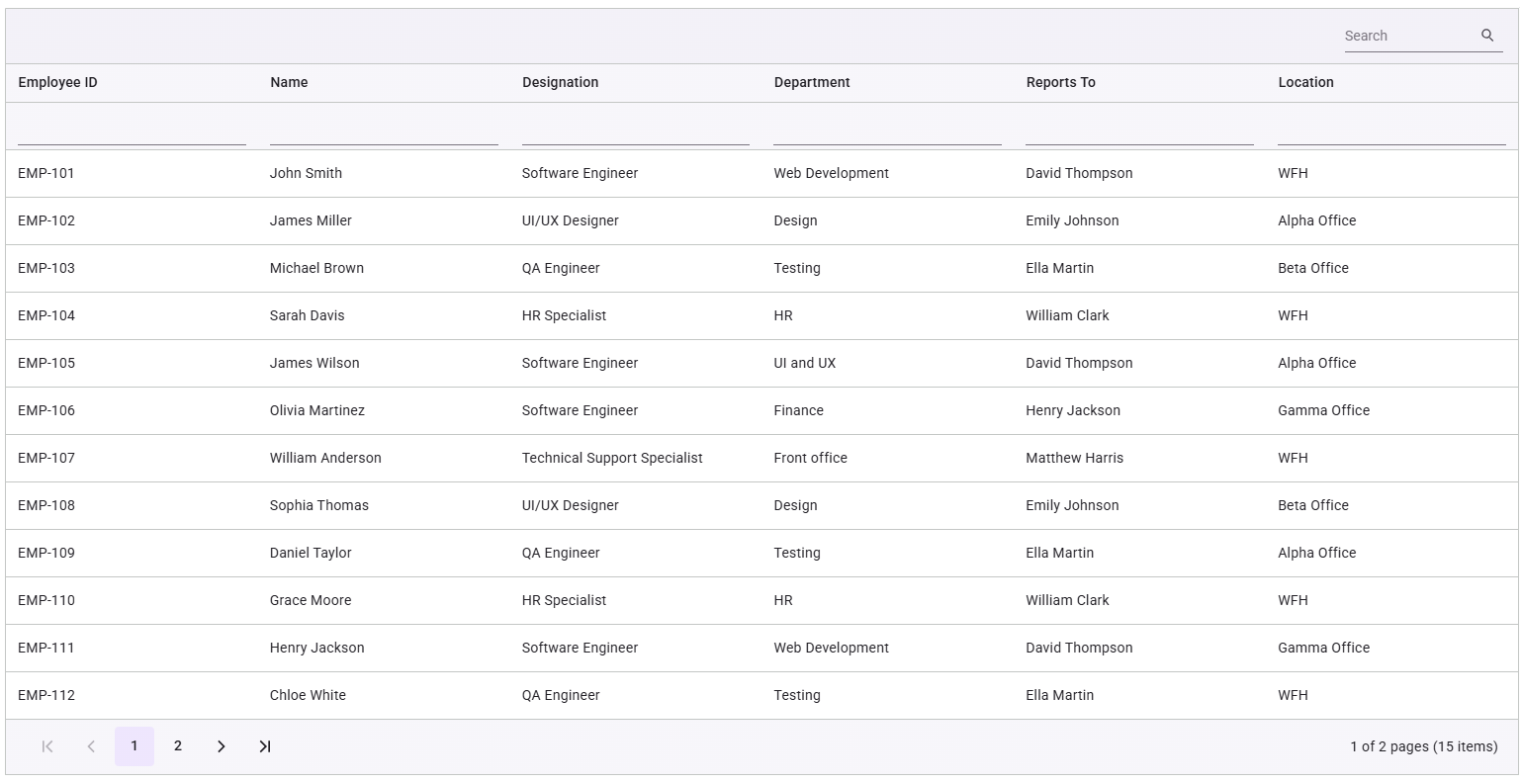
You can specify the columns to display in the Data Grid as shown below.
<Grid dataSource={employeeInformation}>
    <Columns>
        <Column field="EmployeeID" headerText="Employee ID" />
        <Column field="Name" headerText="Name" />
        <Column field="Designation" headerText="Designation" />
        <Column field="Department" headerText="Department" />
        <Column field="ReportingPerson" headerText="Reports To" />
        <Column field="Location" headerText="Location" />
    </Columns>
</Grid>
Step 6: Enable core features
We can add features like paging, sorting, searching, and filtering to enhance the Grid’s functionality:
<Grid
    dataSource={employeeInformation}
    pageSettings={{ enabled: true }}
    filterSettings={{ enabled: true }}
    sortSettings={{ enabled: true }}
    searchSettings={{ enabled: true }}
    toolbar={['Search']}/>
Step 7: Run the application
To see the Data Grid in action, launch your application by running the command below:
npm run devThe image below illustrates the basic Grid layout.
Key features of the Pure React Data Grid
The Syncfusion Pure React Data Grid is packed with powerful features that make it a go-to solution for developers working with complex, data-driven interfaces. Let’s walk through what it offers:
- Data binding: Whether you’re working with local JSON files or remote sources like OData and RESTful services, the grid efficiently handles large datasets.
- Columns: You can define columns with field mapping, header text, formatting, and even custom templates, giving you full control over how data is displayed.
- Pagination: Built-in pagination lets users navigate through data smoothly, with configurable page sizes and intuitive controls.
- Text wrap: Long text? No problem. The grid supports text wrapping in cells for improved readability.
- Header and column templates: Want a more tailored UI? You can customize headers and columns to match your design needs.
- Clip mode: You can choose whether to truncate or wrap cell content, which is perfect for keeping your layout clean and user-friendly.
- Row template: Customize how each row is rendered to create a more personalized data visualization experience.
- Inline editing: Make real-time edits directly within the grid, and changes are reflected instantly.
- Sorting: We have provided Multi-column sorting with flexible sort directions, helping users organize data the way they need.
- Filtering: Quickly narrow down data using the built-in filter bar, which is ideal for fast, intuitive filtering.
- Aggregates: Display summary data like totals and averages directly in the grid, making it easy to analyze key metrics.
- Accessibility: The grid is fully compliant with WAI-ARIA standards and supports keyboard navigation and high-contrast visuals to ensure accessibility for all users.
Roadmap for future releases
Syncfusion is committed to enhancing its Pure React Components with new features and improvements to meet the evolving needs of developers. The roadmap below highlights upcoming enhancements for the React Data Grid:
- Enhanced editing options:
- Batch editing: You will be able to edit multiple rows at once and save them in a single operation, which will be perfect for bulk updates and improved performance.
- Dialog editing: A modal dialog-based editing experience will be introduced to provide a more structured and user-friendly interface.
- Command column editing: A dedicated column with customizable action buttons like Edit, Delete, and Save will be added to streamline data manipulation.
- Virtual scrolling: The grid will render large datasets efficiently by loading only the visible rows, which will boost performance and reduce memory usage.
- Grouping: You will be able to organize data by one or more columns to create a hierarchical view, making analysis easier and more intuitive.
- Advanced filtering options: Filtering capabilities will be expanded with menu-based filters, Excel-style filters, and checkbox filters to offer more flexible and intuitive data filtering experiences.
- Exporting enhancements: Basic and advanced export options will be introduced, including customizable export templates and support for additional file formats to enhance data export flexibility.
- Printing improvements: Printing capabilities will be added with customizable print layouts and options for including headers, footers, and aggregated data.
Choosing the right Grid: Essential Studio React vs. Pure React – what fits your workflow?
- Pure React Grid is best for modern, fully React-based workflows. It delivers fast performance and all essential features.
- Essential Studio React Grid (Wrapper) is still a solid option, but Pure React offers a more seamless experience.

Conclusion
Syncfusion’s Pure React Data Grid offers developers a robust, performant, and native solution for building modern web applications. With seamless integration, modular design, and enterprise-grade features, these components empower developers to create data-intensive interfaces easily.
The planned roadmap ensures continued innovation, with features like batch editing, virtual scrolling, and advanced filtering on the horizon. Try them out today and elevate your React development experience!
Start building smarter UIs today with Essential Studio Pure React components. Explore the documentation, experiment with interactive demos, and take your frontend development to the next level. New users can enjoy a 30-day free trial to explore all features and capabilities.
If you’re an existing Syncfusion user, you can download the latest version of Essential Studio from the license and downloads page.
If you need further assistance, contact us via our support forums, support portal, or feedback portal. We’re always here to help you!



 No spam, just valuable updates.