
 Dhanaraj Rajendran
TL;DR: A modern markdown viewer control for .NET MAUI helps developers render and preview markdown content. It supports Mermaid diagrams, themes, and mobile responsiveness and is ideal for building note-taking, documentation, and content-driven apps.
Introducing the SfMarkdownViewer control: Effortless Markdown rendering for .NET MAUI
Ever find yourself copy-pasting Markdown into random tools just to see how it looks? You’re not alone, and you don’t have to anymore. Whether you’re building a documentation platform, a note-taking app, or anything in between, rendering Markdown cleanly and natively across devices shouldn’t be a hassle.
That’s where Syncfusion’s Markdown Viewer for .NET MAUI comes in. It’s a plug-and-play control that makes Markdown look great no hacks, no workarounds. From code blocks and Mermaid diagrams to styled text and hyperlinks, this control gives you everything you need to deliver a polished, cross-platform experience.
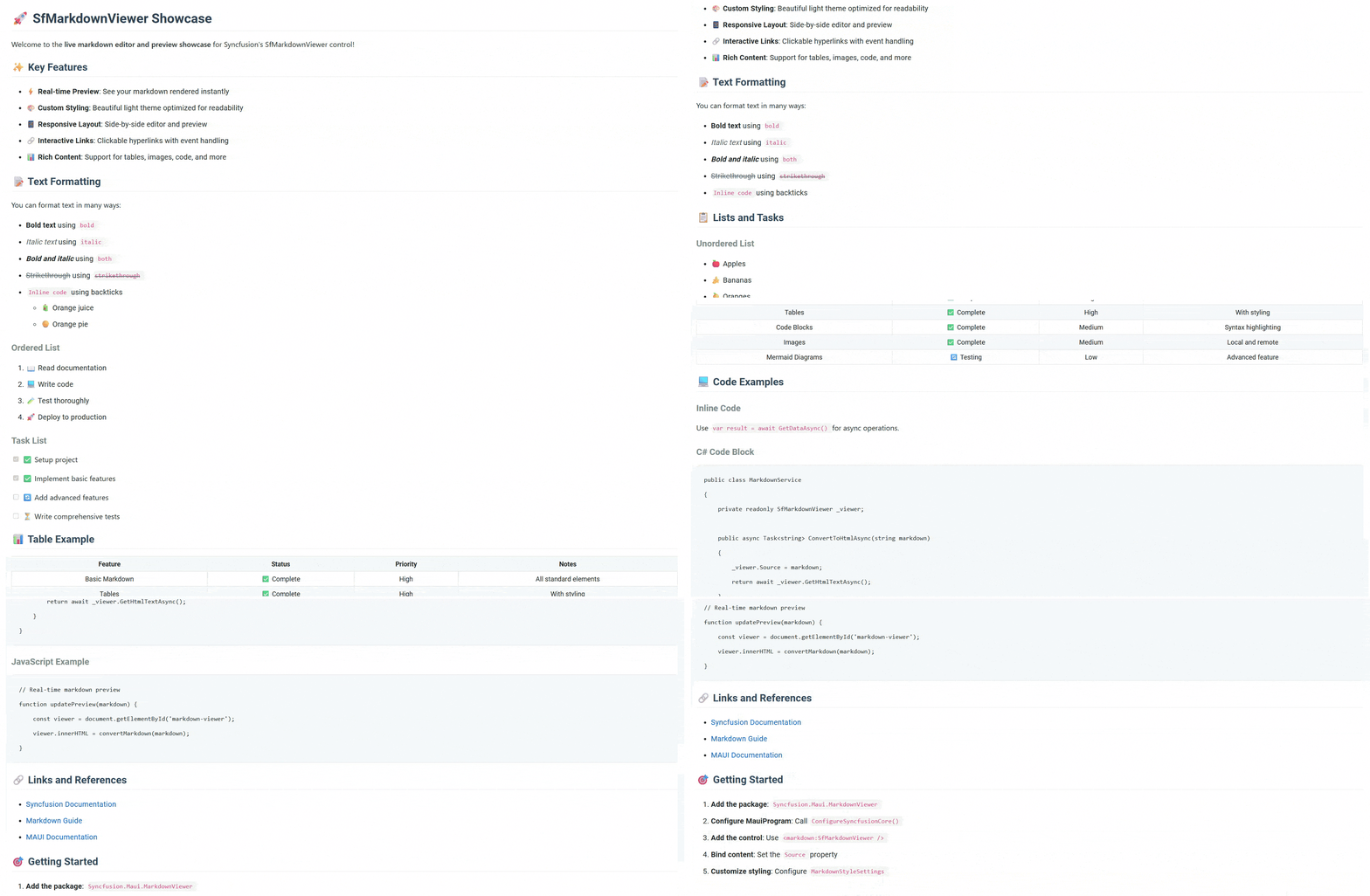
Key features
1. Multiple content sources: Load from anywhere
The control’s flexible Source property accepts content from multiple origins, making it perfect for various application architectures:
- Dynamic content: You can directly bind to strings for real-time content updates.
- Local resources: You can display bundled .md files shipped with your application.
- Remote content: You can fetch and display content from APIs, GitHub repositories, or content management systems.
Use case example: A documentation app that loads help articles from a remote server, caches them locally, and displays them with consistent formatting across all devices.
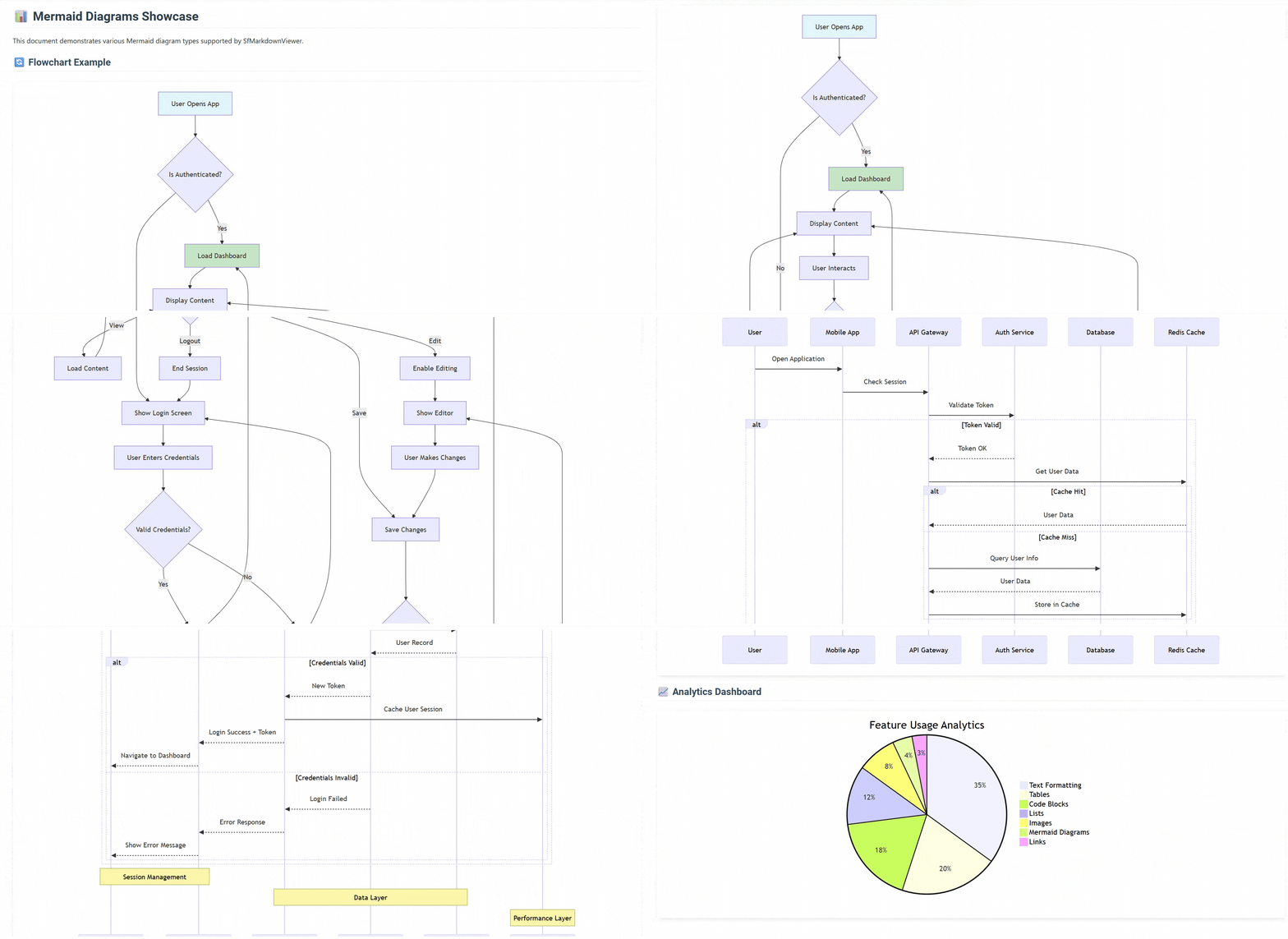
2. Mermaid diagram support – beyond basic Markdown
The control has built-in Mermaid diagram support to create complex visual content without additional dependencies.
- Flowcharts for process documentation.
- Sequence diagrams for API interactions.
- Class diagrams for software architecture.
- Gantt charts for project timelines.
- State diagrams for workflow visualization.
Use case example: A project management app that displays sprint timelines using Gantt charts and system architecture using flowcharts, all rendered directly from Markdown content.
3. Intelligent style customization
With the comprehensive MarkdownStyleSettings class, you can transform the visual appearance to match your brand. The control enables instant brand alignment through simple property settings for colors and typography. For advanced needs, the CssStyleRules property accepts standard CSS for complete presentation control.
Use case example: An e-learning platform dynamically switches between light and dark themes while maintaining consistent typography and brand colors across all content.
4. Smart hyperlink management
The control has a HyperlinkClicked event that provides granular control over navigation behavior. You can implement custom logic to handle different link types, enabling seamless internal navigation while managing external resources appropriately.
Use case example: A knowledge base app handles internal cross-references differently from external links, providing seamless in-app navigation while opening external resources in the system browser.
5. Flexible content extraction
Extract content in multiple formats for different application needs:
- GetMarkdownText(): Preserve original formatting for editing.
- GetHtmlText(): Export to web or email systems.
- GetText(): Create search indexes or summaries.
Use case example: A content management system that allows users to edit in Markdown, preview with SfMarkdownViewer, export to HTML for web publishing, and extract plain text for search indexing.
Real-world implementation scenarios
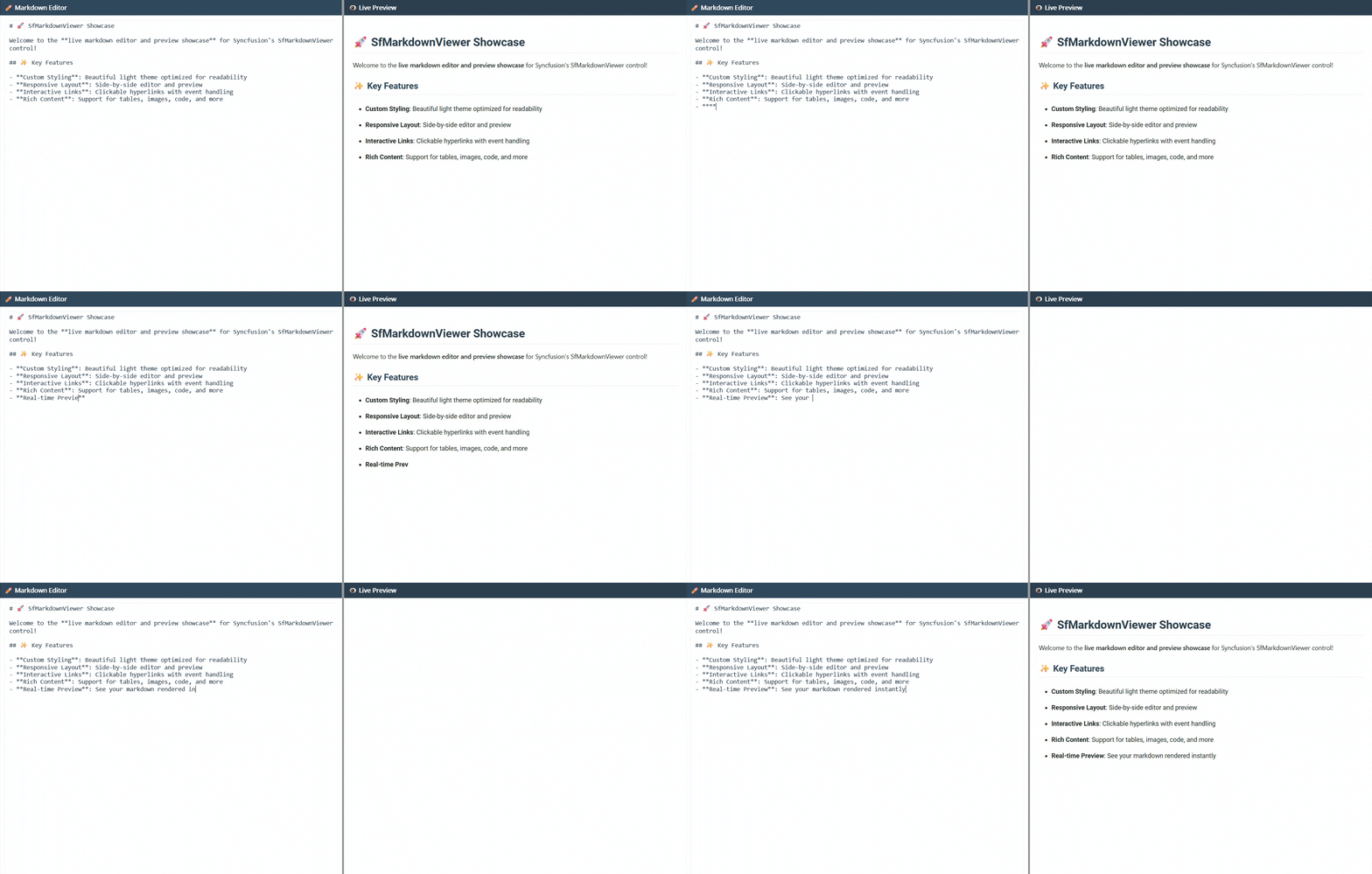
Live Markdown Editor
- Challenge: Provide a real-time preview while users edit Markdown content.
- Implementation: Side-by-side editor and preview panels that update instantly as users type.
- Result: Content creators see immediate visual feedback, reducing errors and improving productivity.
Effortless setup process
Step 1: Install the package
First, install Syncfusion.Maui.MarkdownViewer via NuGet Package Manager.
Step 2: Register the handler
In the MauiProgram.cs file, register the handler for Syncfusion controls.
using Syncfusion.Maui.Core.Hosting;

namespace ChartGettingStarted
{
    public static class MauiProgram
    {
        public static MauiApp CreateMauiApp()
        {
            var builder = MauiApp.CreateBuilder();

            builder
                .UseMauiApp<App>()
                .ConfigureSyncfusionCore();

            return builder.Build();
        }
    }
}
Step 3: Basic implementation
To initialize the control, import the Syncfusion.Maui.MarkdownViewer namespace and initialize the SfMarkdownViewer.
<ContentPage xmlns:sf="clr-namespace:Syncfusion.Maui.MarkdownViewer;assembly=Syncfusion.Maui.MarkdownViewer">
    <sf:SfMarkdownViewer Source="{Binding DocumentContent}" />
</ContentPage>
Step 4: Customize as needed
Apply themes, handle events, and configure styling to match your application’s requirements. That’s it! Your application now supports rich Markdown content with professional rendering.
Note: For more details, check out the official documentation for Markdown Viewer in .NET MAUI.
Future improvements and plans
We’re committed to continuously improving the SfMarkdownViewer control. Here’s what’s planned:
Upcoming features:
- Scroll detection: Enhanced scroll synchronization when using the control with editors to match scrolling behavior.
- Mathematical expressions: Built-in support for rendering mathematical formulas and equations.
- Inline HTML: Direct HTML content support within Markdown documents.
- Inbuilt theme support: Pre-configured themes for quick styling implementation.
- Local images support: Enhanced support for using local images within Markdown content.

Conclusion
Thanks for reading! This blog explored the key capabilities of the new Syncfusion Markdown Viewer control in .NET MAUI, introduced in the 2025 Volume 3 release. Whether you’re building documentation tools, content-driven apps, or note-taking platforms, this control offers a clean, customizable, and interactive way to render Markdown content across devices.
Ready to enhance your content presentation? Download the latest Essential Studio® for .NET MAUI and start building with Markdown Viewer today.
To learn more about all the exciting features in this release, check out our Release Notes and What’s New pages. Try them out and let us know your thoughts in the comments!
For existing Syncfusion® customers, the latest version of Essential Studio® is available from the license and downloads page. If you are not a customer, try our 30-day free trial to check out these new features.
Need assistance? Contact us anytime via our support forums, support portal, or feedback portal. We are always eager to help you!








 No spam, just valuable updates.