
 Gowrimathi S
TL;DR: Need just one async value? A Promise works. Need streams, cancellation, or RxJS power? That’s where Observables shine. Angular leans on Observables for a reason; your choice can change how your app behaves more than you might expect.
Why is this decision more complicated than it looks
Promises and Observables both solve async problems in Angular, but they model completely different worlds.
- A Promise begins executing immediately when created and resolves once with a single value.
- An Observable can emit multiple values over time, start only when subscribed, and support cancellation.
In Angular, Observables are the default pattern because the entire HTTP layer, routing, and reactive forms are built on RxJS. Understanding the strengths of each tool leads to cleaner, safer, more maintainable Angular apps.

What exactly is a Promise?
A Promise is a native JavaScript construct that represents a single async operation. It resolves once with a value or rejects once with an error, and it starts executing the moment it is created. It works naturally with async/await, making sequential async code easy to read.
In Angular, Promises are most useful for one-off tasks, such as:
- Loading app configuration at startup,
- Interoperating with a browser,
- Third-party APIs that already return Promises.
What is Observable?
An Observable, provided by the RxJS library, is a lazy stream that can emit zero, one, or many values over time. It does not execute until something subscribes to it, and it can be canceled at any point via unsubscribe, takeUntil, or the async pipe.
RxJS provides a rich set of operators, maps, filters, switchMap, debounceTime, and retry that let you transform, combine, and control async streams precisely.
Angular’s HttpClient, Router events, and reactive forms (valueChanges) all return Observables, making them the dominant async pattern in Angular apps.
Angular Promises vs Observables: Key differences
| Category | Promises | Observables |
| Values emitted | Resolves once with a single value (or rejects with an error). | Can emit zero, one, or multiple values over time. |
| Execution | Eager and start immediately upon creation. | Lazy and start executing only when subscribed. |
| Cancellation | No built-in cancellation (can use AbortController in some APIs.) | Supports cancellation via unsubscribe(), takeUntil(), or Angular async pipe. |
| Composition | Uses .then(), .catch(), Promise.all() methos. | Rich set of RxJS operators like map, switchMap, mergeMap, retry, combineLatest, etc. |
| Angular HTTP | Requires conversion using firstValueFrom() or lastValueFrom(). | Default return type of Angular HttpClient. |
| Error handling | Single error channel via the .catch() method. | Powerful error handling using catchError, retry, retryWhen, etc. |
| Memory management | Automatically completes after resolution. | Long-lived streams require explicit unsubscribe to prevent memory leaks. |
| Learning curve | Low, built into JavaScript. | Higher, requires understanding of RxJS concepts. |
| Use case fit | Best for single asynchronous operations. | Best for streams, events, real-time updates, and complex async workflows. |
Let’s compare code snippets of similar operations using promises and observables.
| Operations | Observables | Promises |
|---|---|---|
| Creation | const obs = new Observable((observer) => {
observer.next(10);
}) ;
| const promise = new Promise(() => {
resolve(10);
});
|
| Transform | Obs.pipe(map(value) => value * 2); | promise.then((value) => value * 2); |
| Subscribe | const sub = obs.subscribe((value) => {
console.log(value)
});
| promise.then((value) => {
console.log(value)
});
|
| Unsubscribe | sub.unsubscribe(); | Can’t unsubscribe |
With this information, we have some idea about what observables and promises are, how they’re initialized, etc. Now, let’s see the practical usage of them with the help of the Syncfusion Charts component.
Real‑world example with Syncfusion Angular Charts
Here’s how to load data in Syncfusion Angular Charts using both promises and observables.
Populating the chart with data using promises
First, I am going to populate the chart with some data from services. For that, initialize the chart with a series and create a service for the data.
<e-series-collection>
      <e-series> </e-series>
</e-series-collection>

export class AppComponent  {

  public chartData: Data[];
  constructor(private dataService: DataService) {

  }

}
Now get the data from dataService with the help of a promise, and assign it to the chart dataSource.
<e-series-collection>
     <e-series [dataSource]='chartData' type='Spline' xName='year' yName='sales'> </e-series>
</e-series-collection>

export class AppComponent  {

  public chartData: Data[];
  constructor(private dataService: DataService) {

  }
  new Promise((resolve, reject) =>
                   {
                    resolve(this.dataService.getData())
                   }
              ).then((value : Data[]) =>
                    this.chartData = value
              ).catch((err) =>
                     this.chartData = null
              );
}
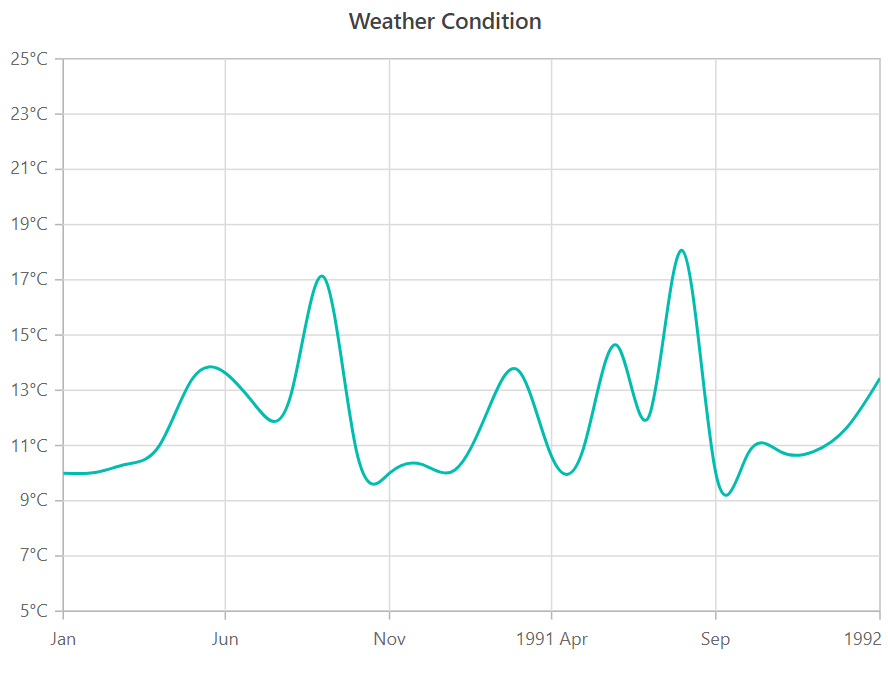
Data emitted by the promise is visualized in a Syncfusion chart as shown in the following screenshot.
Dynamically updating chart data using observables
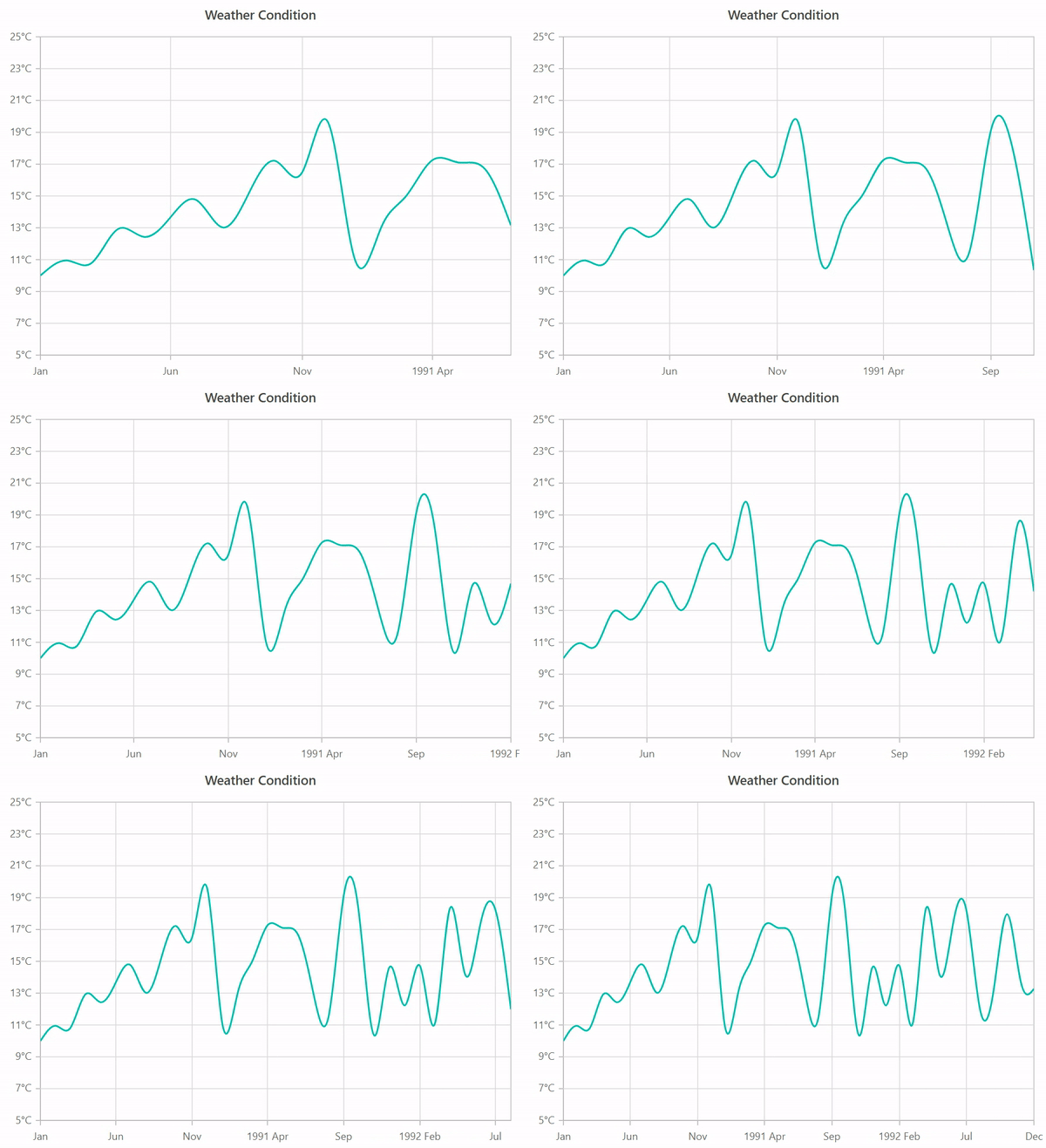
With this, a chart was rendered with some initial data. Let’s assume the service updates its data every 1000ms. Then we must retrieve data from the service every 1000ms and assign it to the chart using observables.
 this.Obs = new Observable((observer) => {
              observer.next(this.dataService.getData(true));
              setInterval(() => {
                observer.next(this.dataService.getData(false));
               }, 1000)
 });
Now you can see the chart updating with live data from the service.
References
For more details, refer to the difference between Angular Promises Vs. Observables on Stackblitz.
Practical considerations developers often miss
Observables are not inherently multi-value; Angular HTTP Observables emit only once and complete. They are still Observables because they support cancellation and operator composition.
- Cancellation matters in Angular components. When a component is destroyed mid-request, Observables can be stopped cleanly using
takeUntil(this.destroy$)or the async pipe. Promises cannot be canceled; they run to completion even if the result is never used. - Subscription discipline prevents memory leaks. Angular HTTP Observables auto-complete after one emission, so short-lived subscriptions are safe. Event-based or timer-based Observables do not complete automatically and must be explicitly unsubscribed to avoid memory leaks.
- Pick a convention and stick to it. Most Angular teams choose Observables in services and HTTP calls by default, converting to Promises only at integration boundaries where
async/awaitgenuinely simplifies a one-off flow.
Decision guide: When to use what
| Use case | Recommended | Reason |
| One-time async result (e.g., app config load) | Promise | Single value, clean async/await, no subscription needed. |
| HTTP calls in Angular services | Observable | HttpClient returns Observables by default; supports retry, cancel, and composition. |
| Live updates (polling, WebSockets, UI events) | Observable | Designed to handle multiple values emitted over time. |
| Cancel request when component is destroyed | Observable | takeUntil(), unsubscribe(), or Angular async pipe enables automatic cleanup. |
| Simple sequential flow, one result | Promise | Minimal abstraction overhead; highly readable with async/await. |
| Reactive forms or router events | Observable | Angular APIs expose Observables natively for event streams. |
| Third-party API that already returns a Promise | Promise | Avoids unnecessary conversion or wrapping into an Observable. |
Wrapping up
Thank you for reading! Promises are best for single, immediately executing operations where async/await simplicity is the priority. Observables suit reactive streams, cancellable requests, and composable pipelines. In Angular, Observables are the default because Angular’s own APIs are built on RxJS. Use Promises when they genuinely simplify things, not just to avoid learning RxJS.
Do you want to see how these async patterns behave inside real UI components?
Try Syncfusion Angular UI Components.
Whether you’re handling live data updates, dynamic chart rendering, or fast, interactive dashboards, Syncfusion integrates seamlessly with both Promises and Observables, so your async workflows stay clean, scalable, and easy to maintain.
Explore the online Angular demos or start a free trial to try these components with your own data streams, HTTP calls, or real‑time dashboards.
If you have any questions, please let us know in the comments below. You can also contact us through our support forum, support portal, or feedback portal. We are happy to assist you!
 No spam, just valuable updates.
Comments (9)
Thanks for the detailed information
great article!..thanks.
Lovely explanation
Thanks for this article!
thanks for this article, its great
Simple !! Understandable !! Great clarty !! Thanks a lot !!
The code examples in this article need correction. For example see ‘Create Promise’ code example. It shows
=>
instead of
=>
which could be confusing to anyone who doesn’t realize this is an HTML conversion problem.
I just read your blog on Angular Promises Versus Observables—thanks for sharing! It was a great comparison of how promises and observables handle asynchronous functionality differently in Angular.
While exploring more, I found this resource on Angular Signals Guide: Architectural Patterns and Best Practices https://mobisoftinfotech.com/resources/blog/angular-signals-architecture-best-practices , which also touches on state management and reactivity in Angular. How do you think Signals will impact the way we handle asynchronous operations, especially compared to promises and observables?
Looking forward to your thoughts—great read!
Hi Alexis,
Thank you for reaching out to Syncfusion! We appreciate your thoughtful question!
While Signals are synchronous by nature, they complement asynchronous flows when paired with Observables using conversion utilities (e.g., toSignal). Promises remain ideal for one-time async actions (like HTTP requests), whereas Observables excel with continuous streams (like WebSockets).
Signals introduce a new reactive layer that handles sync UI updates seamlessly, and when integrated with Observables, they enable a unified approach to managing both sync and async data—reducing the need for manual subscriptions and improving overall readability and maintainability.
Regards,
Meena