
 Rangarajan Ashokan
TL;DR: Adding and removing digital signatures in PDF can be tricky; adding is simple, but removing involves cryptographic data. This guide shows how to do both in .NET MAUI using Syncfusion PDF Library for secure, compliant document management.
Have you ever needed to sign a PDF and later realized you must remove or completely unsign that signature? This is a common scenario when working with secure or certified documents. While adding a signature is usually straightforward, removing one is more complex because it involves deleting the signature field and its cryptographic data, not just clearing a visual mark.
In this guide, we’ll show you how to add or remove digital signatures in PDF files using Syncfusion® .NET PDF Library. This powerful tool enables developers to add (sign) and remove (unsign) PDF signatures in .NET applications with complete programmatic control. You’ll learn how to manage PDF signature fields, maintain document integrity, and ensure compliance using clean, developer-friendly APIs in a MAUI cross-platform app.

Now that you know what’s possible, let’s walk through how to set up your .NET MAUI project so you can start working with digital signatures.
Initialize your .NET MAUI App for PDF signature handling
Before you can add or remove digital signatures in PDF files, set up your development environment:
Create a .NET MAUI project
- Open Visual Studio 2022.
- Click create a new project and select .NET MAUI App.
- Make sure the latest .NET MAUI workload is installed to avoid compatibility issues.
Install Syncfusion .NET PDF Library
- In Solution Explorer, right-click your project and select Manage NuGet Packages.
- Search for the Syncfusion.
Pdf. Net. Core NuGet package. - Click install to add the library to your project.
With your MAUI project ready and the Syncfusion PDF Library installed, let’s look at how to add a digital signature.
How to add a digital signature to your PDF
Adding a digital signature to a PDF ensures authenticity, integrity, and compliance. With Syncfusion PDF Library, you can easily implement this feature in your .NET MAUI applications.
Sign an existing PDF document
If you already have a PDF that needs to be signed, there’s no need to recreate it. Instead, you can load the existing file and apply a digital signature without altering its original content. Here’s how:
Step 1: Load the PDF document
To begin, load the PDF using the Syncfusion PDF library. This allows you to:
- Access pages and form fields programmatically for complete control.
- Apply a digital signature without changing the original content.
Here’s how that looks in code:
Assembly assembly = typeof(MainPage).GetTypeInfo().Assembly;
string basePath = "Load_and_Save_PDF_MAUI.Resources.Data.";
Stream inputStream = assembly.GetManifestResourceStream(basePath + "DrawSignInput.pdf");
Stream pfxStream = assembly.GetManifestResourceStream(basePath + "PDF.pfx");
Stream signStream = assembly.GetManifestResourceStream(basePath + "signature.png");

//Load the PDF document
PdfLoadedDocument loadedDocument = new PdfLoadedDocument(inputStream);

//Gets the first page of the document
PdfLoadedPage page = loadedDocument.Pages[0] as PdfLoadedPage;

//Gets the first signature field of the PDF document
PdfLoadedSignatureField field = loadedDocument.Form.Fields[0] as PdfLoadedSignatureField;
Step 2: Attach a digital certificate
Once the PDF is loaded, attach a digital certificate to validate authenticity and prevent tampering. Syncfusion PDF library makes this process simple and secure for developers working in .NET MAUI.
Refer to the following example code.
//Creates a certificate
PdfCertificate certificate = new PdfCertificate(pfxStream, "password123");
field.Signature = new PdfSignature(loadedDocument, page, certificate, "Signature", field);
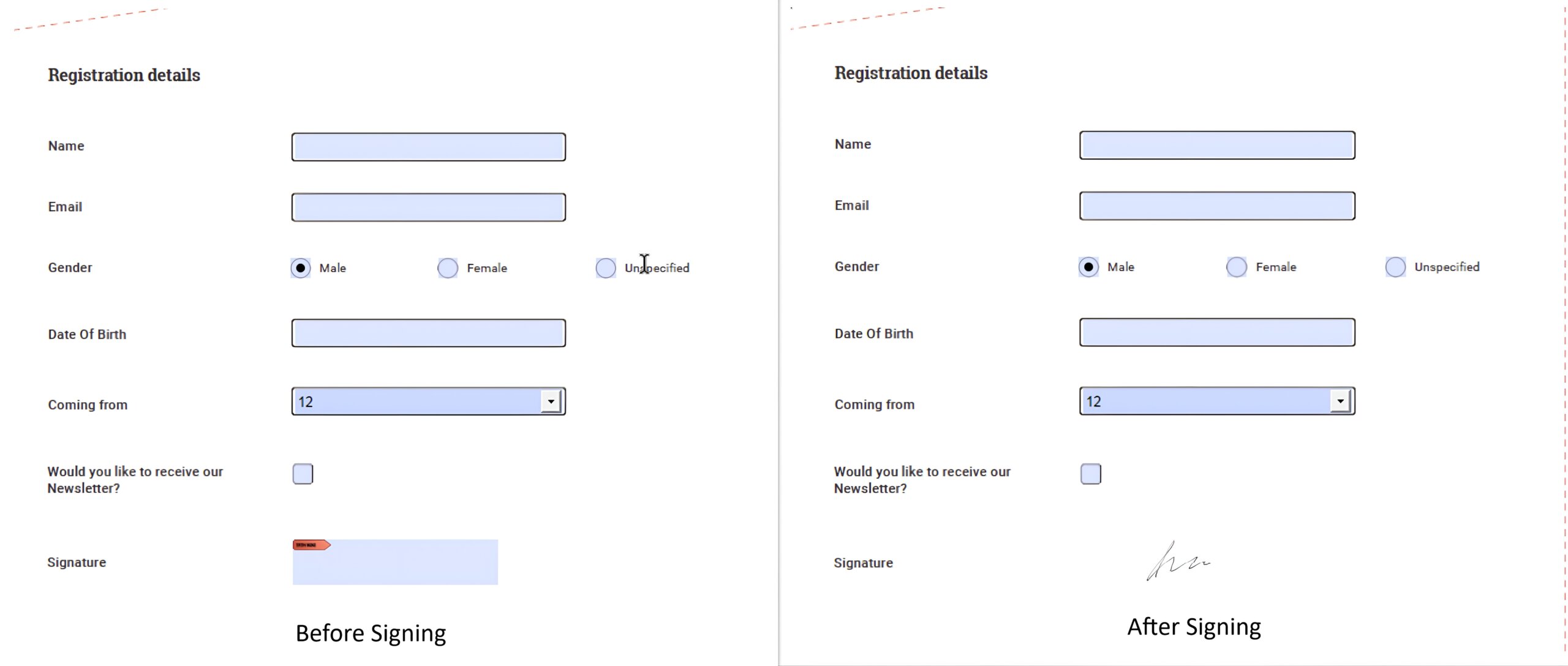
The following image shows the result.
Note: Check out our GitHub repository for a complete working sample you can explore and try out.
Step 3: Create a signature field
If your PDF doesn’t have a signature field, you can create one easily. Syncfusion PDF Library allows you to add a signature field instantly, choose its position, customize its size, and apply a signature image or digital certificate for a legally binding result.
Here’s how you can do it in code:
//Create PDF Signature field.
PdfSignatureField signatureField = new PdfSignatureField(page, "Signature");

//Set properties to the signature field.
signatureField.Bounds = new Syncfusion.Drawing.RectangleF(0, 400, 90, 20);
signatureField.ToolTip = "Signature";

//Add the form field to the document.
document.Form.Fields.Add(signatureField);
Note: Check out our GitHub repository for a complete working sample you can explore and try out.
That covers adding signatures to an existing PDF. But what if you need to generate a PDF from scratch and sign it immediately? Syncfusion supports that too.
Generate and sign a new PDF document
With Syncfusion PDF Library, you can do both effortlessly.
- Create a new PDF: Generate a fresh document and add text, images, or any required content.
- Apply a digital signature: Once your PDF is ready, apply a digital signature using a certificate to ensure authenticity and integrity.
Syncfusion’s API simplifies embedding signatures and supports multiple certificate types, including:
- PFX files
- Hardware Security Module (HSM)
- Online Certificate Status Protocol (OCSP)
- Certificate Revocation List (CRL)
- Windows Certificate Store
- Elliptic Curve Digital Signature Algorithm (ECDSA)
Let’s see this in action:
//Creates a new PDF document
PdfDocument document = new PdfDocument();

//Adds a new page.
PdfPageBase page = document.Pages.Add();

//Create PDF graphics for the page.
PdfGraphics graphics = page.Graphics;

Assembly assembly = typeof(MainPage).GetTypeInfo().Assembly;
string basePath = "Load_and_Save_PDF_MAUI.Resources.Data.";

Stream pfxStream = assembly.GetManifestResourceStream(basePath + "PDF.pfx");
Stream signStream = assembly.GetManifestResourceStream(basePath + "signature.png");

//Creates a certificate instance from a PFX file with a private key.
PdfCertificate pdfCert = new PdfCertificate(pfxStream, "password123");

//Creates a digital signature.
PdfSignature signature = new PdfSignature(document, page, pdfCert, "Signature");

//Sets an image for the signature field.
PdfBitmap signatureImage = new PdfBitmap(signStream);

//Sets signature information.
signature.Bounds = new RectangleF(new PointF(0, 0), signatureImage.PhysicalDimension);
signature.SignedName = "Syncfusion";
signature.ContactInfo = "[email protected]";
signature.LocationInfo = "Honolulu, Hawaii";
signature.Reason = "I am author of this document.";

//Draws the signature image.
signature.Appearance.Normal.Graphics.DrawImage(signatureImage, 0, 0);Remove a digital signature from a PDF
Removing a signature is just as important as adding one, and Syncfusion makes it easy by deleting its visual mark and cryptographic data, leaving the document fully unsigned.
With Syncfusion PDF Library, you can:
- Load a signed PDF
- Locate the signature field and remove it cleanly without breaking document integrity.
Step 1: Load the signed PDF
Use PdfLoadedDocument to open and manipulate existing PDFs. This class provides access to form fields and annotations, which are essential for removing signatures.
Here’s how you can do it in code:
Assembly assembly = typeof(MainPage).GetTypeInfo().Assembly;
string basePath = "Load_and_Save_PDF_MAUI.Resources.Data.";
Stream inputStream = assembly.GetManifestResourceStream(basePath + "DrawSignInput.pdf");
PdfLoadedDocument lDoc = new PdfLoadedDocument(inputStream);
Note: PdfDocument is used for creating new PDFs, not editing existing ones.
Step 2: Locate and remove the signature field
Digital signatures are stored as specialized form fields named PdfLoadedSignatureField To completely remove a signature:
- Locate the signature field in the form field collection.
- Delete the entire field, not just its visual appearance. This step removes all cryptographic signature data, leaving the document unsigned.
Refer to the code example below.
PdfLoadedSignatureField signatureField = pdfLoadedDocument.Form.Fields[0] as PdfLoadedSignatureField;
loadedDocument.Form.Fields.Remove(signatureField);

//Saves the PDF to the memory stream.
using MemoryStream ms = new();
loadedDocument.Save(ms);

//Close the PDF document
loadedDocument.Close(true);
ms.Position = 0;

//Saves the memory stream as a file.
SaveService saveService = new();
saveService.SaveAndView("Result.pdf", "application/pdf", ms);
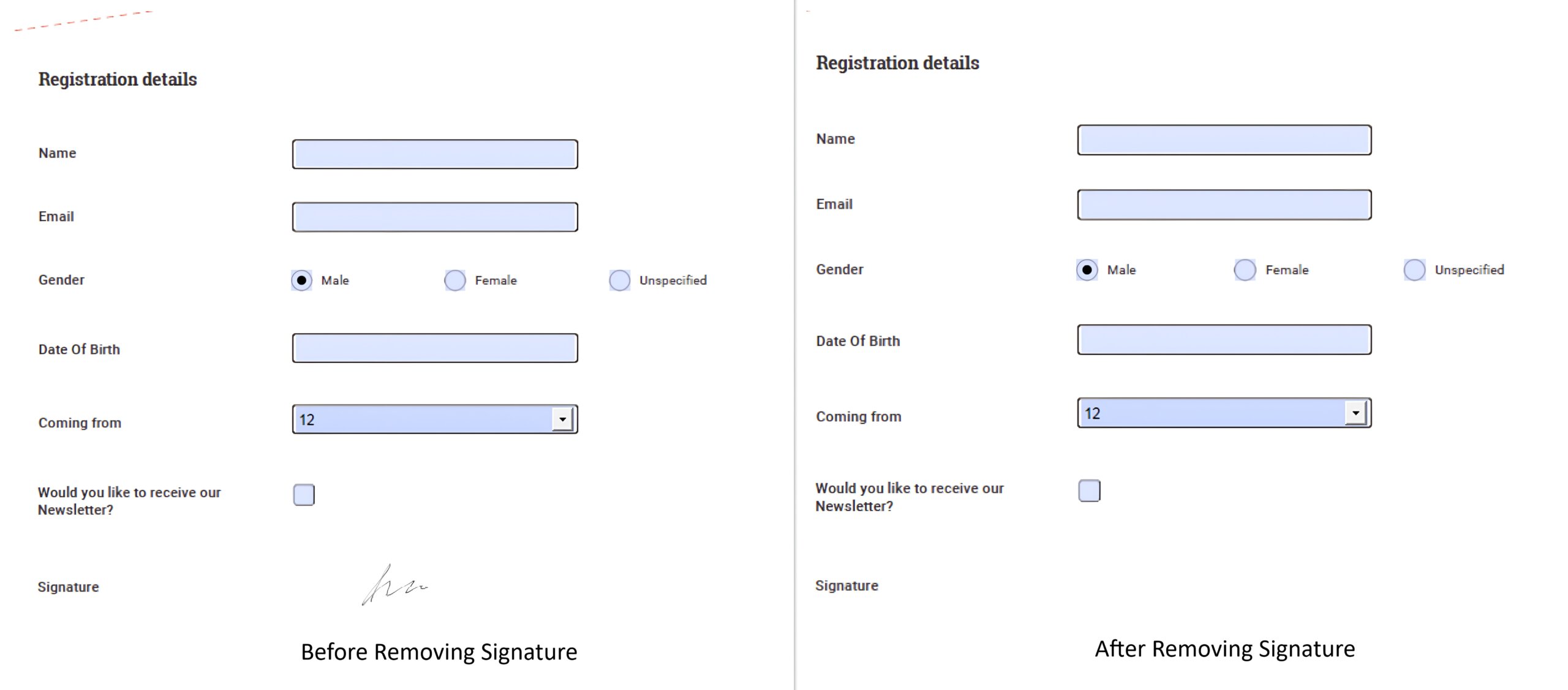
Here’s what the output looks like:
Note: Want to explore more? Check out our user guide for a complete .NET MAUI sample and step-by-step instructions. You can also view the GitHub repository to learn how to load and save PDF documents.
Why choose Syncfusion for PDF signatures?
Syncfusion’s PDF signature solution combines enterprise-grade security with developer-friendly APIs, delivering a fast, compliant, and flexible way to digitally sign documents across platforms.
Key Benefits
- Compliance-ready: Supports advanced standards like PAdES for global security and legal requirements.
- Flexible certificate options: Works with PFX, HSM, OCSP, CRL, and Windows Certificate Store.
- Cross-platform integration: Seamlessly integrates with .NET MAUI for mobile and desktop apps.
- Optimized performance: Handles large PDFs and multiple signatures efficiently.
- Simple API: Add, customize, or remove signature fields programmatically without breaking document structure.
- Built-in security: Maintains cryptographic integrity and provides APIs for validating and managing signatures.
GitHub reference
For more details, check out the GitHub repository on adding and removing digital signatures in PDFs.
Conclusion
Thanks for reading! Managing PDF signatures is critical for authenticity, integrity, and compliance. With Syncfusion .NET PDF Library for .NET MAUI, you can easily add, customize, and remove digital signatures without sacrificing performance or document structure. Whether you’re building cross-platform apps or securing enterprise workflows, Syncfusion delivers flexibility and reliability.
Ready to simplify PDF signature management? Download Syncfusion .NET PDF Library and start building secure, high-performance apps today!
Explore more in our .NET MAUI controls and demos on GitHub and share your feedback or questions in the comments. We’d love to hear from you!
If you’re a Syncfusion user, you can download the latest setup from the license and downloads page. Otherwise, you can download a free 30-day trial.
You can contact us through our support forum, support portal, or feedback portal for queries. We are always happy to assist you!




 No spam, just valuable updates.