
 Arulraj Aboorvasamy
TL;DR: Slow EF Core queries can significantly impact application performance if not optimized properly. This guide covers practical techniques such as query optimization, proper indexing, no-tracking reads, compiled queries, pagination, batching, and caching to help you build faster, scalable, and maintainable .NET applications with improved runtime efficiency and user experience.
Unoptimized EF Core queries can quietly become a bottleneck as applications scale, driving up response times, memory usage, and infrastructure costs. While EF Core simplifies data access, performance depends heavily on how queries are modeled, executed, and monitored.
This guide focuses on practical EF Core performance tuning techniques tested in real-world .NET applications. The goal is simple: reduce query latency, improve scalability, and build APIs that stay fast under load.
Tips for EF Core performance tuning
1. Measure first: Identify real bottlenecks
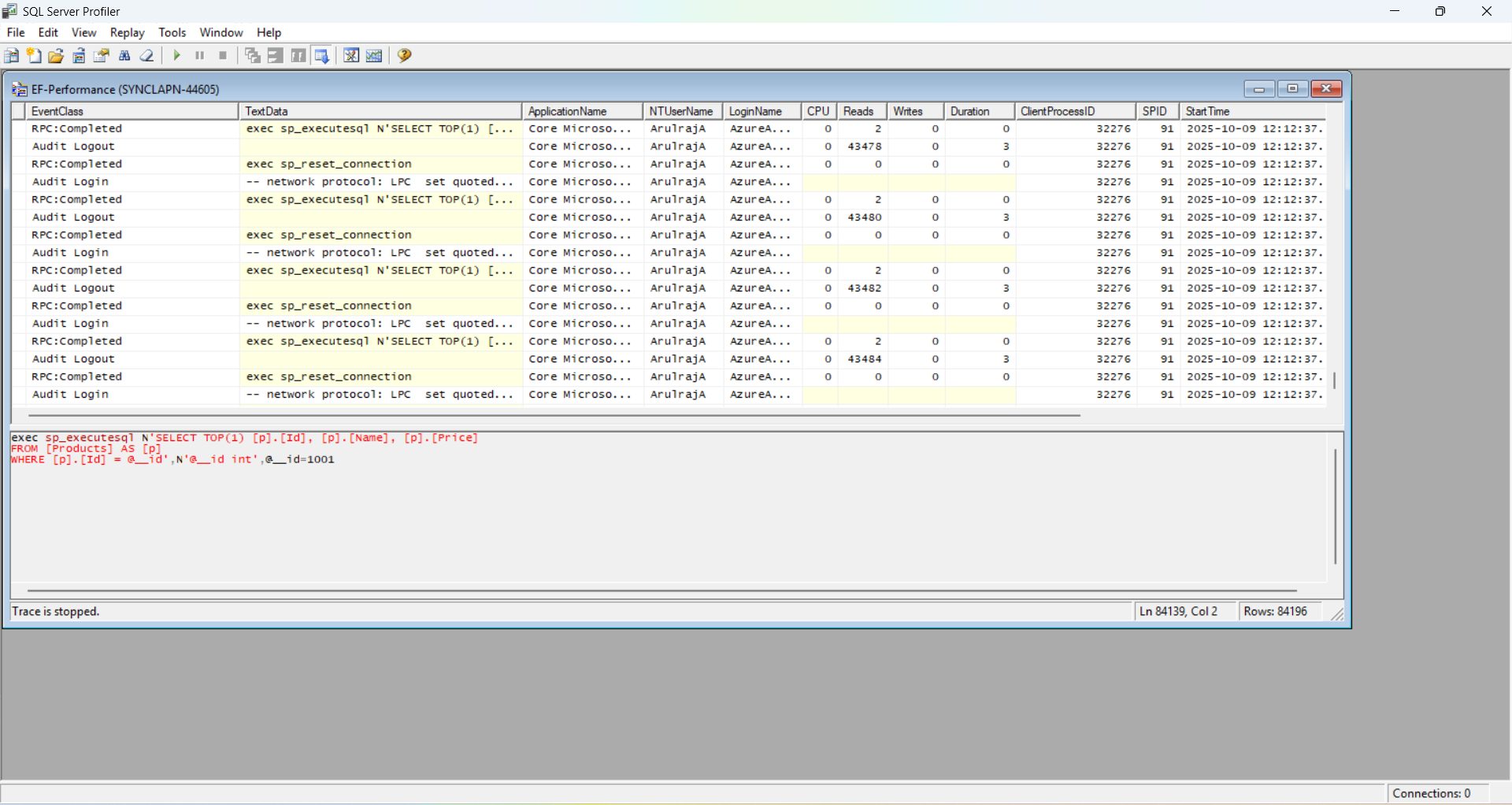
Before applying optimizations, measure where time is actually spent. Most EF Core performance issues come from inefficient SQL generation, excessive round-trips, or unnecessary data loading.
Focus on identifying:
- N+1 queries
- Large result sets
- Repeated query execution
- Missing or ineffective indexes
Tools: You can use profilers like Entity Framework Profiler or SQL Server Profiler/pgAdmin for deeper analysis. You can log the information via EF Core to check the operation details.
Enable EF logging
services.AddDbContext(options =>
    options.UseSqlServer(connectionString)
.LogTo(Console.WriteLine, LogLevel.Information));Tip: Benchmark alternatives; public results may not match your setup due to latency or data volume differences. Always test it in your environment.
Performance impact: Ensures efforts target real problems, avoiding wasted time.
2. Index the database strategically
Indexes are one of the highest-impact optimizations for EF Core queries. Without them, even well-written LINQ queries can degrade into full table scans as data grows. Indexes act like a lookup table for your database, enabling faster data retrieval for queries involving WHERE, JOIN, ORDER BY, and GROUP BY clauses. Without indexes, the database performs full table scans, which can be prohibitively slow for large datasets.
Good index candidates include:
- Columns used in
WHEREfilters - Foreign keys used in joins
- Columns used for sorting and pagination
- Frequently searched fields
Composite indexes work well for multi-column filters when column order matches selectivity. Keep in mind that indexes improve read performance at the cost of slower writes and additional storage.
EF Core indexing code example
Use EF Core’s Fluent API in your DbContext to define indexes during model configuration. Here’s an example for indexing the Url column in a Blog entity:
modelBuilder.Entity<Blog>()
    .HasIndex(b => b.Url)
.HasDatabaseName("IX_Blog_Url");Explanation: The HasIndex method creates an index on the Url column, which speeds up queries such as WHERE Url = 'example.com/blog‘. The optional HasDatabaseName assigns a clear name (e.g., IX_Blog_Url, following the convention: IX for index, table, then column).
Composite indexes
For queries filtering multiple columns, use composite indexes. For example, if you frequently query Posts by PublishedDate and CategoryId:
modelBuilder.Entity<Post>()
    .HasIndex(p => new { p.PublishedDate, p.CategoryId })
    .HasDatabaseName("IX_Post_PublishedDate_CategoryId");
Order matters: Place the most selective column (e.g., PublishedDate if it has more unique values) first for better efficiency.
- Benefits: Faster
WHERE,JOIN, andORDER BYoperations. - Warning: Indexes increase write time and storage; test before applying in production.
- Tool: Use EF Core’s migrations to apply indexes or analyze query plans with tools like SQL Server Profiler.
3. Fetch only what you need
Over-fetching data is a common cause of slow queries and high memory usage. EF Core makes it easy to load full entities, but most read paths don’t need every column.
Recommended approach:
- Use Select projections to fetch only required fields
- Map results to lightweight DTOs or C# records
This reduces network payload size, memory usage, and materialization cost, especially in high-concurrency scenarios.
Avoid Select * Equivalents: Instead of retrieving entire entities, use Select to project only required fields.
// Bad: Fetches all columns
var users = context.Users.ToList();

// Good: Fetches only needed fields
var users = context.Users
    .Select(u => new { u.Id, u.Name })
    .ToList();
Projection to a record DTO
Use a record for a reusable, immutable DTO instead of a class.
public record BlogDto(int Id, string Title, DateTime PublishedDate);

// Query using record DTO
var blogs = context.Blogs
    .Select(b => new BlogDto(
        Id: b.Id,
        Title: b.Title,
        PublishedDate: b.PublishedDate
    ))
    .ToList();
Explanation: The BlogDto record is immutable, ensuring data consistency in high-concurrency scenarios. The SQL query is SELECT Id, Title, PublishedDate FROM Blogs. Records also support value equality, reducing bugs in comparisons.
- Benefits: Reduces database load and memory usage.
- Warning: Overusing projections can lead to complex queries; balance readability and performance.
4. Fix N+1 Queries with the right loading strategy
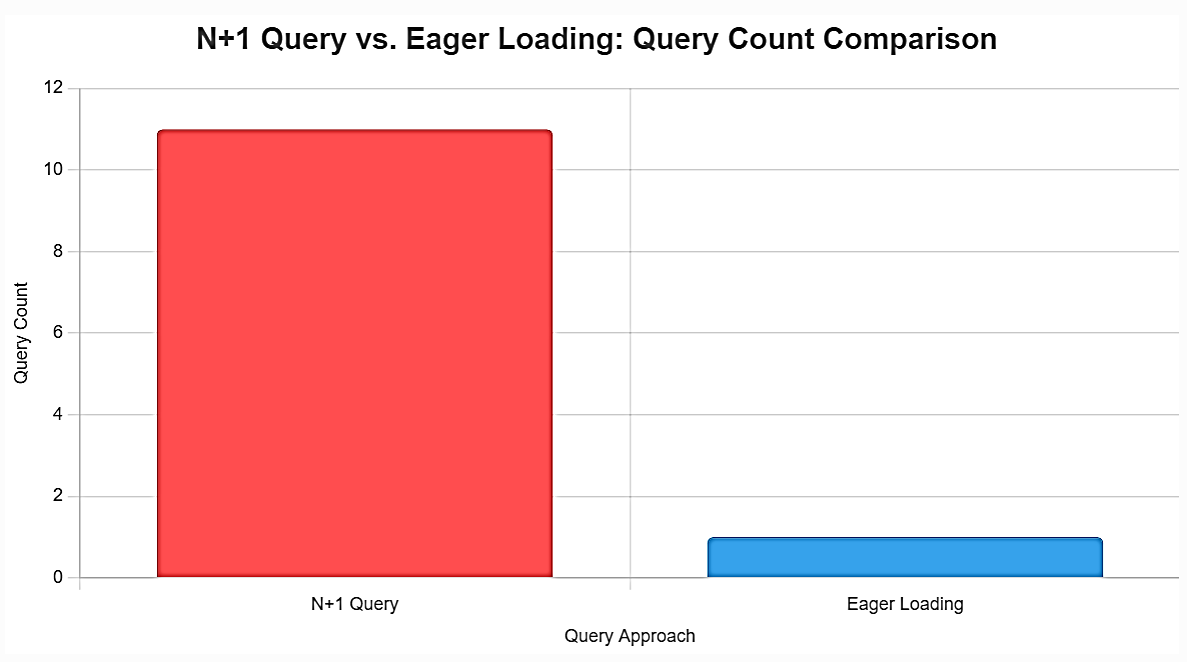
Improper loading strategies often lead to N+1 query problems or overly complex SQL.
Choose wisely between eager, lazy, and explicit loading to avoid N+1 issues or cartesian explosions. The N+1 problem occurs when EF Core executes one query for an entity and additional queries for each related entity.
Example:
// Bad: N+1 queries
var orders = context.Orders.ToList();
foreach (var order in orders)
{
    var items = order.OrderItems.ToList(); // Separate query per order
}

// Good: Single query
var blogs = await context.Blogs
    .Include(b => b.Posts)
    .ToListAsync();
Advanced tip: Use SplitQuery in EF Core 5+ to break large queries into smaller, parallel ones.
var blogs = await context.Blogs
    .AsSplitQuery()
    .Include(b => b.Posts)
    .ToListAsync();
Comparison of eager, lazy, and explicit loading:
| Strategy | Pros | Cons |
| Eager | Single query | Large result sets |
| Lazy | On-demand | N+1 risk |
| Explicit | Controlled | Extra code |
5. Filter and paginate early
Filtering and pagination should always be pushed to the database to avoid loading unnecessary data into memory.
Key practices:
- Apply
Where,OrderBy, andTakeas early as possible - Avoid offset-based pagination for large datasets
Apply filters client-side only if necessary; push to the database for efficiency. Limit results with Take and Skip.
var recentPosts = await context.Posts
    .Where(p => p.Title.StartsWith("A"))
    .OrderBy(p => p.CreatedDate)
    .Take(25)
    .ToListAsync();
Efficient pagination options
- Keyset pagination uses indexed columns to retrieve the next page efficiently. Instead of skipping rows, keyset pagination uses a filter based on the last seen key (usually a unique, indexed column like Id) to fetch the next set of records.
public async Task<List<Post>> GetPostsKeysetAsync(DateTime? lastSeenDate)
{
    return await context.Posts
        .Where(p => p.Title.StartsWith("A") && (!lastSeenDate.HasValue || p.CreatedDate > lastSeenDate.Value))
        .OrderBy(p => p.CreatedDate)
        .Take(25)
        .ToListAsync();
}- Cursor-based pagination builds on keyset pagination by encoding position into an opaque cursor, improving API usability and safety
public async Task<List<Post>> GetPostsCursorAsync(string? cursor)
{
    DateTime? lastSeenDate = null;

    if (!string.IsNullOrEmpty(cursor))
    {
        var bytes = Convert.FromBase64String(cursor);
        var dateString = Encoding.UTF8.GetString(bytes);
        lastSeenDate = DateTime.Parse(dateString);
    }

    return await context.Posts
        .Where(p => p.Title.StartsWith("A") && (!lastSeenDate.HasValue || p.CreatedDate > lastSeenDate.Value))
        .OrderBy(p => p.CreatedDate)
        .Take(25)
        .ToListAsync();
}
The API call would look like the following,
GET /posts?cursor=MjAyNS0xMC0xNlQwMTowMzozNi4wMDAwMDAwWg==Performance impact: Prevents loading massive result sets, saving memory and time.
6. Use compiled and precompiled queries
EF Core translates LINQ expressions into SQL at runtime. For queries executed frequently, this translation cost can become noticeable.
- Compiled queries reduce runtime translation overhead
private static readonly Func<BlogContext, int, IAsyncEnumerable<Blog>> CompiledQuery =
    EF.CompileAsyncQuery((context, length) => context.Blogs.Where(b => b.Url.Length == length));

await foreach (var blog in CompiledQuery(context, 8)) { /* ... */ }- Precompiled Queries (EF 9+): Generate during publish for Native AOT; reduces startup time.
Warning: Not for dynamic queries; rewrite as static if possible.
Comparison of different compilation methods
| Method | Execution Time (ms) for 10K Records | Improvement |
| Standard LINQ | 5528.07 | – |
| Compiled Query | 4113.80 | 25.6% faster than Standard |
| Precompiled Query (EF9) | 389.07 | 90.5% faster than Compiled |
7. Batch updates and raw SQL for high-volume operations
Batch operations and raw SQL allow you to:
- Execute bulk updates or deletes in a single database command.
- Write custom SQL for complex queries that LINQ struggles to optimize.
- Minimize memory usage by bypassing change tracking.
- Reduce roundtrips, improving latency, and scalability.
Tracked entity updates can be inefficient for bulk operations or complex queries.
Prefer:
ExecuteUpdateAsyncandExecuteDeleteAsyncfor bulk changes- Parameterized raw SQL for complex or performance-sensitive queries
These approaches reduce round-trips, bypass unnecessary tracking, and improve throughput for large workloads.
ExecuteUpdateAsync
await context.Posts.ExecuteUpdateAsync(s =>
    s.SetProperty(p => p.Views, p => p.Views + 1));
Raw SQL (Use parameterized queries to prevent SQL injection)
int pageSize = 10;
DateTime lastSeenCreatedDate = new DateTime(2023, 01, 01);

var blogs = await context.Blogs
    .FromSqlRaw(
        @"SELECT TOP({1}) * FROM Blogs
            WHERE CreatedDate > {0}
            ORDER BY CreatedDate ASC",
        lastSeenCreatedDate, pageSize)
.ToListAsync();Tip: Batch saves automatically, but configure MaxBatchSize if needed.
Performance impact: Single roundtrip for bulk ops vs. multiple with traditional methods.
8. Use no-tracking for read-only queries
Change tracking adds overhead that isn’t needed for read-only queries.
For reporting, feeds, or public API endpoints:
- Use
AsNoTracking()to skip tracking - Reduce memory usage and improve query performance
This is one of the simplest and most effective EF Core optimizations for read-heavy paths.
// Tracking (default) - Slower for reads
var blogs = await context.Blogs.ToListAsync();

// No-tracking - Faster, no identity resolution
var blogsNoTracking = await context.Blogs
    .AsNoTracking()
    .ToListAsync();
The tracking query in the above code example loads all Blog entities into memory with snapshots, generating SQL like SELECT * FROM Blogs. The no-tracking query uses the same SQL but skips snapshot creation and identity resolution, reducing overhead.
When to use: Read-only scenarios like reports; skip if updating later.
9. Cache strategically to reduce database load
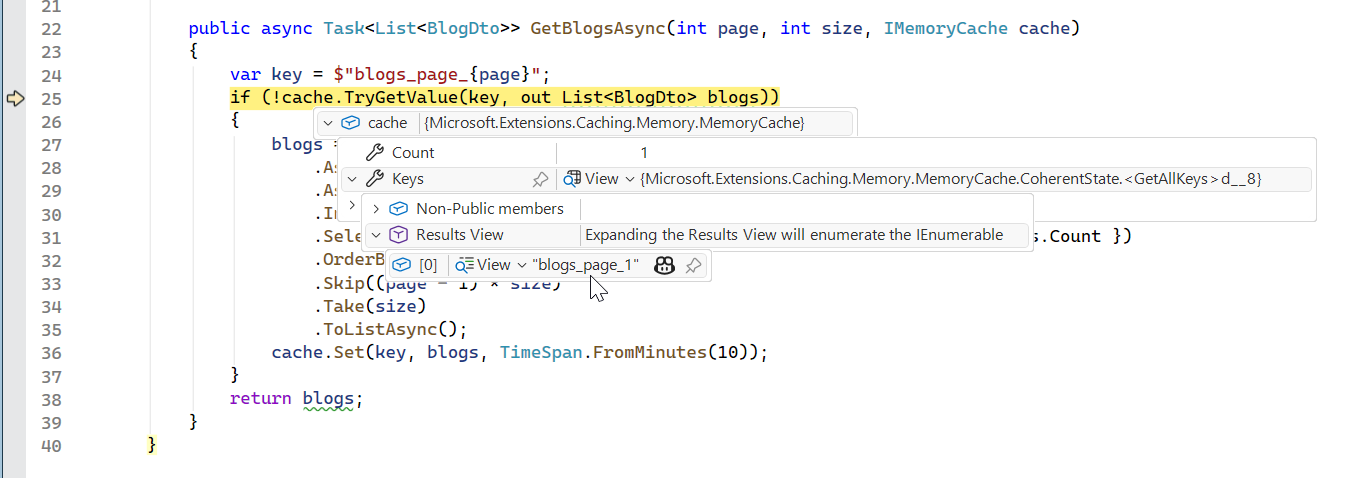
Cache query results externally (e.g., with IMemoryCache or Redis) to skip database hits. Database queries, even optimized ones, incur latency due to I/O, network roundtrips, and query execution.
For example, fetching a list of recent Blogs from a database with 100,000 rows can take 100-200ms per request, even with indexing and no-tracking. In a high-traffic blog API with thousands of requests per minute, this adds up, straining the database and increasing response times. Caching stores query results in memory (or a distributed store), allowing subsequent requests to retrieve data in microseconds instead of milliseconds.
For a blogging system, caching is ideal for:
- Static data, like a list of top blogs or categories.
- Semi-static data, like recent posts updated hourly.
- Read-heavy endpoints, like blog feeds or search results.
if (!cache.TryGetValue("blogs", out List<Blog> blogs))
{
    blogs = await context.Blogs
        .AsNoTracking()
        .ToListAsync();
    cache.Set("blogs", blogs, TimeSpan.FromMinutes(5));
}
Choose appropriate expiration and invalidation strategies to avoid serving stale data.
10. Advanced: DbContext pooling and async
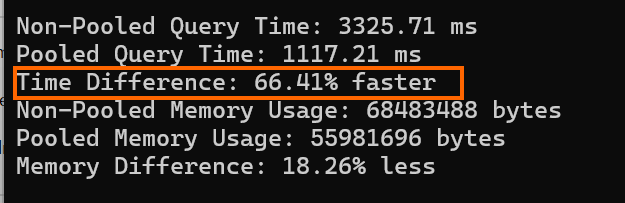
Creating and disposing DbContext instances per request adds overhead under high concurrency. DbContext pooling reuses instances to reduce allocation and initialization cost.
Benefits include:
- Faster request handling
- Lower memory pressure
- Better scalability in high-throughput APIs
Pool sizes should be tuned based on traffic patterns and available resources.
services.AddDbContextPool<BlogContext>(
    o => o.UseSqlServer(connectionString),
    poolSize: 2000);
In the above code example, AddDbContextPool creates a pool of up to 2000 BlogContext instances (the default pool size in EF Core is 1024). Reused instances skip initialization, reducing overhead. The connectionString specifies the SQL Server database. A smaller pool size (e.g., 256) is often sufficient for most applications, balancing memory and performance.
Async: Always use async methods (e.g., ToListAsync) for scalability.
Implementation example: Optimized EF Core blog query
Combine tips for fetching blogs with posts, paginated and cached. This uses no-tracking, split queries, projection, pagination, and caching for optimal performance.
public async Task<List<BlogDto>> GetBlogsAsync(int page, int size, IMemoryCache cache)
{
    var key = $"blogs_page_{page}";
    if (!cache.TryGetValue(key, out List<BlogDto> blogs))
    {
        blogs = await Context.Blogs
            .AsNoTracking()
            .AsSplitQuery()
            .Include(b => b.Posts.Where(p => p.Published))
            .Select(b => new BlogDto
            {
                Id = b.Id,
                Url = b.Url,
                PostCount = b.Posts.Count
            })
            .OrderBy(b => b.Url)
            .Skip((page - 1) * size)
            .Take(size)
            .ToListAsync();
        cache.Set(key, blogs, TimeSpan.FromMinutes(10));
    }
    return blogs;
}
Frequently Asked Questions
Start with profiling because the most expensive bottleneck is not always the most obvious one. After identifying whether the issue is query shape, data volume, tracking, indexing, or roundtrips, apply the optimization that directly targets that problem.How do I decide which EF Core optimization to apply first?
No, the impact varies by database provider, schema design, query planner, indexing strategy, and network latency. The same LINQ query can generate slightly different SQL depending on the provider, so benchmarks should be repeated against the actual production database.Are EF Core performance gains the same across SQL Server, PostgreSQL, and MySQL?
Use EF Core when queries are maintainable, provider-portable, and produce efficient SQL. Choose raw SQL only when you need precise control over complex joins, database-specific features, reporting queries, or bulk operations that LINQ cannot express efficiently.When should I prefer EF Core over writing raw SQL for performance-critical features?
Yes, better query performance can reduce database CPU usage, memory pressure, network transfer, and application server wait time. In cloud environments where compute, database throughput, and I/O are billed separately, optimized EF Core usage can directly lower operating costs.Can these EF Core optimizations help cloud-hosted applications reduce cost?
Apply one change at a time and compare results using repeatable benchmarks or production-like load tests. This reduces the risk of introducing incorrect query behavior, stale cache data, or database regressions while trying to improve speed.What is the safest way to introduce performance tuning into an existing EF Core project?
Performance tuning often encourages clearer separation between read models, write models, DTOs, caching layers, and database-specific concerns. Over time, this can lead to a more intentional architecture, especially for APIs with high-read traffic or reporting-heavy workloads.How do EF Core optimizations affect application architecture?
No, these techniques should match the query’s purpose. For example, no-tracking is ideal for read-only views, projection is useful when only selected fields are needed, pagination helps large result sets, and caching works best when data does not need to be instantly fresh.Should every EF Core query use no-tracking, projection, pagination, and caching?
If optimized queries, indexing, batching, and caching still cannot meet latency or scale goals, the issue may be architectural rather than ORM-related. At that stage, consider read replicas, denormalized read models, background processing, CQRS, database partitioning, or specialized storage for search and analytics.How do I know when EF Core tuning is no longer enough?
Conclusion
Thank you for reading! Tuning EF Core queries involves measuring first, then applying targeted optimizations like no-tracking, projections, and compiled queries. By modeling efficiently and caching wisely, you can achieve significant speedups, often 2x or more in benchmarks. In my experience, combining AsNoTracking with caching has been a game-changer for high-traffic APIs.
Test iteratively in your environment, as gains vary by database and workload. With these tips, your .NET apps will handle data like a pro.
Apply these optimizations to your EF Core projects today! Dive deeper into the EF Core docs or share your experiences in the comments. You can refer our Entity Framework Core Succinctly® free e-book here. Subscribe for more .NET tips!
![Blazor DataGrid Implement CRUD Operations Using EF Core & Web API [Webinar Show Notes]](https://www.syncfusion.com/blogs/wp-content/uploads/2025/09/Blazor-DataGrid-Implement-CRUD-Operations-Using-EF-Core-Web-API-Webinar-Show-Notes-1.jpg)

 No spam, just valuable updates.