
 Sumathi Uthayakumar
TL;DR: DOCX files can do far more than store static text. Learn how to transform Word documents into interactive, fillable forms by inserting, updating, exporting, resetting, and protecting DOCX form fields in ASP.NET Core. Using UI components and APIs from Syncfusion, you can build secure, workflow-ready document solutions for data collection, approvals, and compliance.
What if your Word documents could collect data like a web form? They can, transforming ordinary documents into interactive tools.
DOCX form fields turn static documents into dynamic templates that users can fill out effortlessly. Whether you’re creating contracts, onboarding forms, surveys, or business workflows, they provide structure, consistency, and a smoother user experience.
For developers, the ability to manage DOCX form fields programmatically unlocks even bigger advantages:
- Automating repetitive document tasks.
- Generating and prefilling templates from external data sources.
- Maintaining accuracy and compliance in business‑critical forms (legal, HR, finance).
In this tutorial, we’ll learn how to insert, update, import, export, reset, and protect DOCX form fields in ASP.NET Core using the Syncfusion DOCX Editor.
What are DOCX form fields?
DOCX form fields are interactive elements embedded directly inside a Word document. They allow users to enter data directly within the file, turning a simple document into a structured, fillable form. When you design templates with form fields, you can ensure consistent, organized data collection, which is especially useful in workflows where accuracy and uniformity are essential.
These interactive fields fit naturally into many real-world scenarios, including:
- Onboarding forms and HR templates.
- Sales contracts and legal agreements.
- Surveys, questionnaires, and checklists.
To support these workflows, DOCX files allow several types of form fields, each serving a different purpose:
- Text: Free-form input used for names, addresses, and notes.
- Checkbox: Binary selections such as Yes/No or True/False.
- Dropdown: Predefined options like departments, categories, or status values.
Together, these field types make DOCX templates more dynamic and help streamline both data entry and document automation.
Managing form fields with Syncfusion DOCX Editor
The Syncfusion DOCX Editor is built to simplify and streamline form field management, offering an intuitive interface for efficient document editing.
It provides:
- Built-in toolbar for quickly adding interactive fields.
- Properties pane for customizing their attributes, such as names, default values, and formatting, without writing extra code.
This integrated UI supports all essential form field types.
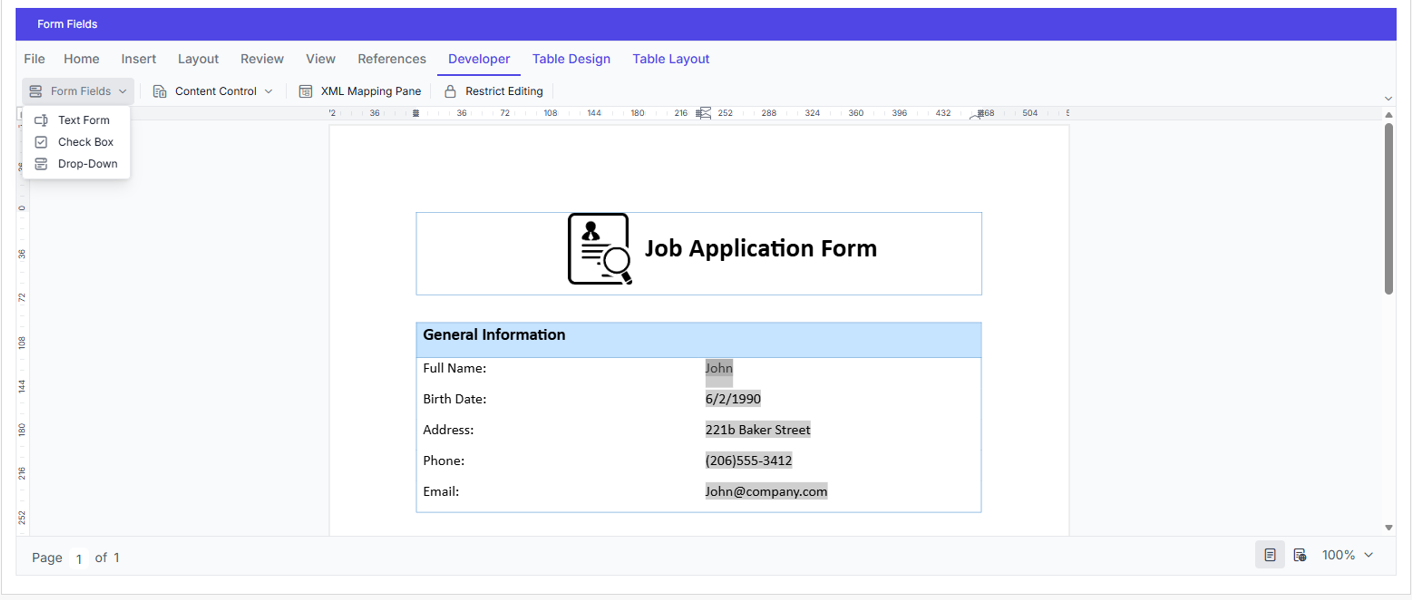
Let’s explore both UI-based tools and API-driven methods to build fully interactive, automated document workflows with minimal effort.
Getting started with DOCX Editor in ASP.NET Core
To get started, we’ll need to set up the Syncfusion DOCX Editor in our ASP.NET Core application. The steps below guide us through the initial configuration.
Step 1: Create a .NET Core web app
Begin by using Visual Studio to create a new ASP.NET Core project with Razor pages.
Step 2: Install the NuGet package
Next, install the Syncfusion.EJ2.AspNet.Core NuGet package to your project using the NuGet Package Manager or the following command.
Install-Package Syncfusion.EJ2.AspNet.Core -Version 32.1.19Step 3: Add Syncfusion tag helper
After installing the package, open the ViewImports.cshtml file and add the following line to enable the Syncfusion tag helper.
@addTagHelper *, Syncfusion.EJ2Step 4: Include the required styles and scripts
To ensure proper rendering, add the Syncfusion CSS and JavaScript CDN links inside your _Layout.cshtml file.
<head>
    ...
    <!-- Syncfusion ASP.NET Core controls styles -->
    <link rel="stylesheet" href="https://cdn.syncfusion.com/ej2/32.1.19/fluent.css" />
    <!-- Syncfusion ASP.NET Core controls scripts -->
    <script src="https://cdn.syncfusion.com/ej2/32.1.19/dist/ej2.min.js"></script>
</head>
Step 5: Register Script Manager
Before closing the <body> tag, include the Syncfusion Script Manager to ensure proper component initialization.
<body>
    ...
    <!-- Syncfusion ASP.NET Core Script Manager -->
    <ejs-scripts></ejs-scripts>
</body>
Step 6: Add Syncfusion DOCX Editor in ASP.NET Core app
Finally, add the DOCX Editor to the Index.cshtml file.
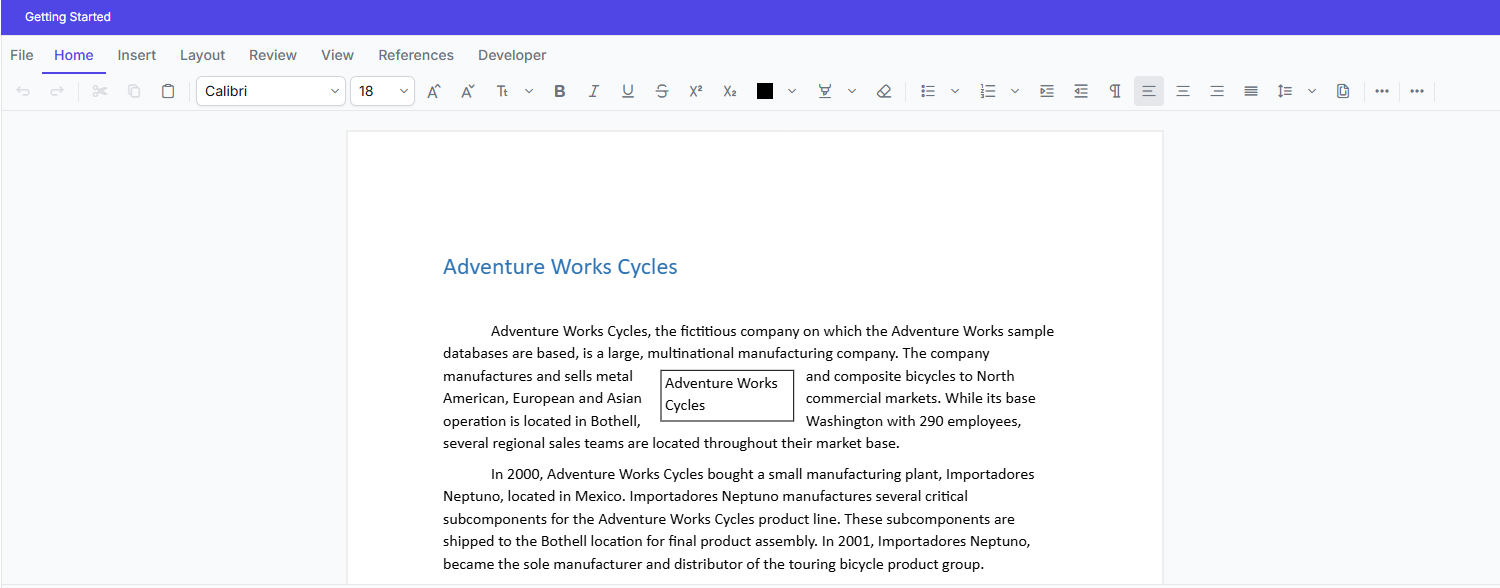
<ejs-documenteditorcontainer id="container"></ejs-documenteditorcontainer>This renders the full editor with its default toolbar and environment.
Once these steps are complete, your Syncfusion DOCX Editor is fully configured and ready to start working with DOCX form fields, as shown below.
Manage form fields in DOCX files
Working with form fields in DOCX files is not just about reading values; it’s about creating dynamic, interactive documents. With the Syncfusion Document Editor, you can insert new form fields, update their properties, reset them, and even protect the document, so users can only edit designated fields.
Below is a quick overview of the key operations you can perform.
Insert form fields
Form fields make it easy to build interactive documents such as feedback forms, contracts, and questionnaires. They ensure users enter structured responses digitally, protect legal text, and make surveys interactive and easy to analyze programmatically.
Insert form fields via UI
We can insert form fields by selecting form fields from the built-in toolbar and choosing the desired field type, such as text, checkbox, or dropdown.
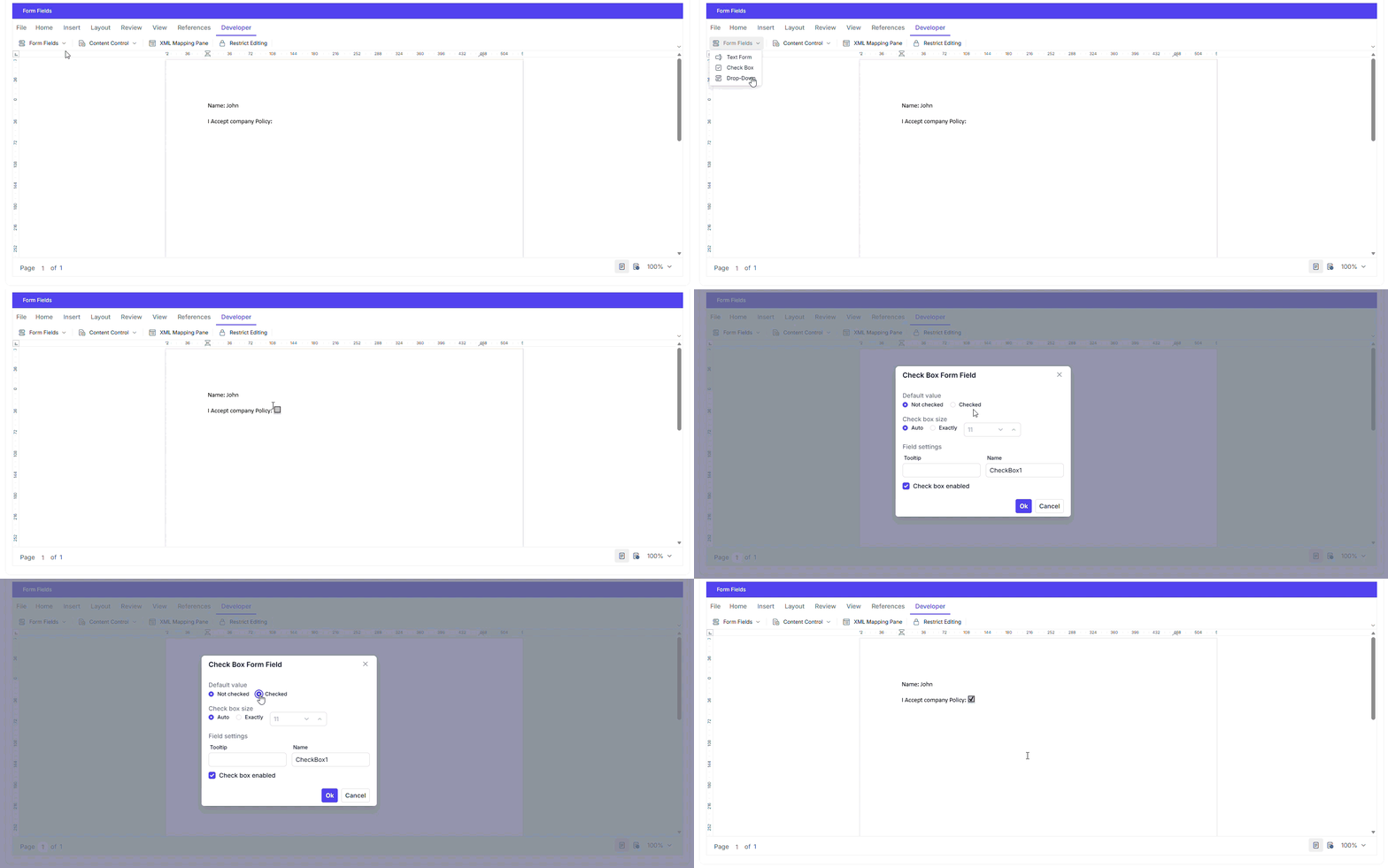
Note: Explore our live demo and start adding form fields effortlessly!
Insert form fields programmatically
We can also generate form fields dynamically using the insertFormField API. This is ideal for generating interactive documents that require fields to be inserted on demand.
Just a few lines of code are all it takes:
//Insert Text form field
documentEditor.editor.insertFormField('Text');

//Insert Checkbox form field
documentEditor.editor.insertFormField('CheckBox');

//Insert Drop down form field
documentEditor.editor.insertFormField('Dropdown');
Get form field names and properties
Validating form fields before submission is essential for accuracy, consistency, and compliance. Retrieving field names and properties helps ensure all required fields are present, enables dynamic customization based on user roles or conditions, and supports auditing and reporting for compliance purposes.
We can retrieve all form field names and fetch detailed properties using the getFormFieldNames and getFormFieldInfo APIs.
// Get all form field names
var formFieldsNames = documentEditor.getFormFieldNames();

//Text form field
var textfieldInfo = documentEditor.getFormFieldInfo('Text1');
Update form field properties
Updating form field properties is essential for creating accurate and user-friendly documents. This feature allows you to pre-fill forms, enforce input formats, and maintain data consistency, commonly used in HR onboarding, tax forms, and compliance-driven templates.
Update via UI
You can update form field values directly using the built-in toolbar and properties pane in the editor.
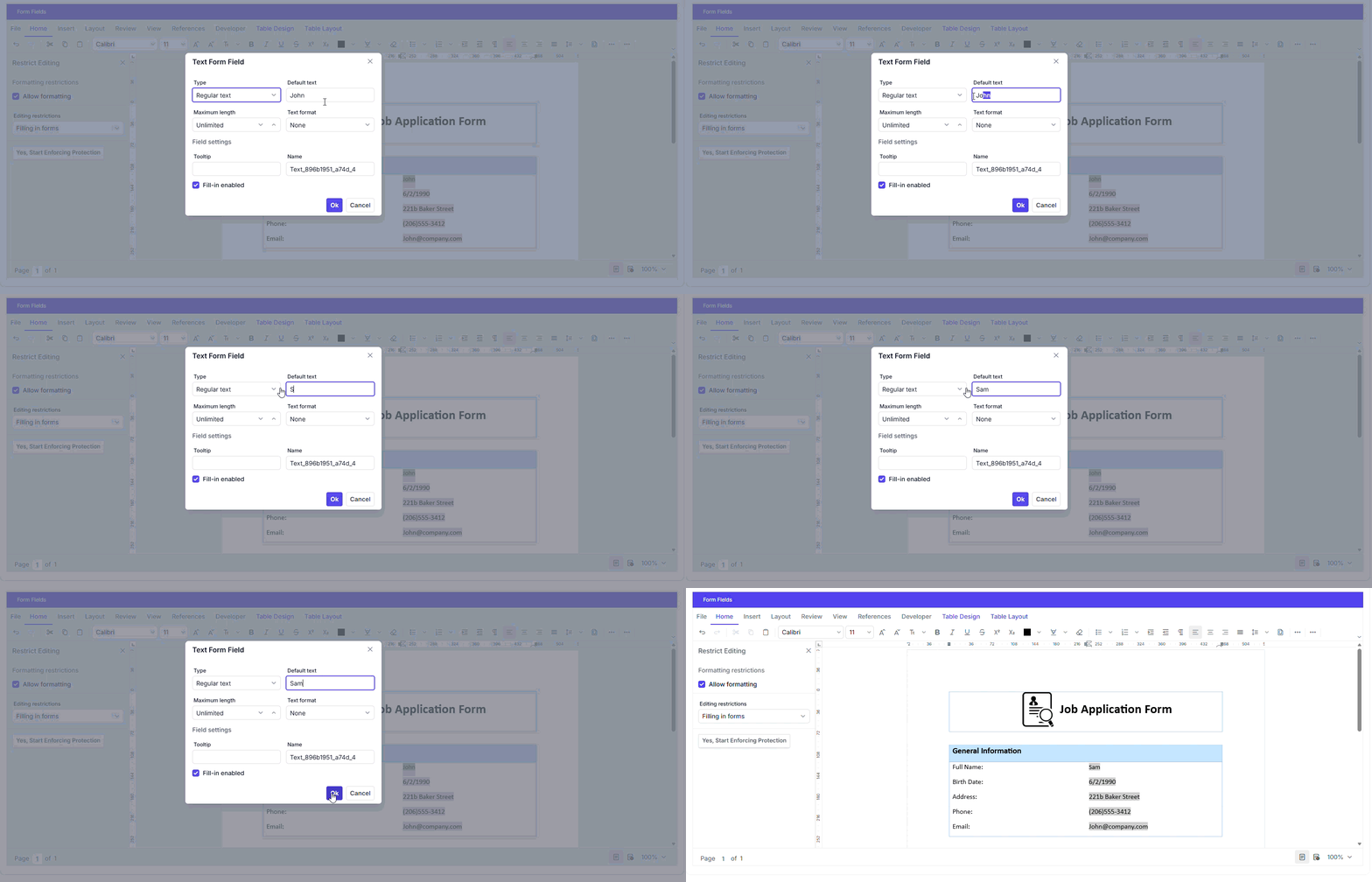
Note: Try it yourself in our live demo and see how quickly you can update form fields without writing any code!
Update programmatically
Use the setFormFieldInfo API to dynamically update properties:
// Set text form field properties
var textfieldInfo = documentEditor.getFormFieldInfo('Text1');
textfieldInfo.defaultValue = "Hello";
textfieldInfo.format = "Uppercase";
textfieldInfo.type = "Text";
documentEditor.setFormFieldInfo('Text1', textfieldInfo);
Reset form fields
Resetting form fields is useful when users need to start over, such as re-filling a form on a shared device. It prevents accidental reuse of previous responses and ensures clean data collection. It is ideal for surveys, questionnaires, and repeated forms of submissions.
You can reset all form fields to their default values using the resetFormFields API:
documentEditor.resetFormFields();Import and export form field data of DOCX files
Exporting and importing form fields data makes it easy to reuse information across documents. This feature helps you save user input, generate reports, or create pre-filled forms to speed up workflows.
You can export all form field values from the loaded document using the exportFormData method. Similarly, you can prefill form fields by importing data with the importFormData method.
Here’s how you can export form field data from the DOCX files with Syncfusion DOCX Editor:
var formFieldDate = documentEditor.exportFormData();And here’s how you can import the saved data back into the DOCX files with Syncfusion:
var textformField = { fieldName: 'Text1', value: 'Hello World' };
var checkformField = { fieldName: 'Check1', value: true };
var dropdownformField = { fieldName: 'Drop1', value: 1 };

// Import form field data
documentEditor.importFormData([
    textformField,
    checkformField,
    dropdownformField
]);
Note: For more details about importing and exporting form fields, read the full documentation.
Protect the document for form filling
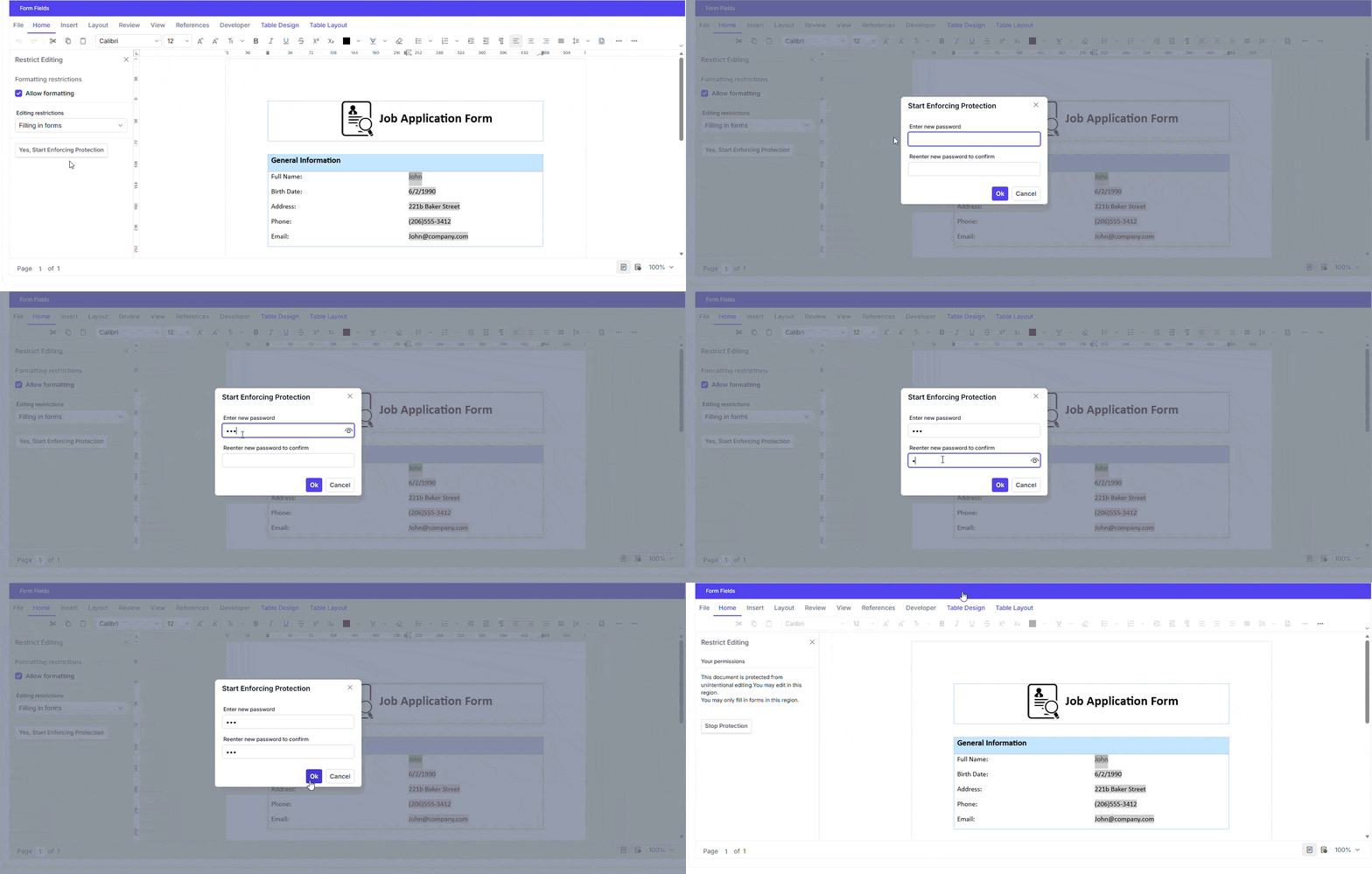
Enable protection so that users can only fill out form fields while the rest of the document remains read-only. We can use this feature for legal documents, contracts, templates, and any scenario where the primary text must stay unchanged.
Enable protection via UI
To enable protection using the built-in interface:
- Go to the Review tab.
- Select Restrict Editing from the toolbar.
- Choose the option to allow editing only in form fields.
This ensures that users can interact with designated fields while preventing modifications to the rest of the document.
Enable protection programmatically
You can also control document protection through code. Use enforceProtection to enable form-filling-only mode, and stopProtection to remove existing protection.
var documenteditorElement = document.getElementById('container');
container = documenteditorElement.ej2_instances[0];
documenteditor = container.documentEditor;

// Enable protection for form fields only
container.documentEditor.editor.enforceProtection('123', 'FormFieldsOnly');

// Stop the document protection
container.documentEditor.editor.stopProtection('123');
Frequently Asked Questions
Yes. DOCX supports text, checkbox, and dropdown fields for interactive documents.Can a DOCX file use form fields?
Yes. Use the Can I update or reset fields?
setFormFieldInfo method to update properties and resetFormFields() to clear values.
The DOCX file supports a variety of form fields, including text fields for general text entry, numbers, and dates, checkbox fields for binary selections, and dropdown fields that allow users to choose from a predefined list of strings.What types of form fields are supported?
Yes, the Docx Editor supports legacy form fields (text, checkbox, and dropdown lists) to create fillable forms. It also supports content controls.Does the Syncfusion editor support form fields?
Yes, the Document Editor control provides an intuitive UI for inserting and managing form fields through its toolbar.Can I create form fields using the UI?
You can get all field names using How can I retrieve form field data?
getFormFieldNames() and retrieve specific properties (like default values, formats, or type) using getFormFieldInfo('FieldName'). Data can also be programmatically exported from the entire document.
The document can be protected using the “Restrict Editing” feature, which locks the document layout while allowing users to fill in form fields.How do I protect the document so that only form fields are editable?
Conclusion
Thank you for reading! Managing form fields in DOCX files offers powerful advantages for web applications, enabling interactive documents, streamlined data collection, and fully automated workflows. With the Syncfusion DOCX Editor, developers can effortlessly insert, customize, and manage form fields, and import or export their data to support dynamic templates and system integrations. These capabilities significantly reduce manual effort and make it easier to build fast, efficient, and user‑friendly document solutions.
If you’re an existing customer, the latest version is available on the License and Downloads page. New to Syncfusion? Try our 30-day free trial and experience all the newest features firsthand.
We’re here to support you every step of the way! Reach out through our support forums, support portal, or feedback portal. We’re always happy to assist.




 No spam, just valuable updates.