
 Sameerkhan NainarAliBadusha
TL;DR: Redaction fails when it only hides text—PDF data often remains recoverable. And signatures that appear valid can still break without timestamps or revocation details. This guide shows a standards-based .NET workflow using Syncfusion to properly redact, secure, sign, and validate PDFs.
Compliance-driven teams in finance, healthcare, legal, and government handle sensitive PDFs every day, and even small mistakes can expose confidential data. Many PDF libraries may look secure after redaction, but they can leave searchable text, signatures may fail across readers, and encryption might not hold up over time.
Are your documents truly protected across platforms and years?
True document safety comes from standards-based redaction, where sensitive content is entirely removed, not just visually masked, along with reliable digital signatures that validate consistently across desktop apps, browsers, mobile devices, and long-term archives.
In this guide, we’ll look at the compliance failures teams face with redaction and digital signatures, how to perform redaction using the Syncfusion® PDF Library, how to implement standards‑aligned digital signatures, and finally, how to build an end‑to‑end workflow that keeps PDFs consistently secure.

Where compliance fails: Redaction and signature issues in the real world
Compliance failures in PDFs often start with a simple question: Are your redactions and signatures as secure as they look? In many cases, the answer is no. Visual redaction and incomplete digital signatures often create a false sense of safety. Hidden text, unremoved metadata, or missing validation details can expose sensitive information during audits, eDiscovery, or document reviews, long after the document has been shared.
Why visually redacted PDFs still leak data
Many teams assume that covering text is enough. Still, the underlying content usually remains intact, searchable in full-text queries, accessible through select-and-copy actions, or recoverable from hidden layers. During compliance checks, this can reveal sensitive PII, account details, patient records, or legal information that was supposed to be permanently removed.
Why digital signatures fail technical validation
Even when a document appears signed correctly, it may fail to provide technical validation across different viewers. Missing timestamps, incomplete certificate chains, absent revocation data (OCSP/CRL), or post-signing modifications can cause signatures to appear INVALID. These issues become visible when files are opened in different PDF readers or long after they’ve been archived.
The result can be costly: Faulty redaction can undermine privacy laws like GDPR and HIPAA, while broken signatures can disrupt essential business workflows. These problems occur not because teams are careless, but because many solutions prioritize appearance over genuine standards compliant with PDF security.
PDF Redaction with Syncfusion: Accurate, Irreversible, Auditable
The Syncfusion .NET PDF Library delivers true programmatic PDF redaction that removes sensitive content at the document structure level, rather than merely masking it. Once applied, redacted text and images are permanently deleted. Each operation can be logged and flattened into the final file, creating an audit-ready PDF that stands up to compliance checks.
How Syncfusion redaction works
- Permanent removal at the PDF data level: Syncfusion deletes text, images, and annotations directly from the PDF structure, ensuring redacted content cannot be restored through search, copy, or layer inspection.
- Precise region targeting with layout preserved: Define exact redaction areas using coordinate-based boxes, removing only sensitive content while keeping the rest of the document interactive.
- Scalable server-side batch processing: Process large volumes of PDFs in automated .NET workflows on Windows, Linux, or Docker with no desktop components.
- Flattened output for irreversible redaction: After redaction, flatten the document to lock changes permanently and prevent any editing or recovery attempts.
This gives compliance-driven teams a standard-aligned redaction workflow for PDF security, PII redaction, and audit-ready documents, improving both trust and cross-platform reliability in modern content pipelines.
Here’s how you can do it in code:
// Load the existing PDF document
using (PdfLoadedDocument document = new PdfLoadedDocument("Input.pdf"))
{
    // Get the first page from the document
    PdfLoadedPage page = document.Pages[0] as PdfLoadedPage;

    // Apply redaction to the confidential region using the specified bounds
    PdfRedaction redaction = new PdfRedaction(new RectangleF(343, 147, 60, 17), Color.Black);
    // Add the redaction to the page
    page.AddRedaction(redaction);
    // Apply redactions and permanently remove marked content from the PDF
    document.Redact();
    // Save the redacted PDF file
    document.Save("Output.pdf");
}
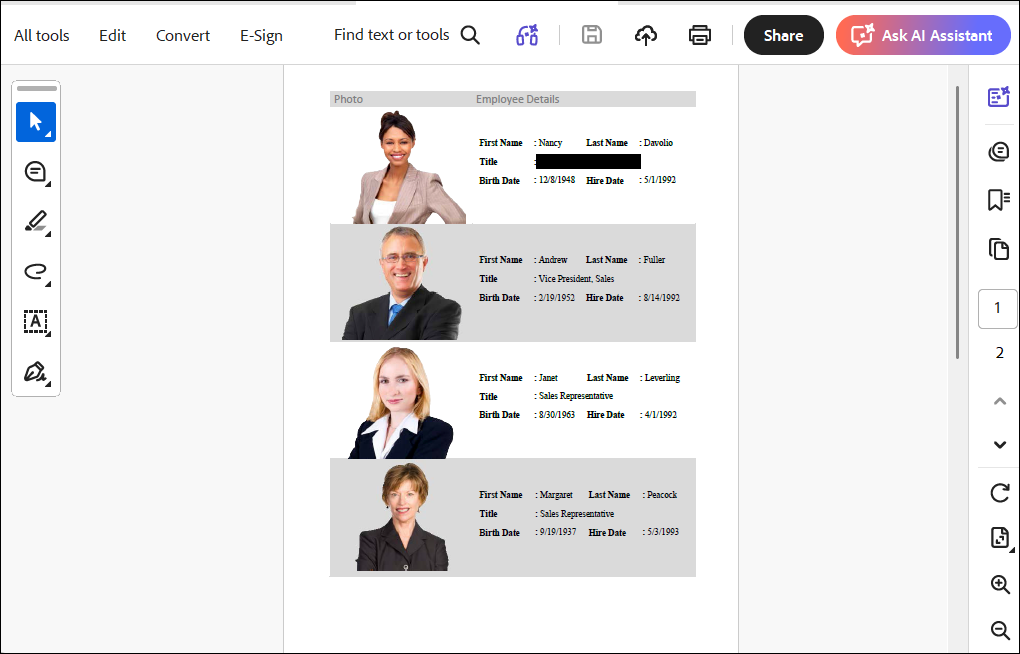
Running this code generates a PDF document similar to the screenshot below.
Want to redact PDF documents using interactive UI controls?
Syncfusion offers the PDF Viewer SDK, a powerful interactive UI suite that allows users to inspect pages, mark sensitive regions, preview redaction markers, and review all changes before redaction is applied. Since this UI component is licensed separately, it’s important to carefully evaluate your workflow needs.
If you require a fully interactive UI for editing and redaction, the PDF Viewer SDK is the ideal solution. However, if your workflow is primarily focused on automation or server-side processing, the Document SDK alone can fully meet your requirements.
Tips for PDF Reduction
- Automated redaction with APIs:
- Load your PDF file using
PdfLoadedDocument. - Find the sensitive content (text or images) and get their positions on the page.
- Create redaction boxes around each item using
PdfRedaction. - Add them to the page with
PdfLoadedPage.AddRedaction(). - Then apply them all at once with
PdfLoadedDocument.Redact().
- Load your PDF file using
- If you target a compliance format like PDF/A‑2u, apply the conformance setting after redaction is complete and before applying the digital signature.
Digital Signatures done right: Standards-based, trusted, verifiable
The Syncfusion .NET PDF Library creates standards-based digital signatures that validate consistently across Adobe Reader, major PDF viewers, document management systems, and long-term archives. Each signature carries proof of identity, data integrity, and time of signing, making tampering immediately detectable.
How Syncfusion digital signatures work
- Standards-based formats: Supports PAdES, CAdES, and CMS signatures using SHA256/SHA512 to ensure validation across major PDF viewers.
- Trusted timestamping: Adds RFC 3161 timestamps to prove the exact moment a document was signed.
- Long Term Validation (LTV): Embeds OCSP/CRL data, so signatures remain verifiable years after certificate changes.
- Flexible certificate sources: Works with PFX files, Windows certificate store, and HSM-backed keys.
- Automated server-side signing: Runs on Windows, Linux, and Docker with no UI interaction, enabling high-volume automated workflows.
Here’s how you can do it in code:
// Load the PDF document
using (PdfLoadedDocument document = new PdfLoadedDocument("Input.pdf"))
{
    // Load digital ID with password.
    PdfCertificate certificate = new PdfCertificate(@"DigitalSignatureTest.pfx", "DigitalPass123");
    // Create a signature with a loaded digital ID.
    PdfSignature signature = new PdfSignature(document, document.Pages[0], certificate, "DigitalSignature");
    // Save the PDF document.
    document.Save("SignedDocument.pdf");
}
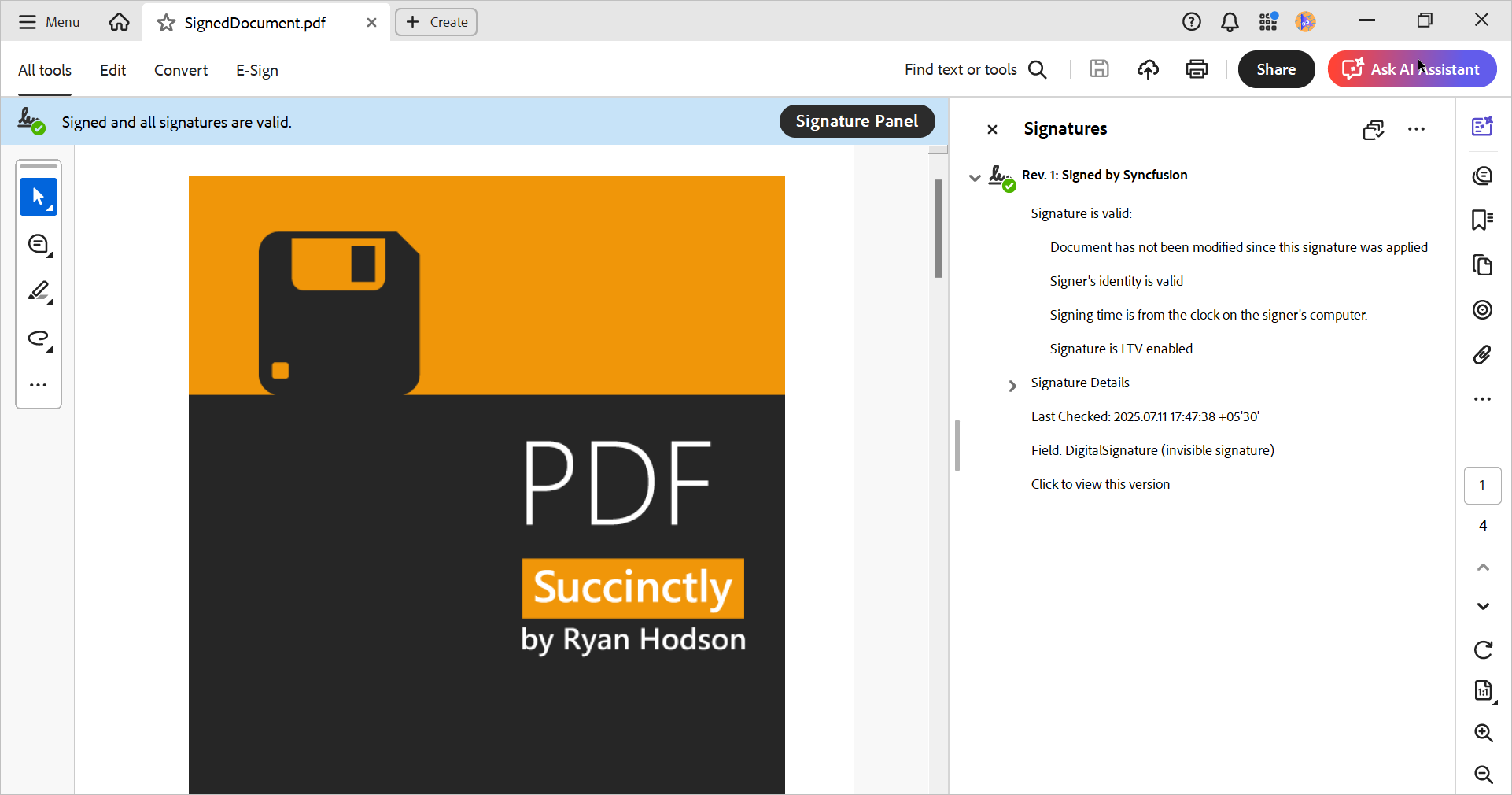
Running this code generates a PDF document similar to the screenshot below.
Tips for standards-based digital signatures
- Use a trusted CA-issued certificate (not self-signed) for workflows that require broad validation.
- Add a TSA timestamp (RFC 3161) to prove when the signing occurred.
- Embed revocation info (OCSP/CRL) to keep validation possible after certificate changes or expiration.
- Lock down edits after signing so viewers don’t mark the signature invalid due to post-sign changes. For more details, refer to our official documentation.
How to build the compliance-ready workflow: Redact → Secure → Sign → Archive → Validate
Want a repeatable, compliance-ready PDF workflow that stands up to audits, legal reviews, and long-term retention requirements? Follow these stages, each aligned to how regulated organizations protect sensitive data, enforce policy, and guarantee verifiable document integrity.
1. Redact: permanently remove sensitive content
Precisely target regions and flatten redactions.
- Redact confidential information before security or signing.
- Flatten where appropriate to prevent editing or recovery attempts.
- Optional: mark redactions programmatically using the .NET PDF Library, review in the PDF Viewer SDK, then apply permanent redaction.
2. Secure: apply encryption and permissions
Restrict access and control what users can do.
- Configure AES-based encryption.
- Set permissions to disable editing/copying or allow form-fill and comments based on policy.
3. Sign: add digital signatures
Prove document authenticity and detect tampering.
- Use standards-based signatures (PAdES, CAdES, CMS) with SHA-256/SHA-512 algorithms.
- Include RFC 3161 timestamps for durability.
4. Archive: enable Long-Term Validation (LTV)
Keep signatures valid for years or decades.
- Embed certificate chains.
- Include OCSP responses and CRL data.
- Keep signatures verifiable even after certificate expiration.
5. Validate: confirm compliance before distribution
Perform final verification:
- Redactions are permanent (no searchable/copyable residual content).
- Encryption and permissions match policy.
- Signatures validate across target viewers.
- LTV evidence is embedded.
- No hidden content remains.
This workflow fits automated document pipelines and can run server-side at scale (Windows, Linux, Docker, Kubernetes) without UI dependencies.
Frequently Asked Questions
Yes. Syncfusion PDF library supports regex-based search to find items like emails, dates, or IDs and redact them automatically.Can Syncfusion redact text automatically using patterns or regex?
Yes. You can add custom overlay text, fonts, colors, and even images to the redacted zones using the Syncfusion PDF library.Does Syncfusion support overlay text or custom appearance on redacted areas?
Yes. Syncfusion’s PDF Library is optimized for server-side, high-volume workloads. Developers can batch process redactions using automation pipelines, and the library even provides a redaction progress event for large documents. This makes it suitable for enterprises that need to sanitize thousands of PDFs for audits, legal archives, GDPR exports, and regulatory submissions.Can Syncfusion handle redaction for high-volume or bulk PDF processing?
Yes. Syncfusion .NET PDF library allows multiple signatures, enabling sequential approvals and multi-sign workflows.Can I digitally sign a PDF that already contains another signature?
Yes. Syncfusion PDF library enables fully customizable digital signature appearances, including signer name, reason, timestamp info, custom images, logos, handwritten signatures, and shapes. This helps brands maintain a professional, compliant document-signing experience.Does Syncfusion allow for creating custom digital signature appearances?
Yes. The library supports OCSP, CRL, timestamps, ECDSA, CMS, and CAdES, ensuring full compliance with digital signature standards.Are Syncfusion’s digital signatures compliant with global standards?
Yes. Syncfusion’s PDF Library supports adding LTV signatures, which remain valid even if root certificates expire or are revoked—ideal for long-term archiving and audits.Does Syncfusion support long-term validation (LTV) for PDF signatures?
Yes. It works on ASP.NET Core, MAUI, Blazor, WinForms, WPF, Windows, macOS, Linux, iOS, and Android.Is Syncfusion’s redaction and signing available across all .NET platforms?
Yes. Syncfusion provides a PDF Viewer SDK that lets users visually inspect pages, highlight sensitive text, and place redaction markers interactively. After marking, the content can be permanently removed, ensuring secure and irreversible redaction.Can I apply or manage PDF redaction interactively using UI controls?
Conclusion: Why teams choose Syncfusion for compliance workflows
Thank you for reading! Redaction and digital signing aren’t optional; they’re the foundation of every compliance-ready document workflow. A single error, such as residual searchable text after redaction or a digital signature that fails validation, can expose sensitive information, spark audit failures, and undermine customer trust in an instant. So, the real question is: which platform do you trust to get this right?
The Syncfusion PDF Library eliminates these risks at the structural level. Redaction permanently removes sensitive information, including text, images, annotations, layers, and metadata, ensuring nothing can be recovered through search or analysis. Digital signatures follow global standards, including timestamps and OCSP/CRL validation, and remain trusted across readers and long-term archives.
Beyond functional correctness, Syncfusion offers cloud-ready, server-safe libraries optimized for high-load production environments. With extensive documentation and implementation samples, development teams can rapidly deploy reliable, compliant, and automated document workflows from end to end, ready.
Curious how this fits your workflow? Experience it directly with our live demo.
ASP.NET Core PDF library – Redaction Example – Syncfusion Demos
If you’re a Syncfusion user, you can download the setup from the license and downloads page. Otherwise, you can download a free 30-day trial.
You can also contact us through our support forum, support portal, or feedback portal for queries. We are always happy to assist you!


 No spam, just valuable updates.