.NET 10 support now available
Trusted by the world’s leading companies

Overview
The WPF Calculation Engine library allows you to add extensive calculation support to your business objects, and easily set up forms that have calculation dependencies among various controls. It includes a function library of more than 400+ Excel-compatible functions, covering calculations for databases, dates and times, engineering, finances, and much more. In addition, the library provides support for named ranges, dynamic references, cross-sheet references, array formulas, and formula dependencies. When used in conjunction with our .NET Excel library (Essential XlsIO), you can fully load, manipulate, and compute Excel worksheets with no dependence on Excel.
Extensive calculations without Excel
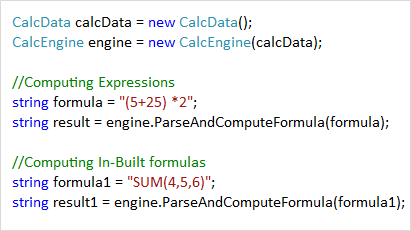
Working with calculation engine
Efficiently parse and compute formulas using the Calculation Engine. It manages several hash tables, such as tables for formula information, dependent cells, dependent formula cells, named ranges, and library functions for calculations. It has several properties for calculating business objects, including Excel-like formula computation; parsing separators like decimals, arguments, and data time; logical operator calculation; and much more. Also, ICalcData provides methods for performing calculations by raw numbers or cell references, retrieving cell values or cell references, and updating cell values based on dependent cells.
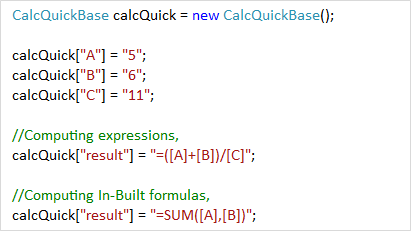
Working with values and variables
Supports parsing and computing formulas directly with values or variables using CalcQuickBase. Additionally, register variable names that can later be used in more complex formulas, and perform manual or automatic calculations.

Named Ranges
Define names for a cell, a range of cells, formulas, constants, or tables to easily identify the purpose of cell references. The library also supports adding, removing, and managing named ranges.
Functions
Built-in functions
The Calculation Engine is preloaded with more than 400+ Excel-compatible functions covering a broad range of business scenarios. The available functions range from standard mathematical functions such as cosine and sine, to statistical functions like averages and standard deviations, and even financial functions like declining balance and future value.
Custom functions
Easily add a custom function with your own business calculations by registering it with CalcEngine, and easily replace or remove it as needed.
Working with .NET Excel library (Essential XlsIO)
The Syncfusion .NET Excel library allows users to create, read, edit, and protect Excel documents in .NET applications without Microsoft Office. Additionally, it supports performing calculations in Excel workbooks by using the Calculation Engine. Calculations can be suspended to optimize performance while a series of changes are made to dependent cells either by the user or programmatically.
155+ WPF CONTROLS
ALL CONTROLS
SMART COMPONENTS
DATA VISUALIZATION
MODERN THEMES
LAYOUT
NAVIGATION
INPUT CONTROLS
BUTTON
BUSINESS INTELLIGENCE
DATA SCIENCE
MISCELLANEOUS
LISTS & DROPDOWNS
NOTIFICATION
FILE VIEWERS & EDITORS
CONVERSATIONAL UI
Build Document Workflows in WPF
Integrate a powerful PDF Viewer, rich DOCX Editor, and full‑featured Spreadsheet Editor into your WPF applications, alongside robust document processing libraries, to create smooth document experiences. Empower users to work with documents interactively while developers automate processing behind the scenes.
Our Customers Love Us
Having an excellent set of tools and a great support team, Syncfusion® reduces customers’ development time.Here are some of their experiences.

Excellent experience with Syncfusion!
Syncfusion is a product that makes life easier! I use it to create Blazor applications (server side and webassembly) and the controls speed up development a lot. Furthermore, if needed, it is possible to ask for direct support that is never long in coming!

Andrea Scarpante,

Sydea srl
The complete component set
It is the most complete component set available. Also very handy is the fact that there is a community edition, this gives me the opportunity to test thing at home without buying a separate license.

Johan Visser,

H and T Pawnbrokers
See Real Success Stories
Developers around the world trust Syncfusion’s Essential Studio to simplify complex projects and speed up delivery. With a vast library of UI controls, powerful SDKs, and reliable support, Essential Studio helps teams build enterprise-ready applications with confidence.
Read Our Customer StoriesIndustry
Software development
75% Cost reduction
50% Faster development

Industry
Utilities (oil and gas)

450+ hours saved
Streamlined processes and hours of development effort saved.

Advanced, flexible features
Empowered users through robust and versatile functionality.
Industry
Software and technology
1000+ of hours saved
Accelerated development with enterprise-ready UI components.

Efficient file management
Streamlined workflows with document libraries without building them from scratch.
Industry
Software and technology

2 Years of delay avoided
Two years of delays prevented with proactive planning.

On-time delivery
Projects delivered on schedule using trusted controls.
Industry
IT services and IT consulting

Improved performance
Large datasets handled with easy customization and quick debugging.

Highly customizable
Plug-and-play controls with quick template integration.
Industry
Professional services
Instant access
Quick availability of features and resources.
Reduced dependencies
Fewer dependencies for faster development.
Rated by users across the globe



Syncfusion WPF Resources
Learning
 Documentation
 Documentation


Awards
Greatness—it’s one thing to say you have it, but it means more when others recognize it. Syncfusion® is proud to hold the following industry awards.