

ESSENTIAL STUDIO® 2025 VOLUME 4
Blazor

Build Next-Gen Web Applications
- New Block Editor (Loop/Notion-style) component.
- Real-time Diagram collaboration for simultaneous multiuser editing.
- Markdown auto formatting and media drag and drop for Rich Text Editor.
Angular

Harness Angular for Impressive Web Apps
- Rich Text Editor adds AI-powered writing and formatting assistance.
- Frozen columns in the Gantt Chart.
- Chat UI, Smart Paste, and Smart TextArea are now production-ready.
React

Access a Complete Line of React Controls
- AI-powered writing and formatting assistance for the Rich Text Editor.
- Conditional row selection based on defined rules in the Data Grid.
- Enhanced Excel exporting with advanced customization in the Pivot Table.
JavaScript

Get the Most out of JavaScript
- New table block for intuitive table creation in the Block Editor.
- Pinned rows that remain visible while paging, sorting, and filtering in the DataGrid.
- Large-icon customization and sequential upload support in the File Manager.
Vue

Create High-Performance Vue Apps
- AI-powered writing and formatting assistance in the Rich Text Editor.
- Frozen columns in the Gantt Chart.
- Row and column spanning in the Tree Grid.
ASP.NET Core

Publish Superior Web Applications
- New Smart Paste and Smart TextArea controls.
- AI-powered writing and formatting assistance in the Rich Text Editor.
- New table block for intuitive table creation in the Block Editor.
ASP.NET MVC

Build Powerful Web Apps
- Conditional row selection based on defined rules in the DataGrid.
- Enhanced Excel exporting with advanced customization in the Pivot Table.
- Frozen columns in the Gantt Chart.
MOBILE
.NET MAUI

Build Cross-Platform Apps
- New Smart DataGrid supports sorting, filtering, and grouping data through natural-language prompts.
- New Smart Scheduler creates and updates appointments using natural language.
- Liquid Glass effects are now supported on iOS and Mac Catalyst.
DESKTOP
WPF

Take Control of the Desktop
- Card tooltips and ascending/descending sorting in Kanban.
- Events before and after predecessor changes in the Gantt control.
- Customizable templates for displaying uploaded files in the AI AssistView.
WinForms

Create Better Apps
- Row reordering and cross-grid movement for the DataGrid.
- Precise value preservation for accurate calculations in the Numeric TextBox.
- Improved disabled-state appearance for consistent styling in the DateTimePicker.
WinUI

Develop Windows apps with advanced technology
- Card tooltips and ascending/descending sorting in Kanban.
- Customizable templates for displaying uploaded files in the AI AssistView.
- PromptRequest event for validation and custom prompt handling in the AI AssistView.
DOCUMENT SOLUTIONS
Document SDK

All-in-One SDKs for Document Processing
- New JavaScript PDF Library for creating and editing PDFs.
- Improved Word document comparison accuracy in the .NET Word Library.
- Improved OCR with image preprocessing and Tesseract 5 in the .NET PDF Library.
PDF Viewer SDK

Seamless PDF Viewing & Form Filling
- Redact documents in the web and .NET MAUI PDF Viewers.
- Extract PDF pages to a new document with the web PDF Viewer.
- Rotate, reorder, insert, delete, and import pages in the Blazor PDF Viewer.
DOCX Editor SDK

Edit DOCX Documents in the Browser
- Load Word documents asynchronously without blocking the interface.
- Ignore uppercase words and acronyms in the spell checker.
- Add user-specific custom dictionaries to the spell checker.
Spreadsheet Editor SDK

Excel-Like Editing & Data Analysis
- Threaded comments for collaborative discussions in the web SDKs.
- Autofill extends patterns and formats across cells in Blazor.
- Merge cells to create structured layouts in Blazor.
FREE PRODUCT
Metro Studio
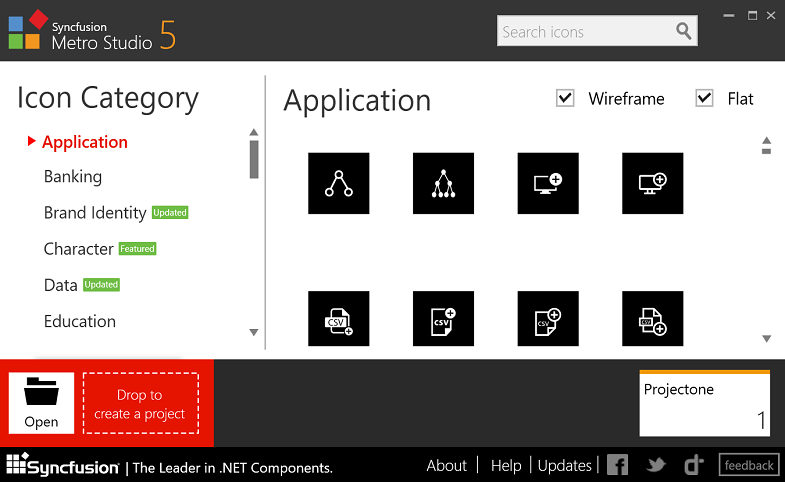
Large collection of icons
- Wide variety of wireframe icons
- Save and export support
- Export icon fonts




