
Project Manager: Agentic Engineering to Software Development
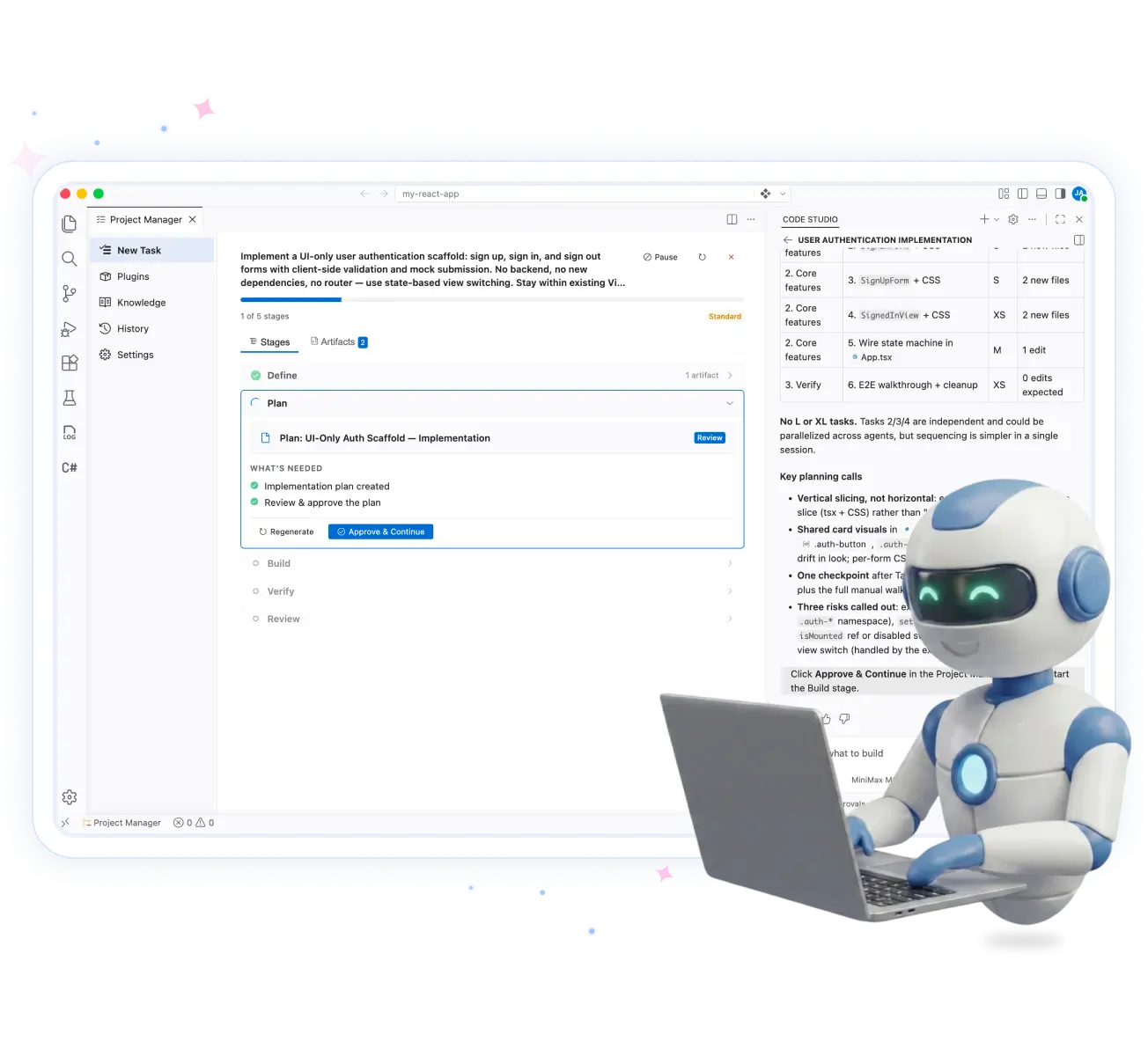
The Project Manager brings agentic engineering to Syncfusion Code Studio by orchestrating AI-assisted development through structured workflows inside your IDE. It helps teams plan, build, verify, review, and deliver production-ready software faster.
-
AI-guided SDLC
-
Smart project planning
-
Built-In quality gates
-
Complete audit trail

Built by Syncfusion. Trusted by 41,000+ enterprises.
25+ years of developer tools, now reimagined for the agent first era.

Enterprises

UI Components

Years in Business

Fortune 500 Companies
Why having a project manager matters
Fast AI Coding Isn't the Problem. Skipping the Process Is.
AI coding assistants accelerate development but don't enforce engineering best practices. Project Manager guides every task through a structured workflow—from requirements to code quality—reducing technical debt without leaving your IDE.
No clear requirements
Start every feature with an AI-generated specification before writing code.
Unplanned development
Automatically create structured implementation plans and task sequencing.
Missing quality checks
Run testing, validation, accessibility, and security reviews before delivery.
Scattered project context
Keep project knowledge, artifacts, and decisions together in one workspace.
Project Manager panel
Everything you need to manage AI-assisted development in one workspace
The Project Manager organizes every stage of AI-assisted development inside Code Studio. Create tasks, extend AI with plugins, maintain project knowledge, review development history, and configure software development lifecycle (SDLC) workflows—all from a single panel.
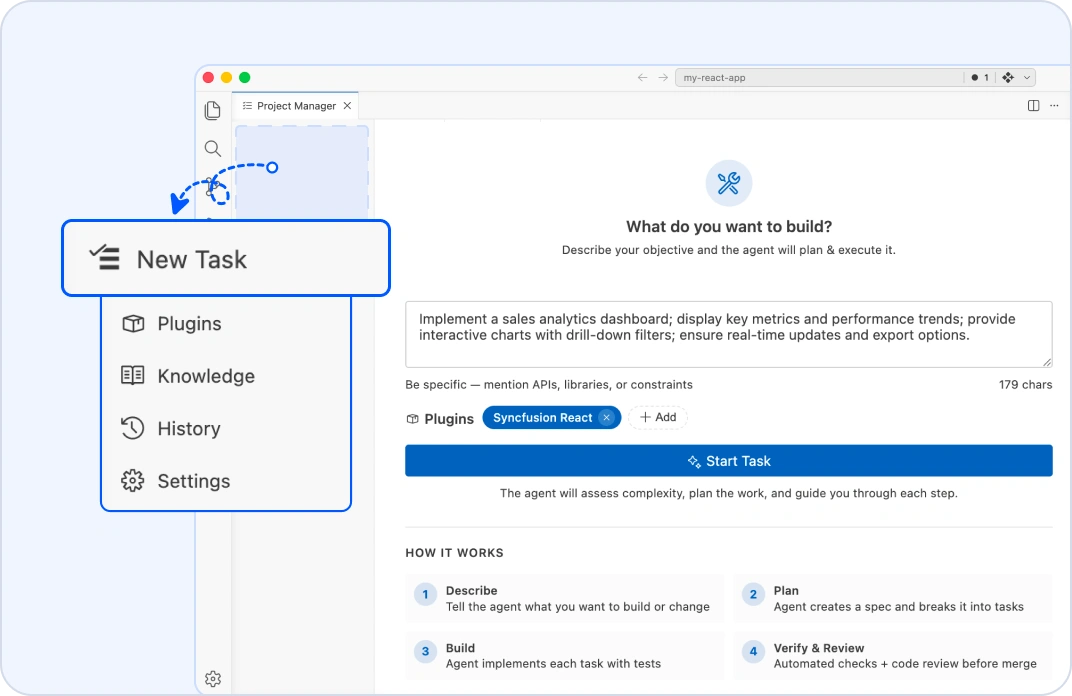
New task
Start every AI workflow with a simple prompt
Describe what you want to build in plain language. The Project Manager analyzes your project, selects the appropriate SDLC process, and automatically begins the workflow of define, plan, build, verify, and review. Pause or cancel tasks at any time without losing control of your development process.
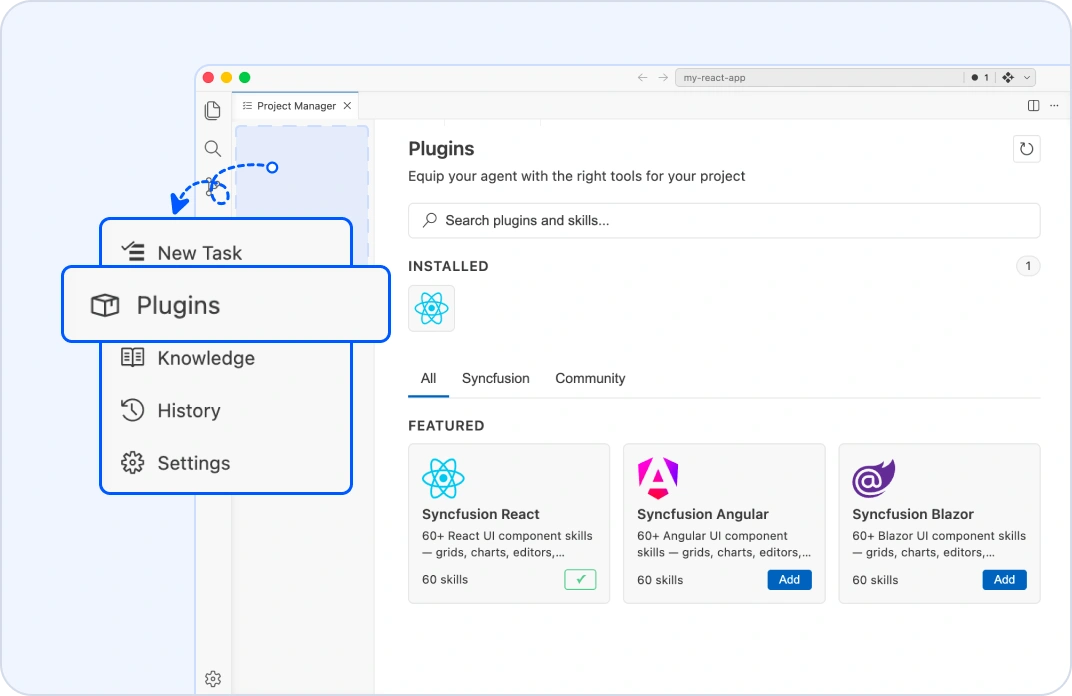
Plugins
Equip AI with framework-specific expertise
Install Syncfusion and community plugins to give AI specialized knowledge of frameworks, libraries, and development tools. Attach plugins to individual tasks so AI generates code using the right technologies and best practices for your project.
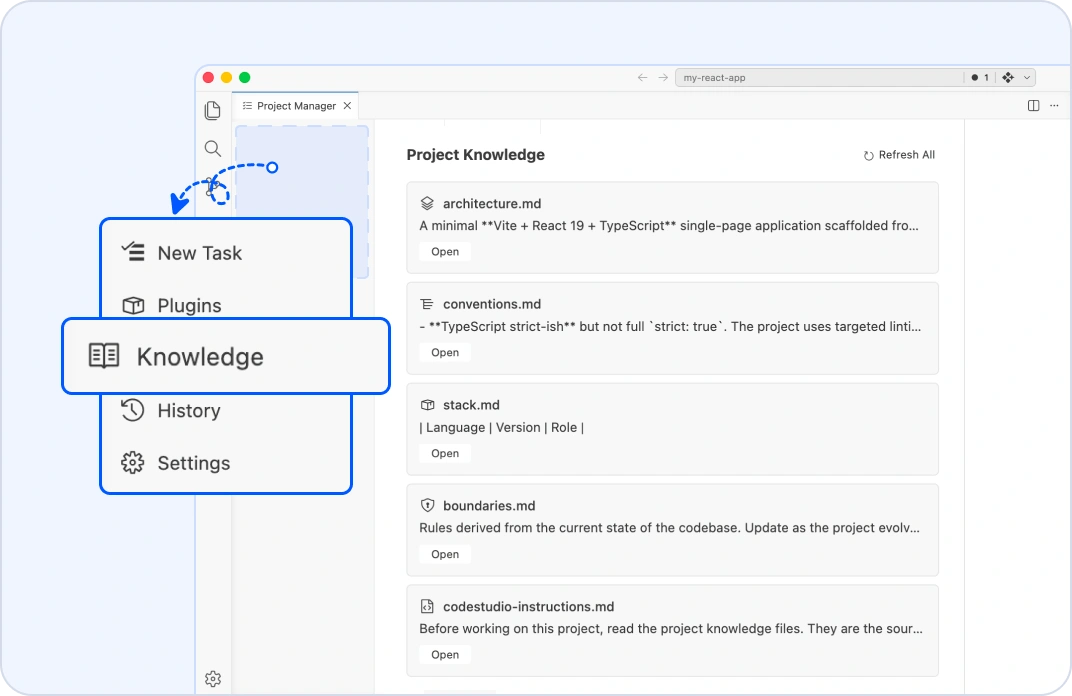
Knowledge
Keep AI continuously aligned with your codebase
Project Manager automatically creates and maintains project knowledge files that help AI understand your application before every task. Review, edit, or refresh these files whenever your project evolves. Use Refresh All after major codebase changes to keep AI working with the latest project context.
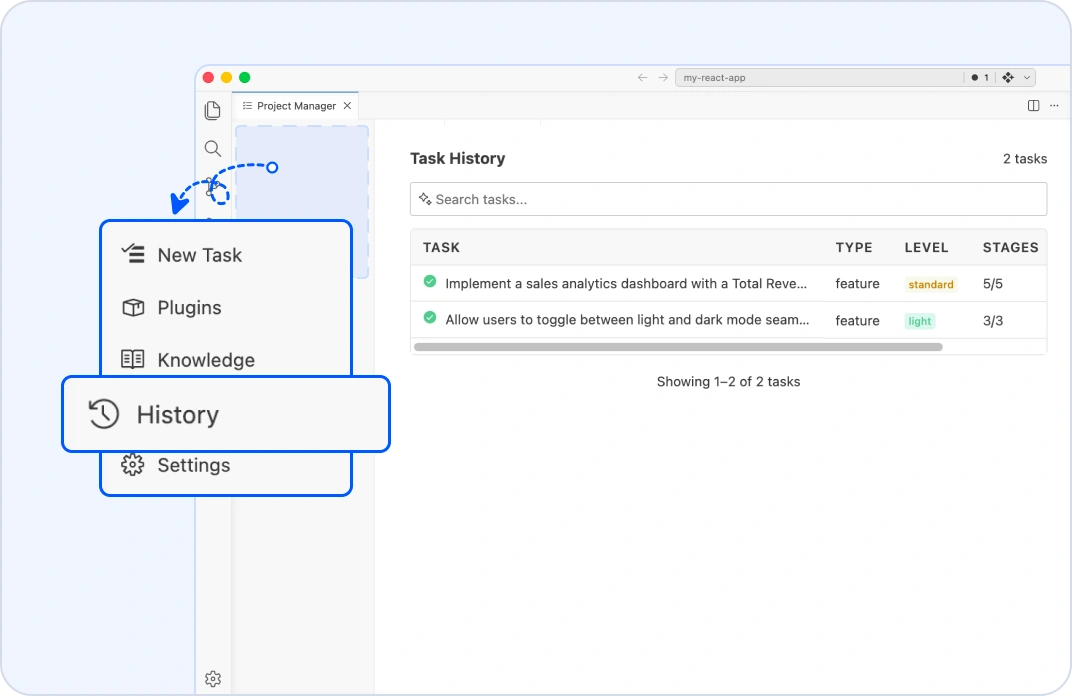
History
Access every task, artifact, and engineering decision
Review every completed task from a single timeline, including specifications, implementation plans, verification reports, code reviews, completed stages, time stamps, and generated artifacts. Nothing is lost between development sessions, giving your team complete traceability throughout the project lifecycle.
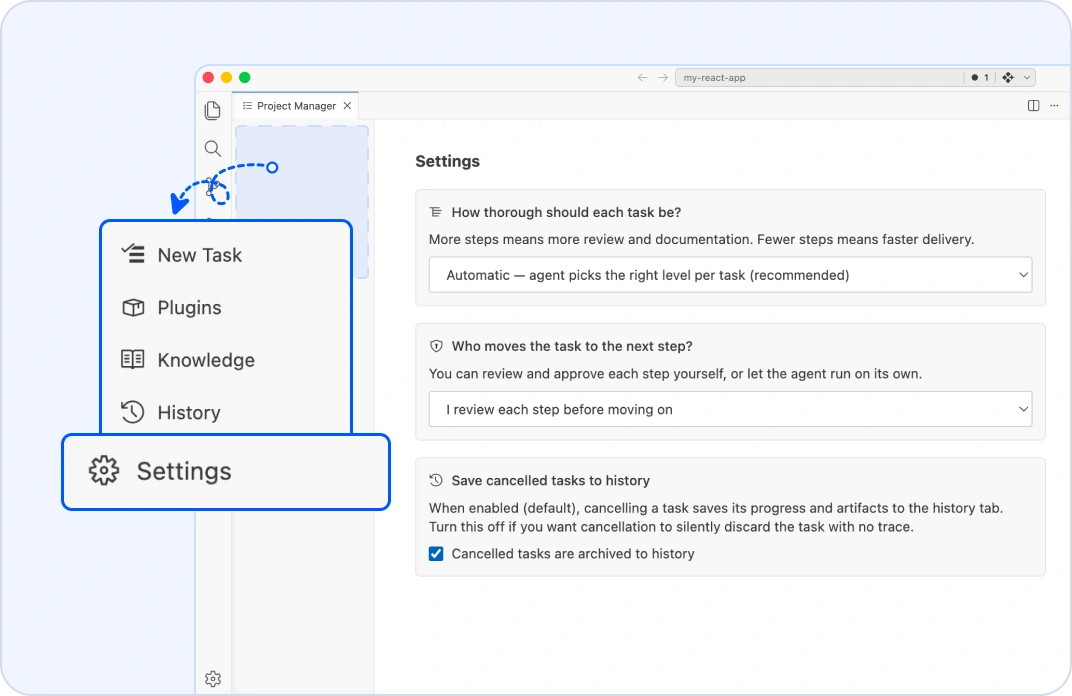
Settings
Configure the SDLC to match your development standards
Choose the right process level for every project with quick, standard, thorough, and maximum workflows. Configure quality gates, approval preferences, and automation settings so the Project Manager performs the right accessibility, security, performance, and code quality checks before every stage is completed.
Project Manager stages
From requirements to production—Every step is structured
The Project Manager automatically guides every AI-assisted task through a structured SDLC. Each lifecycle phase builds on the previous one, generating project artifacts, enforcing approvals, and ensuring every feature is planned, validated, and reviewed before delivery.
Define
The AI analyzes your codebase, understands the project context, and generates a detailed spec.md that captures requirements, design decisions, and implementation assumptions. Review and approve the specification before development begins.
Plan
The AI transforms the approved specification into a structured plan.md with implementation phases, prioritized tasks, dependencies, and the safest execution order. Confirm the plan before moving to development.
Build
The Project Manager has the AI implement the approved plan by generating code, updating project files, and creating tests while following your architecture, coding standards, and project conventions. Review the implementation summary before continuing.
Verify
The AI runs automated verification checks: testing, production builds, code quality, accessibility, performance, and project-specific validations. Review the generated verification report before progressing.
Review
The AI performs a comprehensive code review that evaluates correctness, readability, architecture, security, and performance. Look at the final code review report and approve the implementation for delivery.
Project Manager lifecycle
The right workflow for every development task
The Project Manager automatically evaluates the size, complexity, and risk of every AI-assisted task, then selects the appropriate development workflow. Small updates move quickly, while complex or high-risk changes receive additional engineering stages, quality gates, and approval checkpoints—ensuring every task gets the right level of SDLC discipline.
Light
The light workflow is for documentation updates, configuration changes, and simple bug fixes. It runs a streamlined workflow with the essential stages required to complete low-risk tasks efficiently.

Standard
The standard workflow is for everyday feature development and code refactoring. It includes specifications, code reviews, and required approvals to maintain software quality.
Thorough
The thorough workflow is for complex features, architectural updates, and security-sensitive work. It adds security reviews, prelaunch validation, and additional quality checks before delivery.
Maximum
Built for mission-critical changes like authentication, database migrations, payment systems, and breaking APIs with the highest governance, quality gates, and approvals.
Who gets the most value from the Project Manager
Built for teams that want AI development with structure
Whether you're building new features, managing engineering standards, or onboarding developers, the Project Manager helps your team follow a consistent SDLC without adding manual overhead.
AI-first developers
Build faster without sacrificing engineering discipline. The Project Manager automatically generates specifications, implementation plans, code reviews, and documentation. So every AI-assisted task has a clear record of what was built and why.
Engineering managers
Ensure engineering standards are followed across every project. Verify that specifications, security reviews, quality checks, and approvals are completed before code reaches production, with a complete artifact history for every task.
Growing development teams
Help new developers become productive faster. Every completed workflow produces specifications, implementation plans, and code reviews that explain not only what was built, but also the reasoning behind key engineering decisions.
Teams building critical applications
Reduce delivery risks for applications in which quality matters most. The Project Manager adds structured workflows and review gates to projects involving user-facing applications, data pipelines, public APIs, authentication systems, and payment workflows.
Bring structure to every AI-assisted development workflow
Don't let important engineering steps get skipped. Use the Project Manager to automate your SDLC with AI-guided planning, built-in quality gates, structured reviews, and complete project traceability—all from inside your IDE.
Frequently Asked Questions
The Project Manager is a built-in SDLC tool that guides AI-assisted development through structured workflows. It automates requirements, planning, implementation, verification, and code reviews while keeping every decision documented inside your project.
Other AI coding tools primarily generate code from prompts. The Project Manager adds a structured engineering process by creating specifications, implementation plans, quality checks, approval gates, and code reviews before work is considered complete.
Yes. The Project Manager can scan an existing codebase to generate architecture.md, stack.md, conventions.md, boundaries.md, and codestudio-instructions.md project knowledge files. These allow the AI to understand your project before development begins.
Yes. Project Manager can pause after each stage for developer approval or continue automatically based on your workflow settings.
The Project Manager automatically generates and maintains specifications, implementation plans, verification reports, code review reports, and project knowledge files. These artifacts remain available in the project history.
The Project Manager automatically applies quality gates based on your code changes, including testing, security reviews, accessibility validation, performance checks, and code reviews. This helps teams deliver production-ready software without manually managing the development process.