
Offline Ready Inventory Management App Using Syncfusion .NET MAUI Datagrid


An offline-capable, cross-platform Inventory Management System built using .NET MAUI, Syncfusion DataGrid, SQLite, and MVVM architecture.
This app helps you manage stock, create orders, generate bills, review past transactions, and export reports all with fast, smooth performance on Windows, macOS, Android, and iOS.
Features
Inventory Management
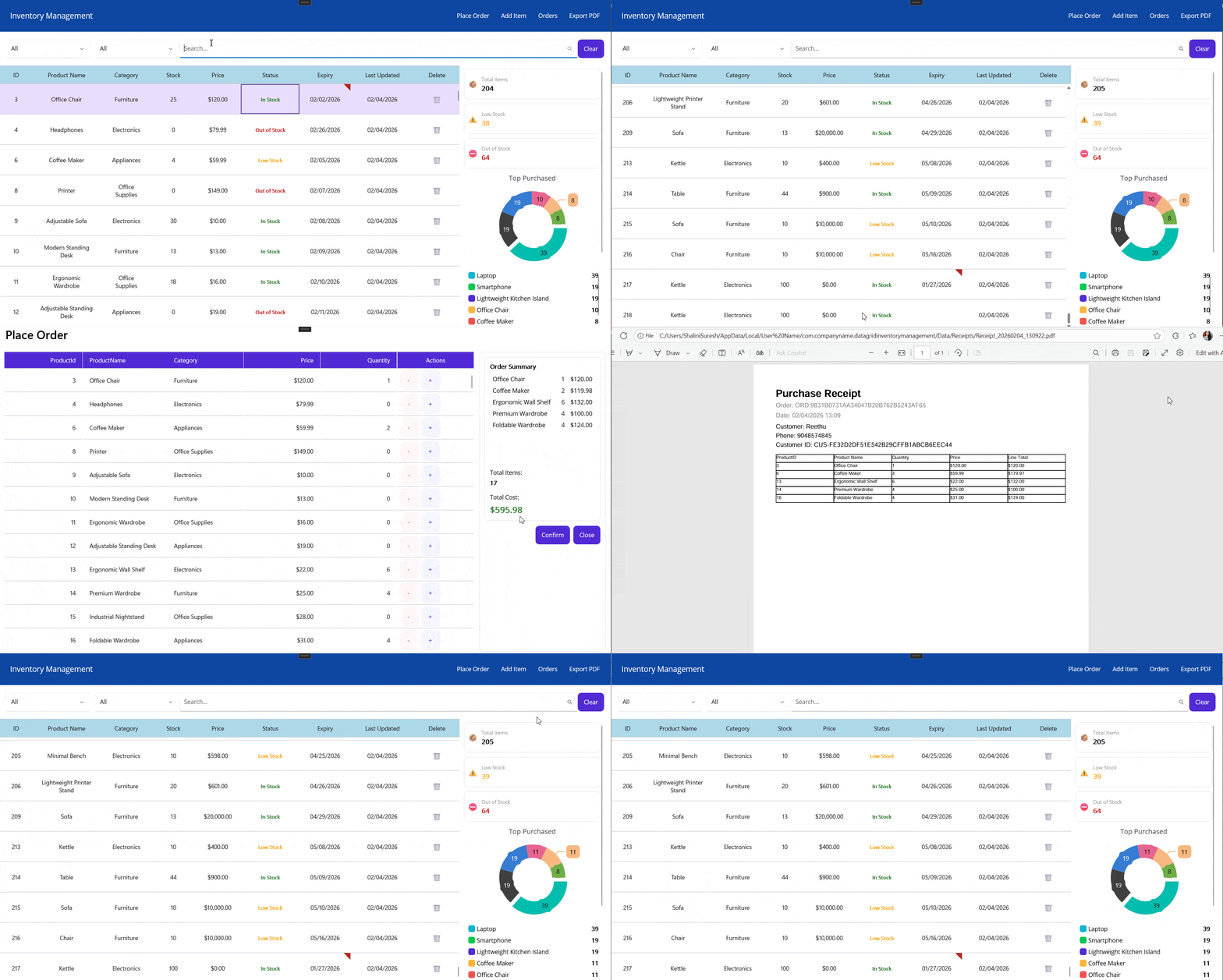
- View all stock items in a Syncfusion DataGrid
- Add, edit, and delete inventory items
- Real-time filtering by category, status, or search text
- Auto-refreshing UI using MVVM + ObservableCollection
Order Management
- Select products with quantity controls
- Auto-calculated totals
- Form validation for customer inputs
- Smooth multi-step order flow
Billing & Reporting
- Generate clean, ready-to-share PDF bills
- Export entire inventory as a structured PDF
- Store past orders locally
- Open past bill summaries anytime
Cross-Platform Offline Support
- SQLite-backed persistent storage
- Works seamlessly offline
- Consistent experience on Windows, macOS, Android, iOS
Tech Stack
| Component | Purpose |
|---|---|
| .NET MAUI | Cross-platform UI |
| Syncfusion .NET MAUI DataGrid | Display and manage inventory |
| SQLite-net-pcl | Offline local database |
| MVVM Pattern | Clean separation of UI & logic |
Getting Started
1. Clone the repository
git clone https://github.com/your-repo/offline-inventory-app.git
cd offline-inventory-app
2. Install Dependencies
Inside your .NET MAUI project, install:
dotnet add package SQLite-net-pcl
dotnet add package Syncfusion.Maui.DataGrid
3. Register Syncfusion License
Add in MauiProgram.cs:
Syncfusion.Licensing.SyncfusionLicenseProvider.RegisterLicense("YOUR LICENSE KEY");
4. Run the Application
dotnet build
dotnet run
Screenshots
Conclusion
Thanks for reading! In this blog, we’ve seen Offline-Ready Inventory System in .NET MAUI DataGrid. Check out our Release Notes and What’s New pages to see the other updates in this release and leave your feedback in the comments section below. For current Syncfusion customers, the newest version of Essential Studio is available from the license and downloads page. If you are not yet a customer, you can try our 30-day free trial to check out these new features. For questions, you can contact us through our support forums, feedback portal, or support portal. We are always happy to assist you!
Troubleshooting
Path Too Long Exception
If you are facing a path too long exception when building this example project, close Visual Studio and rename the repository to short and build the project.
For a step-by-step procedure, refer to the link.

