
Syncfusion® Blazor Smart PDF Viewer Examples


This repository contains implementation examples for the Syncfusion® Blazor Smart PDF Viewer - an AI-enhanced PDF component that extends conventional PDF viewing capabilities with intelligent document processing. The component integrates advanced AI technologies to deliver Document Summarization with interactive Q&A, Smart Redaction for sensitive content protection, and Smart Fill for automated form completion, providing developers with tools to create more efficient and secure document management solutions.
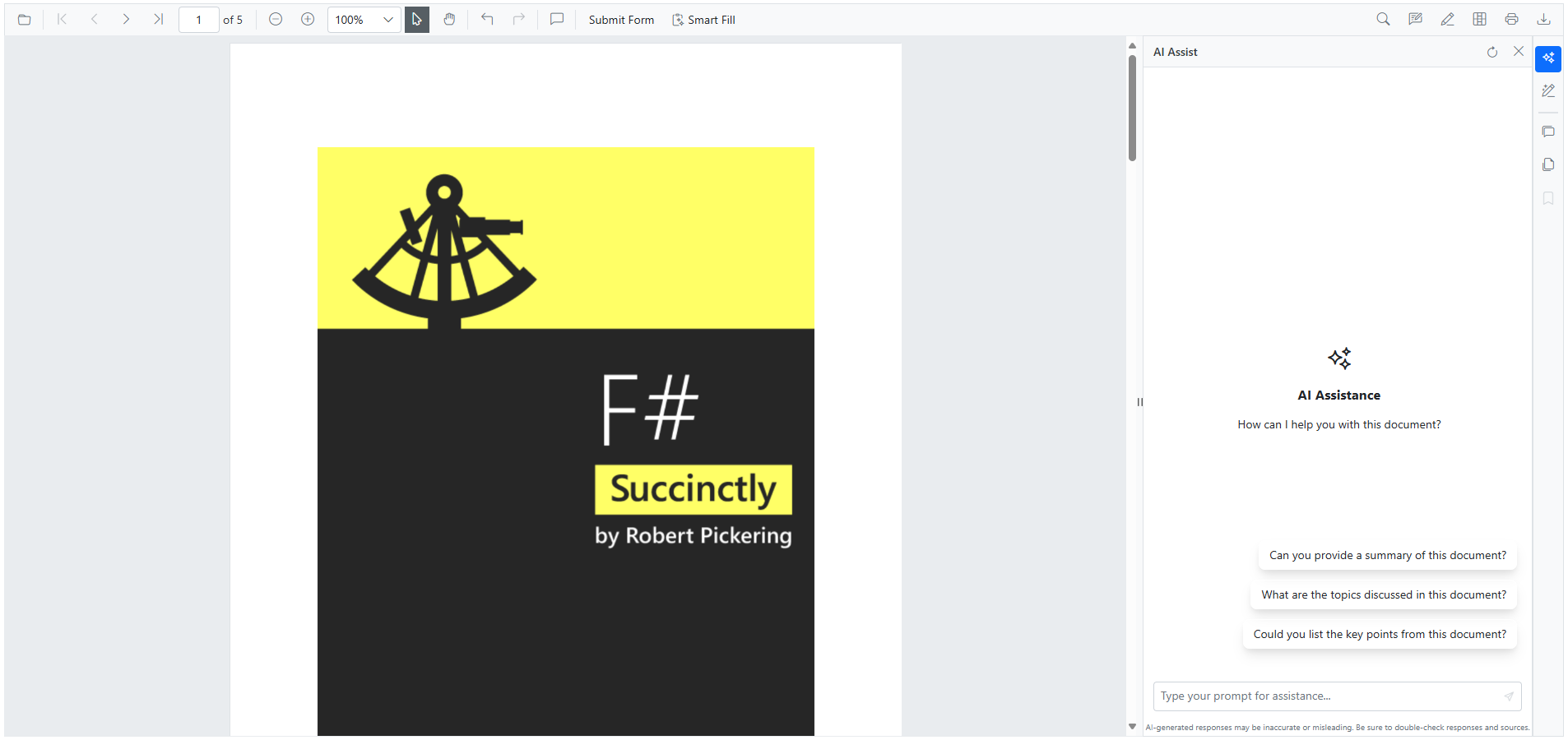
Key AI-Powered Features in Smart PDF Viewer
The Syncfusion® Blazor AI-Powered PDF Viewer incorporates three powerful AI-driven features:
- AI Assistance
- Smart Redaction
- Smart Fill
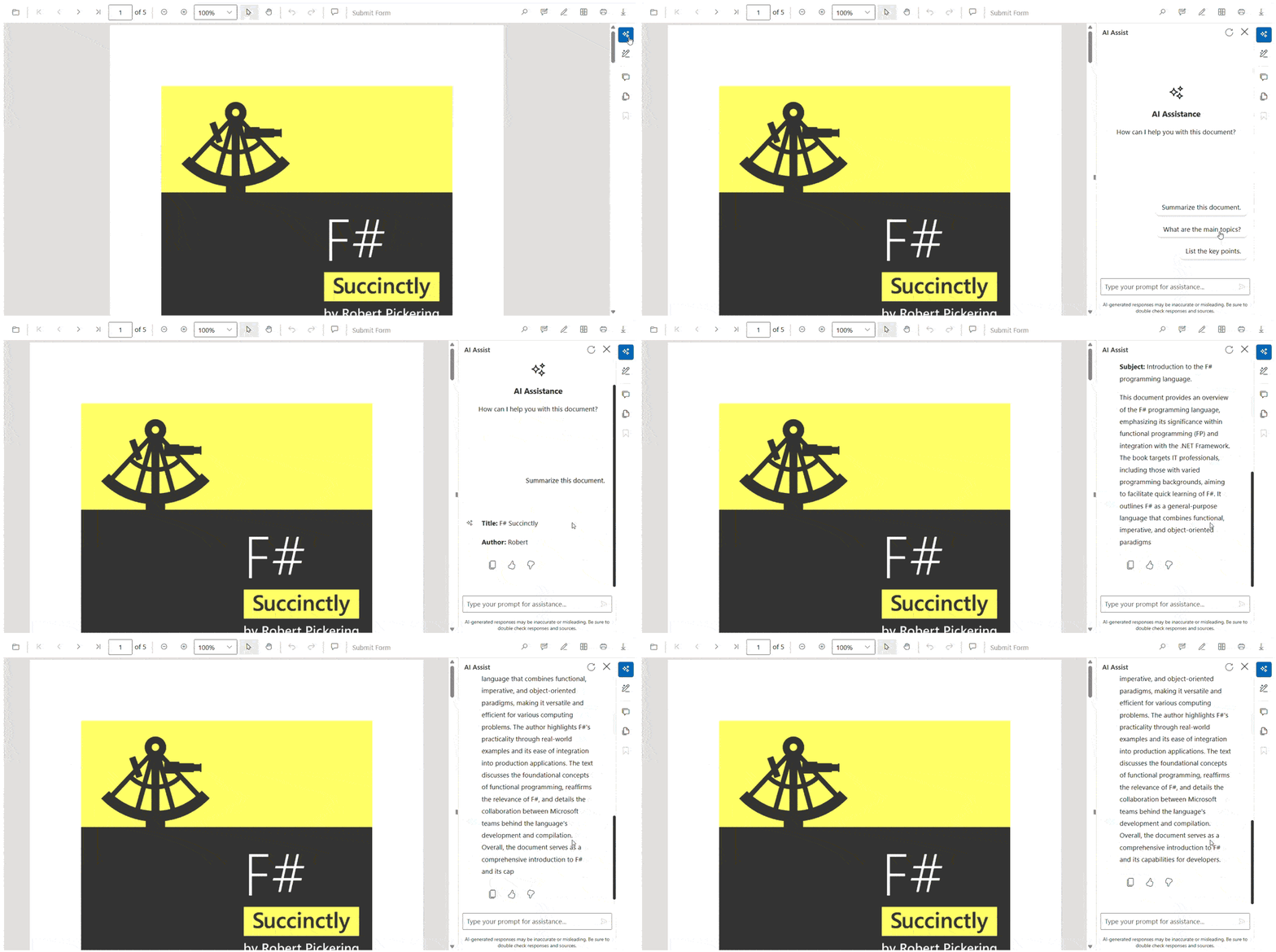
AI-Powered Document Summarization and Interactive Q&A
This feature leverages advanced AI to deliver intelligent document analysis and deeper content understanding. Highlights include:
- Easy Understanding: Automatically analyzes PDF content and helps users grasp key points quickly without reading the entire document.
- Interactive Q&A: Allows users to ask custom questions or choose from AI-suggested queries for deeper insights.
- Ideal for Complex Documents: Perfect for legal contracts, research papers, business reports, and other lengthy or technical PDFs.
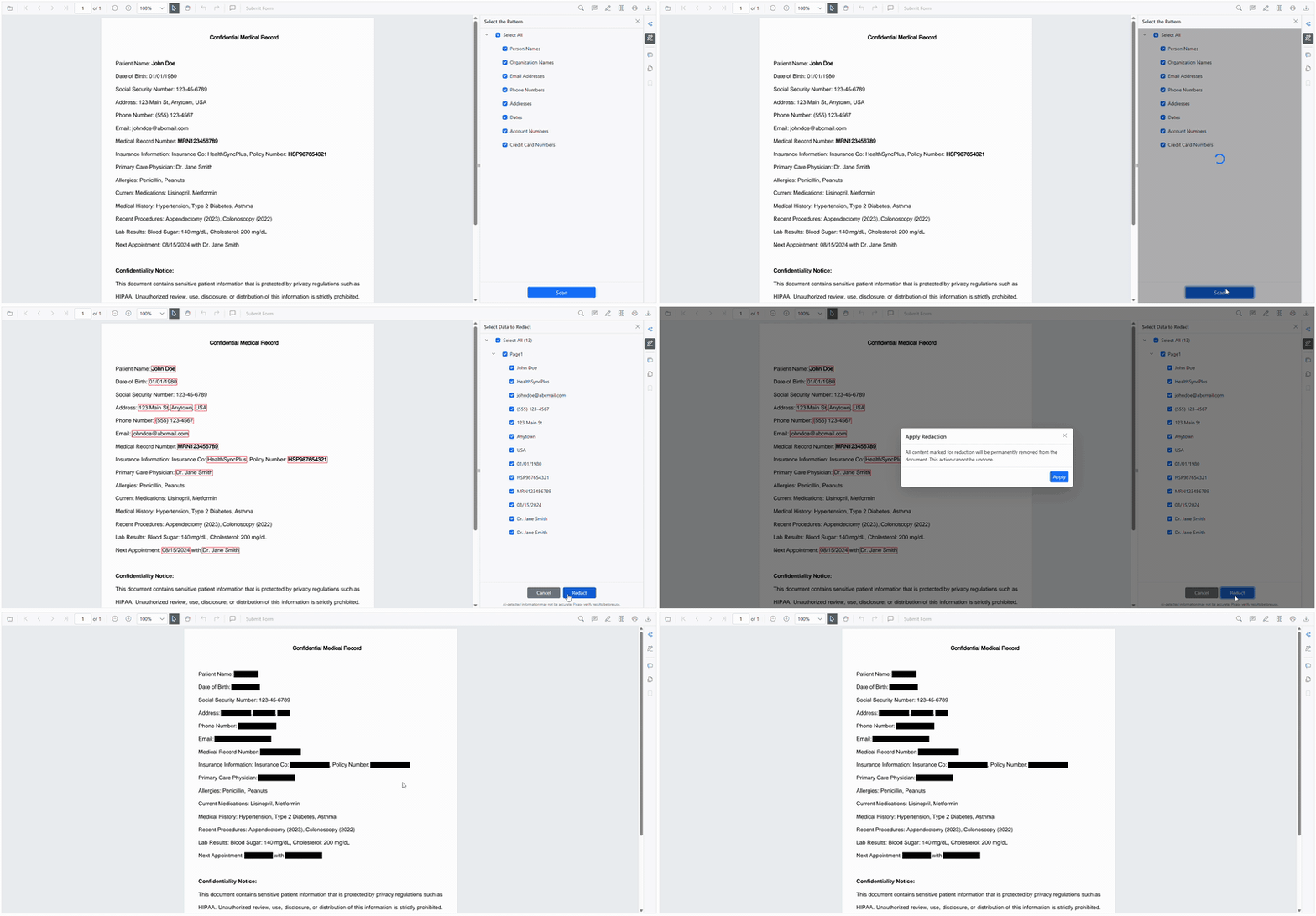
Intelligent Document Redaction and Privacy Protection
The AI-Powered PDF Viewer includes an AI-powered redaction system that intelligently identifies and safeguards sensitive information. Key capabilities:
- PII Data Detection: Automatically identifies Personally Identifiable Information such as Social Security Numbers, email addresses, and phone numbers.
- Customizable Redaction Patterns: Supports domain-specific data recognition for medical records, financial details and other industry-specific compliance needs.
- Consistent Redaction: Ensures secure and uniform redaction across all documents to maintain privacy and regulatory standards.
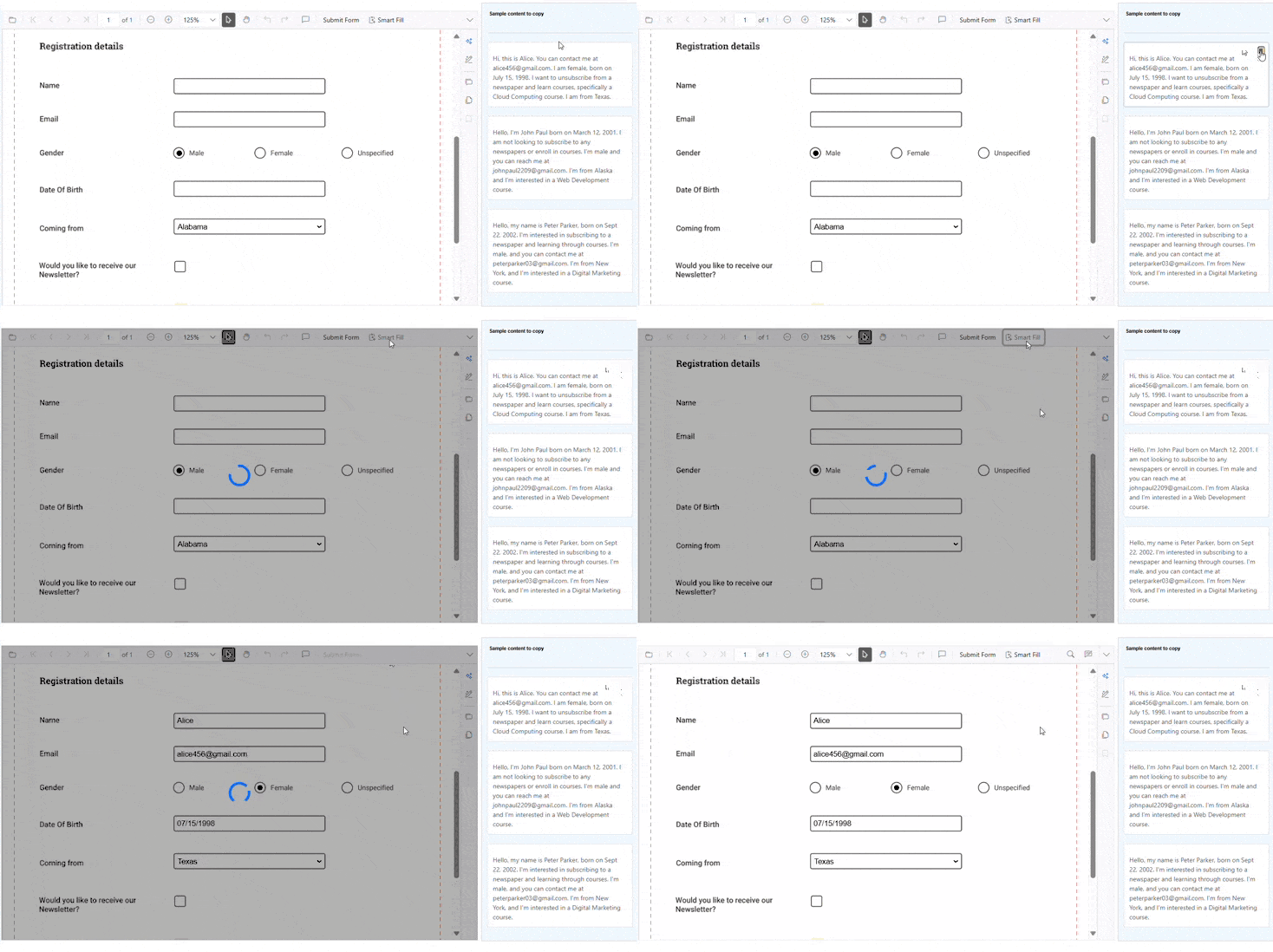
AI-Enhanced Smart Form Filling and Data Extraction
This feature streamlines data entry using AI. Key benefits:
- Clipboard Data Extraction: Automatically extracts relevant information from clipboard content copied from any document or structured data source.
- Intelligent Field Mapping: Accurately assigns extracted data to the appropriate form fields using AI.
- Efficient Data Entry: Reduces manual input while improving accuracy and overall form-filling speed.
Configuration and Setup Instructions
System Requirements and Prerequisites
- .NET 8.0 or later
- Visual Studio 2022 (v17.4 or later) or Visual Studio Code with C# extension
- An active OpenAI API key or Azure OpenAI service subscription
- Minimum 4GB RAM for optimal AI processing performance
- Internet connection for AI service communication
Configuring AI Service Credentials
To run AI samples, navigate to the Program.cs file in any sample project and replace the following placeholders with your actual credentials:
Azure OpenAI Configuration
string apiKey = "your-api-key";
string deploymentName = "your-deployment-name";
string endpoint = "your-azure-endpoint-url";
Your Azure endpoint URL structure:
https://{resource_name}.openai.azure.com/
To use Azure OpenAI, install the Azure.AI.OpenAI package separately in your Blazor application.
OpenAI Configuration
If you are using OpenAI, create an API key and configure as follows:
string openAiKey = "your-openai-api-key";
string deploymentName = "gpt-3.5-turbo"; // or gpt-4, gpt-4-turbo
string endpoint = ""; // Leave empty for OpenAI
The deploymentName should be the model you wish to use (e.g., gpt-3.5-turbo, gpt-4, gpt-4-turbo).
Quick Start Guide and Setup Instructions
Step 1: Repository Setup
git clone https://github.com/SyncfusionExamples/blazor-smart-pdf-viewer-examples.git
cd blazor-smart-pdf-viewer-examples
Step 2: Choose and Navigate to a Sample
cd GettingStarted
Step 3: Configure AI Service Credentials
- Open
Program.csin your preferred editor - Replace placeholder values with your actual AI service credentials
- Ensure proper API key format and endpoint configuration
- Save the configuration changes
Step 4: Build and Run the Sample
dotnet restore
dotnet build
dotnet run
Step 5: Access the Application
- Open your web browser
- Navigate to
https://localhost:5001(HTTPS) orhttp://localhost:5000(HTTP) - Upload a PDF document to test AI features
- Explore Document Summarization, Smart Redaction, and Smart Fill capabilities
- Interact with the AI assistant for document analysis and Q&A
Troubleshooting Common Issues
- API Key Issues: Verify your API key is valid and has sufficient quota
- Network Connectivity: Ensure stable internet connection for AI service calls
- Port Conflicts: Use
dotnet run --urls="https://localhost:5555"for custom ports
Multi-Platform AI Service Integration and Optimization
The repository provides comprehensive examples for integrating various AI service providers with optimized configurations:
- Azure OpenAI Services: Enterprise-grade AI integration with advanced security, compliance features, and scalable deployment options
- OpenAI Platform: Direct OpenAI API integration supporting the latest GPT models with custom fine-tuning capabilities
- Google Gemini AI: Advanced multimodal AI processing with superior language understanding and document analysis
- Groq AI Infrastructure: High-performance AI inference with specialized hardware acceleration for real-time applications
Official Documentation
This table provides a comprehensive overview of all the Smart PDF Viewer AI features and samples in this repository, along with links to their respective documentation site for detailed implementation guidance and documentation.
| Category | Feature | Description | Documentation Link |
|---|---|---|---|
| Getting Started | Basic AI Integration Setup | Comprehensive introduction to Smart PDF Viewer with foundational AI functionality setup, including OpenAI/Azure OpenAI configuration and basic feature implementation. | Read More |
| Document Summarization | AI Assistant Interface | Customizable AI assistant interface with panel positioning, conversation history management, and response formatting options for optimal user experience. | Read More |
| Smart Redaction | AI-Powered PII Detection | Automatic detection and redaction of personally identifiable information (PII) including SSN, emails, phone numbers with context-aware analysis. | Read More |
| Smart Form Filling | AI-Enhanced Form Completion | Intelligent form filling with AI-powered data extraction from clipboard content, supporting various data formats and contextual field suggestions. | Read More |
Support and feedback
- For any other queries, reach our Syncfusion® support team or post the queries through the Community forums and submit a feature request or a bug through our Feedback portal.
- To renew the subscription, click renew or contact our sales team at [email protected] | Toll Free: 1-888-9 DOTNET.
License
Syncfusion JavaScript / Blazor Components is available under the Syncfusion Essential Studio program, and can be licensed either under the Syncfusion Community License Program or the Syncfusion commercial license.
To be qualified for the Syncfusion Community License Program, you must have gross revenue of less than one (1) million U.S. dollars (USD 1,000,000.00) per year and have less than five (5) developers in your organization, and agree to be bound by Syncfusion’s terms and conditions.
Customers who do not qualify for the community license can contact [email protected] for commercial licensing options.
You may not use this product without first purchasing a Community License or a Commercial License, as well as agreeing to and complying with Syncfusion's license terms and conditions.
The Syncfusion® license that contains the terms and conditions can be found at https://www.syncfusion.com/content/downloads/syncfusion_license.pdf
About Syncfusion
Founded in 2001 and headquartered in Research Triangle Park, N.C., Syncfusion® has more than 29,000 customers and more than 1 million users, including large financial institutions, Fortune 500 companies, and global IT consultancies.
Today we provide 1,800+ controls and frameworks for web (ASP.NET Core, ASP.NET MVC, ASP.NET WebForms, JavaScript, Angular, React, Vue, and Blazor, mobile (Xamarin, Flutter, UWP, and JavaScript), and desktop development (WinForms, WPF, and UWP and WinUI)). We provide ready-to deploy enterprise software for dashboards, reports, data integration, and big data processing. Many customers have saved millions in licensing fees by deploying our software.

