
How To Achieve Excel Like Text Alignment In Winforms Gridcontrol?


alignment
excel
excel-like
gridcontrol
text
winforms
By default, text alignment in WinForms GridControl is right-aligned for both alphabetic and numeric values. To achieve Excel-like alignment, use the ExcelLikeAlignment property. With this setting, string values are aligned to the left and numeric values are aligned to the right within each cell, matching Excel’s default behavior.
C#
this.gridControl1.ExcelLikeAlignment = true;
VB
Me.GridControl1.ExcelLikeAlignment = True
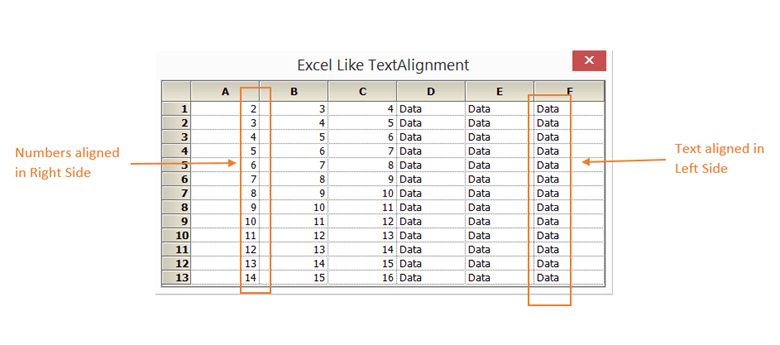
Take a moment to peruse the WinForms GridControl Microsoft Excel Like Features, where you can find about excel like features with code examples.
Requirements
- .NET Framework 4.6 or later
- Windows Forms application
- Syncfusion Windows Forms Suite (GridControl component)
- Visual Studio 2015 or later
Support and Resources
For more information on Syncfusion GridControl, visit Syncfusion Documentation.

