Architecture Compatibility
Adopting a third-party Gantt Chart component for your enterprise application means it has to fit your existing architecture—the framework, build pipeline, deployment model, and organizational standards—without forcing changes. This page covers the compatibility of the Syncfusion® React Gantt Chart with frameworks, React versions, build tools, state management, SSR, micro-front-end architectures, browsers, module formats, CSS strategies, and testing infrastructure. Each section is accompanied by references to the corresponding versioned documentation for deeper examination.
Framework and environment support
The Syncfusion React Gantt Chart integrates as a standard React component in all major deployment environments. The application can run as a Next.js App Router project, Vite SPA or Remix app, or inside a micro-front-end shell. The integration process is uniform across environments, with no environment specific configuration required for the component.
System requirements for all supported environments are documented.
React version compatibility
The Gantt Chart publishes a versioned React compatibility matrix with every release. This provides a documented reference that can be used for upgrade planning.
When upgrading React, keep @syncfusion packages at or above the mapped minimum version to remain supported. Based on the historical adoption pace—React 17 in 2020, React 18 in 2022, React 19 in 2024—Syncfusion has tracked each major, stable React release within approximately 6 to 12 months. This pattern is publicly reviewable in the release notes archive.
Build compatibility
The Gantt Chart installs as a standard npm package and works with the existing build setup without additional configuration or proprietary plugins. Only the feature modules that the application imports are included in the production bundle; everything else is dropped at build time.
State management neutrality
The Gantt Chart has no opinion on how the application manages state. Data goes in as props and events come out—which is the entire contract. Redux, Zustand, TanStack Query, MobX, Jotai, Recoil, and React Context all work without conflict. The Gantt Chart does not require a global store, context provider, or proprietary data layer.
SSR and server component integration
The Gantt Chart integrates with the Next.js App Router using documented client-component boundary patterns and server-driven data loading. It is compatible with Streaming SSR (React Suspense), ISR, and Edge Runtimes, with specific guidance published for each to prevent hydration errors in production.
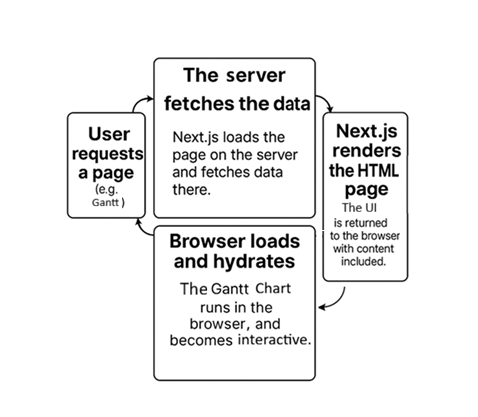
- Data driven loading is supported, where only the required set of Gantt data is prepared and delivered for the initial HTML render, ensuring the component initializes after its data is ready.
- Common hydration issues are avoided by placing the Gantt Chart inside a client component boundary — the documented pattern for App Router integration.
- For Streaming SSR (React Suspense), the Gantt Chart renders inside a Suspense boundary, allowing the surrounding page content to stream and render immediately while the Gantt data is fetched and initialized asynchronously.
- For incremental static regeneration (ISR), the Gantt Chart hydrates correctly on ISR-regenerated pages. No component—specific handling is required.
- Edge runtime—compatibility means that the Gantt Chart has no Node.js-only runtime dependencies that would block Edge deployment.
Browser and runtime support
Syncfusion publishes a versioned browser compatibility matrix with every release. It covers all supported modern browsers, with details on accessibility, high contrast rendering, and legacy browser limitations.
Micro-frontend and Module Federation compatibility
In micro-front-end architecture, loading the same component library multiple times across independent applications causes bundle duplication and version conflicts. The Gantt Chart supports Webpack Module Federation and Single-SPA, with a shared singleton configuration that ensures a single—instance loads across all micro-apps.
Package distribution and module support
Package distribution bundles software into reusable packages for easy sharing and installation, while a module format defines the syntax used to structure and import code across environments.
The full package structure is inspectable on the npm package page.
Theming and design system integration
Gantt Chart theming is built on CSS custom properties, supporting enterprise CSS strategies including CSS modules, Sass, design tokens, and Tailwind utility classes. The Gantt Chart’s theming system allows alignment with branding requirements without modifying source files:
- 22 built-in themes including Fluent 2, Material 3, Bootstrap 5.3, and Tailwind 3.
- Design token-ready via CSS variables; themes stay current across version upgrades without source patching.
- Theme Studio generates exportable SCSS/CSS that can be maintained independently within the project.
CI/CD and testing compatibility
The Gantt Chart works with all standard React testing tools without custom polyfills or separate test environments. Features dependent on the Gantt Chart can be included in CI/CD pipelines using the same test infrastructure that the rest of the application already uses.