How To Show The Password Column In Winforms Gridgroupingcontrol?


password-column
winforms
winforms-application
winforms-controls
winforms-gridgroupingcontrol
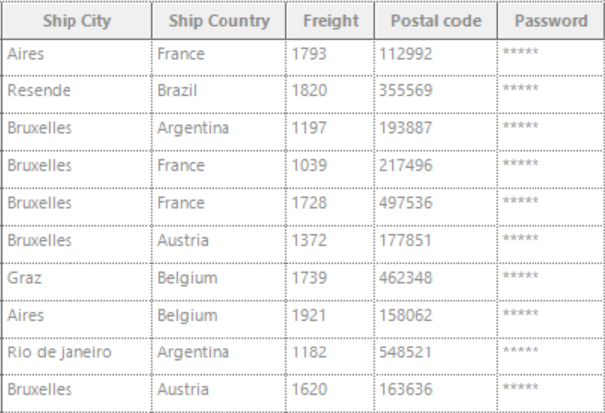
The password column character for the WinForms GridGroupingControl can be set by using the PasswordChar property. The password column character can also be set by using the QueryCellStyleInfo event handler also.
By using the GridColumnDescriptor:
In the following code example, the password character of the Password column is set by using the PasswordChar property.
C
//Sets the password column character by using the PasswordChar property of the TableDescriptor.
this.gridGroupingControl1.TableDescriptor.Columns["Password"].Appearance.AnyRecordFieldCell.PasswordChar = '*';
VB
'Sets the password column character by using the PasswordChar property of the TableDescriptor.
Me.gridGroupingControl1.TableDescriptor.Columns("Password").Appearance.AnyRecordFieldCell.PasswordChar = "*"c
By using the QueryCellStyleInfo Event:
In the following event handler, the password character of the Grid Grouping control is set for the Password column.
C
//Event subscription
this.gridGroupingControl1.QueryCellStyleInfo += GridGroupingControl1_QueryCellStyleInfo;

//Eventcustomization
private void GridGroupingControl1_QueryCellStyleInfo(object sender, GridTableCellStyleInfoEventArgs e)
{
    if (e.TableCellIdentity.Column != null && e.TableCellIdentity.Column.Name == "Password")
    {
        e.Style.PasswordChar = '*';
    }
}
VB
'Event subscription
AddHandler Me.gridGroupingControl1.QueryCellStyleInfo, AddressOf GridGroupingControl1_QueryCellStyleInfo

'Eventcustomization
Private Sub GridGroupingControl1_QueryCellStyleInfo(ByVal sender As Object, ByVal e As GridTableCellStyleInfoEventArgs)
    If e.TableCellIdentity.Column IsNot Nothing AndAlso e.TableCellIdentity.Column.Name = "Password" Then
        e.Style.PasswordChar = "*"c
    End If
End Sub
The screenshot below illustrates the password column in GridGroupingControl