How To Highlighting Row And Column Header Based On Selection In WPF Gridcontrol?


columnheader
gridcontrol
highlight
rowheader
selection
syncfusion
wpf
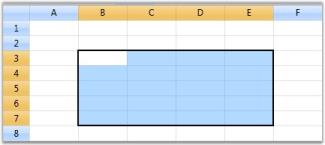
This sample shows row and column header highlighting based on selection in WPF GridControl.
In Excel, whenever a selection is made, the headers of those rows and columns which are involved in the selection will be highlighted. You can get a similar behavior in the Grid by overriding the OnPrepareRenderCell method.
OnPrepareRenderCell method will be invoked for every cell in the grid, when they are about to be rendered. Hence, using this method, the cells which are going to be rendered are identified and their headers are highlighted.
class ExcelGrid : GridControl
{
    protected override void OnPrepareRenderCell(GridPrepareRenderCellEventArgs e)
    {
        base.OnPrepareRenderCell(e);
        if (e.Cell.RowIndex == 0 && Model.SelectedRanges.AnyRangeIntersects(GridRangeInfo.Col(e.Cell.ColumnIndex)))
        {
            e.Style.Background = this.excelOrange;
        }
        else if (e.Cell.ColumnIndex == 0 && Model.SelectedRanges.AnyRangeIntersects(GridRangeInfo.Row(e.Cell.RowIndex)))
        {
            e.Style.Background = this.excelOrange;
        }
    }
    private Brush excelOrange = new SolidColorBrush(Color.FromRgb(244, 198, 111));
}