
Mail Merge And AI Powered Editing In Syncfusion React DOCX Editor


Introduction
This sample demonstrates document editing, Mail Merge, and reusable document sections using the Syncfusion® React DOCX Editor (Document Editor) in client and an ASP.NET Core Web API.
Features
AI-Assisted Editing
The AI Assist experience is integrated into the React DOCX editor and communicates with Azure OpenAI through the ASP.NET Core API.
The sample supports:
- AI content generation.
- Rephrasing selected content.
- Grammar improvement.
- Translation.
The Azure OpenAI API key remains on the server and is not exposed to the React client.
Mail Merge
- Execute Mail Merge using Syncfusion DocIO.
- Open the merged result in the existing Document Editor.
A sample data file is available under for the default document loaded in the Document Editor:
Input Data/Retail and Credit approval.json
Reusable Sections
- Add and Load the reusable document sections from the Server.
- Insert the section in to Document Editor either by drag-and-drop or insert by clicking the section.
- Persist sections in:
Server-side/src/wwwroot/Data/sections.json
Prerequisites
Install the following before running the sample:
- .NET 10 SDK
- Node.js and npm
- A valid Syncfusion license key for the Syncfusion components used by the sample.
- An Azure OpenAI resource with a deployed chat-capable model if the AI features are required.
Configuration
Azure OpenAI Configuration
Azure OpenAI configuration is located in:
Server-side/src/appsettings.json
The repository contains the following configuration section. Configure the chat settings for the AI functionality:
"AzureOpenAI": {
  "ChatEndpoint": "",
  "ChatApiKey": "",
  "ChatDeploymentName": ""
}
Web API Base URL
The React application gets the ASP.NET Core API URL from:
Client-side/src/service-config.js
The default configuration is:
export const API_BASE_URL = 'http://localhost:62870';
export const SERVICE_URL = `${API_BASE_URL}/api/DocumentEditor/`;
If the Web API is deployed to Azure, update API_BASE_URL.
For example:
export const API_BASE_URL = 'https://your-api.azurewebsites.net';
How to Run the Sample
1. Run the ASP.NET Core Web API
Open a terminal in:
Server-side/
Restore the NuGet packages:
dotnet restore
Build the project:
dotnet build
Run the API:
dotnet run
The configured project profile uses:
http://localhost:62870/
Keep the API running.
2. Run the React Client
Open another terminal in:
Client-side/
Install the npm dependencies:
npm install
Start the Vite development server:
npm run dev
Vite will display the client URL in the terminal.
Open the displayed URL in a browser.
Demo
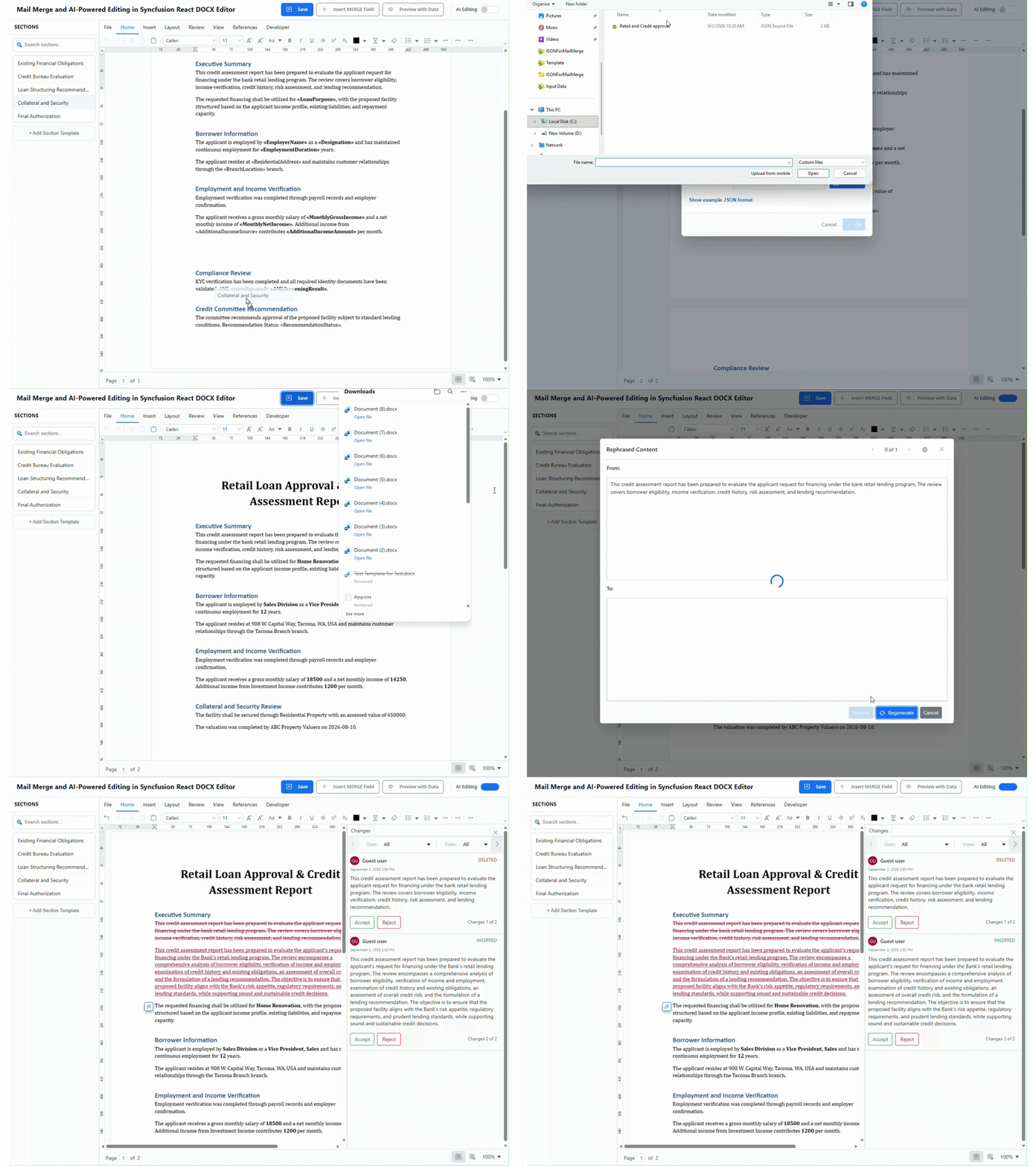
This demo provides an overview of the main capabilities implemented in the sample.
What the Demo Shows
- Reusable Sections – Add a DOCX section, save it on the server, and reuse it from the application.
- DOCX Editing – Open and edit a Word document directly in the browser using Syncfusion DocumentEditor.
- Mail Merge – Use the provided JSON data with a DOCX template to generate a merged document.
- AI Assist – Select content and use AI-powered actions such as Generate, Rephrase, Grammar Improvement, and Translation.
Demo
APIs
The following table lists the APIs relevant to the functionality implemented and used by this sample.
Web API Base URL
http://localhost:62870/api/DocumentEditor/
| HTTP Method | API | Usage in the Sample |
|---|---|---|
POST |
/api/DocumentEditor/Process |
Sends AI prompts/messages from the AI Assist UI to Azure OpenAI through the server. |
POST |
/api/DocumentEditor/Import |
Converts an uploaded DOCX document into SFDT for opening in Syncfusion DocumentEditor. Also used when adding a reusable DOCX section. |
POST |
/api/DocumentEditor/LoadString |
Converts AI-generated HTML content into SFDT so the generated content can be inserted into DocumentEditor. |
POST |
/api/DocumentEditor/MailMerge |
Executes Mail Merge using the current DOCX document and the selected JSON data. Returns the merged document as SFDT. |
GET |
/api/DocumentEditor/GetSections |
Loads the persisted reusable section catalog when the application starts. |
POST |
/api/DocumentEditor/SaveSection |
Converts an uploaded DOCX section to SFDT and persists the section metadata/content in wwwroot/Data/sections.json. |
POST |
/api/DocumentEditor/Save |
DocumentEditor server service used to save the editor document in the requested document format. |
Resources
Product page: Syncfusion® React DOCX Editor
Documentation: Syncfusion® React DOCX Editor - Documentation
Online demo: Syncfusion® React DOCX Editor - Online demo
Support and feedback
For any other queries, reach our Syncfusion® support team or post the queries through the community forums.
Request new feature through Syncfusion® feedback portal.
License
This is a commercial product and requires a paid license for possession or use Syncfusion's licensed software, including this component, is subject to the terms and conditions of Syncfusion's EULA. You can purchase a licnense here or start a free 30-day trial here.

