
How To Sort Winforms Datagrid (Sfdatagrid) Based On The Number Of Items In The Groups?


datagrid
groupdroparea
grouping
groups
sorting
winforms
About the sample
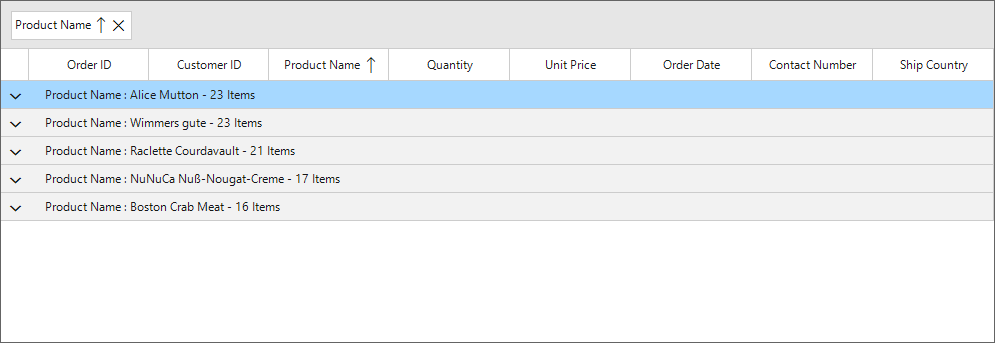
This example illustrates how to sort WinForms DataGrid (SfDataGrid) based on the number of items in the groups.
WinForms DataGrid (SfDataGrid) allows you to sort the items based on the number of records in the groups by using the custom sorting support.
public Form1()
{
    InitializeComponent();
    sfDataGrid1.DataSource = new OrderInfoCollection().OrdersListDetails;

    foreach (var column in this.sfDataGrid1.Columns)
        this.sfDataGrid1.SortComparers.Add(new Syncfusion.Data.SortComparer() { Comparer = new CustomComparer(column.MappingName, this.sfDataGrid1), PropertyName = column.MappingName });
}


public class CustomComparer : IComparer<object>, ISortDirection
{
    string ColumnName { get; set; }

    SfDataGrid DataGrid { get; set; }
    public CustomComparer(string columnName, SfDataGrid dataGrid)
    {
        this.ColumnName = columnName;
        this.DataGrid = dataGrid;
    }
    public int Compare(object x, object y)
    {
        if (x.GetType() == typeof(OrderInfo))
        {
            var valueX = this.DataGrid.View.GetPropertyAccessProvider().GetValue(x, ColumnName);
            var valueY = this.DataGrid.View.GetPropertyAccessProvider().GetValue(y, ColumnName);
            if (valueX is string && valueY is string)
            {
                if (valueX.ToString().CompareTo(valueY.ToString()) > 0)
                    return SortDirection == ListSortDirection.Ascending ? 1 : -1;

                else if (valueX.ToString().CompareTo(valueY.ToString()) == -1)
                    return SortDirection == ListSortDirection.Ascending ? -1 : 1;
                else
                    return 0;
            }
            else if(valueX is DateTime && valueY is DateTime)
            {
                if ((DateTime.Parse(valueX.ToString())).CompareTo(DateTime.Parse(valueY.ToString())) > 0)
                    return SortDirection == ListSortDirection.Ascending ? 1 : -1;

                else if ((DateTime.Parse(valueX.ToString())).CompareTo(DateTime.Parse(valueY.ToString())) == -1)
                    return SortDirection == ListSortDirection.Ascending ? -1 : 1;
                else
                    return 0;
            }
            else
            {
                if (double.Parse(valueX.ToString()) < double.Parse(valueY.ToString()))
                    return SortDirection == ListSortDirection.Ascending ? 1 : -1;

                else if (double.Parse(valueX.ToString()) > double.Parse(valueY.ToString()))
                    return SortDirection == ListSortDirection.Ascending ? -1 : 1;
                else
                    return 0;
            }
        }

        //While sorting groups
        else if (x.GetType() == typeof(Group))
        {
            var countX = ((Group)x).ItemsCount;
            var countY = ((Group)y).ItemsCount;

            if (countX < countY)
                return SortDirection == ListSortDirection.Ascending ? 1 : -1;

            else if (countX > countY)
                return SortDirection == ListSortDirection.Ascending ? -1 : 1;

            else
                return 0;
        }
        else
            return 0;
    }

    private ListSortDirection _SortDirection;

    /// <summary>
    /// Gets or sets the property that denotes the sort direction.
    /// </summary>
    /// <remarks>
    /// SortDirection gets updated only when sorting the groups. For other cases, SortDirection is always ascending.
    /// </remarks>
    public ListSortDirection SortDirection
    {
        get { return _SortDirection; }
        set { _SortDirection = value; }
    }
}
Requirements to run the demo
Visual Studio 2015 and above versions.

