
How To Set Style For Combobox Of The Gridcomboboxcolumn In WPF Datagrid(Sfdatagrid)?


combobox
datagrid
gridcomboboxcolumn
style
styles
wpf
About the sample
This example illustrates how to set style for ComboBox of the GridComboBoxColumn in WPF DataGrid(SfDataGrid).
WPF DataGrid (SfDataGrid) doesn’t have direct support to set style for the ComboBox in the GridComboBoxColumn. However, you can achieve this by creating custom GridCellComboBoxRenderer.
<Window.Resources>
    <Style TargetType="ComboBox" x:Key="comboBoxStyle">
        <Setter Property="Foreground" Value="Blue"/>
    </Style>
</Window.Resources>
public MainWindow()
{
    InitializeComponent();

    this.dataGrid.CellRenderers["ComboBox"] = new CustomComboBoxCellRenderer();
}


public class CustomComboBoxCellRenderer : GridCellComboBoxRenderer
{
    public override void OnInitializeEditElement(DataColumnBase dataColumn, ComboBox uiElement, object dataContext)
    {
        base.OnInitializeEditElement(dataColumn, uiElement, dataContext);
        uiElement.Style = App.Current.MainWindow.Resources["comboBoxStyle"] as Style;
    }
}
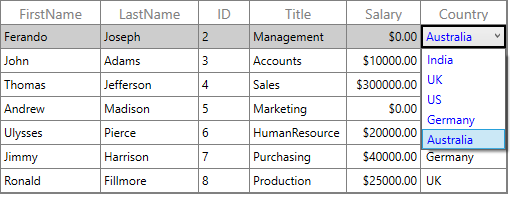
KB article: How to set style for ComboBox of the GridComboBoxColumn in WPF DataGrid(SfDataGrid)?
Requirements to run the demo
Visual Studio 2015 and above versions.

