
How To Set Right Margin In The Column Header In Xamarin Ios Datagrid


This app implements to set the TextMargin in header, to override the GridHeaderCellRenderer, and append some spaces to the text of UI Label following a period and make the color of the period appended at the end of the transparent, such that it will be look like text is set with some margin at the right end. Otherwise we include transparent period at the end of the string after the spaces and set the TextMargin based on the record cells.
Syncfusion Controls
This project uses the following Syncfusion controls:
Screenshots
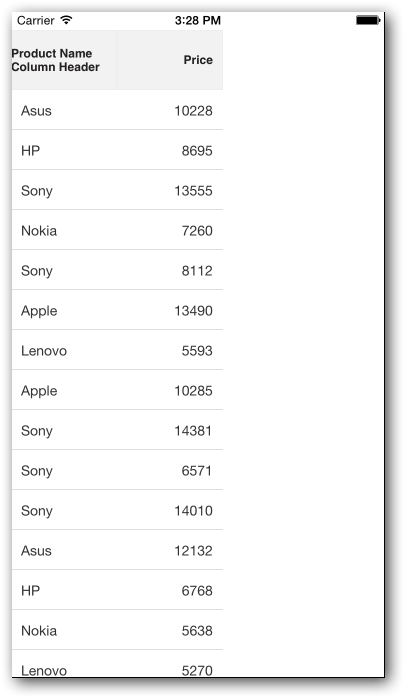
Supported platforms
| Platforms | Supported versions |
|---|---|
| iOS | iOS 9.0 and later versions |
Refer to the following link for more details: System Requirements
Requirements to run the sample
- Visual Studio 2017 or Visual Studio for Mac
- Xamarin add-ons for Visual Studio (available in Visual Studio installer)
How to run the sample
Clone the sample and open it in Visual Studio.
Note: If you download the sample using the "Download ZIP" option, right-click it, select Properties, and then select Unblock.
Register the license key in FinishedLaunching override method of AppDelegate.cs.
public override bool FinishedLaunching(UIApplication application, NSDictionary launchOptions)
{
   //Register Syncfusion license
   Syncfusion.Licensing.SyncfusionLicenseProvider.RegisterLicense("YOUR LICENSE KEY");

   // create a new window instance based on the screen size
   Window = new UIWindow(UIScreen.MainScreen.Bounds);

 // If you have defined a root view controller, set it here:
   // Window.RootViewController = myViewController;

   // make the window visible
   Window.MakeKeyAndVisible();

   return true;
}
Refer to this link for more details.
- Clean and build the application.
- Run the application.
License
Syncfusion has no liability for any damage or consequence that may arise by using or viewing the samples. The samples are for demonstrative purposes, and if you choose to use or access the samples, you agree to not hold Syncfusion liable, in any form, for any damage that is related to use, for accessing, or viewing the samples. By accessing, viewing, or seeing the samples, you acknowledge and agree Syncfusion’s samples will not allow you seek injunctive relief in any form for any claim related to the sample. If you do not agree to this, do not view, access, utilize, or otherwise do anything with Syncfusion’s samples.

