How To Modify Expander Cell Node Checkbox Position In UWP Treegrid?

Sample date Updated on Jan 19, 2026
checkbox expander positionchange treegrid uwp

This example illustrates how to modify Expander cell node checkbox position in UWP TreeGrid (SfTreeGrid).

TreeGrid does not provide the direct support to change the position of Node CheckBox in TreeGridExpanderCell. You can change the position of Node CheckBox by overriding the TreeGridExpanderCell Template in TreeGrid.

XAML

<Page.Resources>
        <syncfusion1:BoolToVisiblityConverter x:Key="VisiblityConverter" />
        <ControlTemplate x:Key="ValidationToolTipTemplate">
            <Grid x:Name="PART_ToolTipPresenter"
              Margin="5,0"
              Opacity="0"
              RenderTransformOrigin="0,0">
                <Grid.RenderTransform>
                    <TranslateTransform x:Name="Transform" X="-25" />
                </Grid.RenderTransform>
                <VisualStateManager.VisualStateGroups>
                    <VisualStateGroup x:Name="OpenStates">
                        <VisualStateGroup.Transitions>
                            <VisualTransition GeneratedDuration="0" />
                            <VisualTransition GeneratedDuration="0:0:0.2" To="Opened">
                                <Storyboard>
                                    <DoubleAnimation Duration="0:0:0.2"
                                                 Storyboard.TargetName="Transform"
                                                 Storyboard.TargetProperty="X"
                                                 To="0">
                                        <DoubleAnimation.EasingFunction>
                                            <BackEase Amplitude=".3" EasingMode="EaseOut" />
                                        </DoubleAnimation.EasingFunction>
                                    </DoubleAnimation>
                                    <DoubleAnimation Duration="0:0:0.2"
                                                 Storyboard.TargetName="PART_ToolTipPresenter"
                                                 Storyboard.TargetProperty="Opacity"
                                                 To="1" />
                                </Storyboard>
                            </VisualTransition>
                        </VisualStateGroup.Transitions>
                        <VisualState x:Name="Closed">
                            <Storyboard>
                                <DoubleAnimation Duration="0"
                                             Storyboard.TargetName="PART_ToolTipPresenter"
                                             Storyboard.TargetProperty="Opacity"
                                             To="0" />
                            </Storyboard>
                        </VisualState>
                        <VisualState x:Name="Opened">
                            <Storyboard>
                                <DoubleAnimation Duration="0"
                                             Storyboard.TargetName="Transform"
                                             Storyboard.TargetProperty="X"
                                             To="0" />
                                <DoubleAnimation Duration="0"
                                             Storyboard.TargetName="PART_ToolTipPresenter"
                                             Storyboard.TargetProperty="Opacity"
                                             To="1" />
                            </Storyboard>
                        </VisualState>
                    </VisualStateGroup>
                </VisualStateManager.VisualStateGroups>

                <Border Margin="4,4,-4,-4"
                    Background="#052A2E31"
                    CornerRadius="5" />
                <Border Margin="3,3,-3,-3"
                    Background="#152A2E31"
                    CornerRadius="4" />
                <Border Margin="2,2,-2,-2"
                    Background="#252A2E31"
                    CornerRadius="3" />
                <Border Margin="1,1,-1,-1"
                    Background="#352A2E31"
                    CornerRadius="2" />

                <Border Background="#FFDC000C" CornerRadius="2" />
                <Border CornerRadius="2">
                    <TextBlock MaxWidth="250"
                           Margin="8,4,8,4"
                           Foreground="White"
                           Text="{TemplateBinding Tag}"
                           TextWrapping="Wrap"
                           UseLayoutRounding="false" />
                </Border>
            </Grid>
        </ControlTemplate>

        <Style TargetType="syncfusion:TreeGridExpanderCell">
            <Setter Property="Background" Value="Transparent" />
            <Setter Property="BorderThickness" Value="0,0,1,1" />
            <Setter Property="BorderBrush" Value="Gray" />
            <Setter Property="Padding" Value="0" />
            <Setter Property="Template">
                <Setter.Value>
                    <ControlTemplate TargetType="syncfusion:TreeGridExpanderCell">
                        <Grid x:Name="Root">
                            <VisualStateManager.VisualStateGroups>
                                <VisualStateGroup x:Name="IndicationStates">
                                    <VisualState x:Name="NoError" />
                                    <VisualState x:Name="HasError">
                                        <VisualState.Setters>
                                            <Setter Target="PART_InValidCellBorder.Visibility" Value="Visible" />
                                        </VisualState.Setters>
                                    </VisualState>
                                </VisualStateGroup>
                                <VisualStateGroup x:Name="CurrentStates">
                                    <VisualState x:Name="Regular" />
                                    <VisualState x:Name="Current">
                                        <VisualState.Setters>
                                            <Setter Target="PART_CurrentCellBorder.Visibility" Value="Visible" />
                                        </VisualState.Setters>
                                    </VisualState>
                                </VisualStateGroup>
                                <VisualStateGroup x:Name="FooterStates">
                                    <VisualState x:Name="NormalCell" />
                                    <VisualState x:Name="FrozenColumnCell"/>
                                    <VisualState x:Name="FooterColumnCell">
                                        <Storyboard BeginTime="0">
                                            <ObjectAnimationUsingKeyFrames BeginTime="0"
                                                                       Duration="1"
                                                                       Storyboard.TargetName="PART_FooterCellBorder"
                                                                       Storyboard.TargetProperty="BorderThickness">
                                                <DiscreteObjectKeyFrame KeyTime="0" Value="1,0,1,1" />
                                            </ObjectAnimationUsingKeyFrames>
                                        </Storyboard>
                                    </VisualState>
                                    <VisualState x:Name="BeforeFooterColumnCell">
                                        <Storyboard BeginTime="0">
                                            <ObjectAnimationUsingKeyFrames BeginTime="0"
                                                                       Duration="1"
                                                                       Storyboard.TargetName="PART_FooterCellBorder"
                                                                       Storyboard.TargetProperty="BorderThickness">
                                                <DiscreteObjectKeyFrame KeyTime="0" Value="0,0,0,1" />
                                            </ObjectAnimationUsingKeyFrames>
                                            <ObjectAnimationUsingKeyFrames BeginTime="0"
                                                                       Duration="1"
                                                                       Storyboard.TargetName="PART_GridCellBorder"
                                                                       Storyboard.TargetProperty="BorderThickness">
                                                <DiscreteObjectKeyFrame KeyTime="0" Value="0,0,0,1" />
                                            </ObjectAnimationUsingKeyFrames>
                                        </Storyboard>
                                    </VisualState>
                                </VisualStateGroup>
                            </VisualStateManager.VisualStateGroups>
                            <Border x:Name="PART_FooterCellBorder"
                                Background="{TemplateBinding Background}"
                                BorderBrush="{TemplateBinding BorderBrush}" 
                                BorderThickness="{TemplateBinding BorderThickness}"/>
                            <Border x:Name="PART_GridCellBorder"
                                    Background="{TemplateBinding Background}"
                                    BorderBrush="{TemplateBinding BorderBrush}"
                                    BorderThickness="{TemplateBinding BorderThickness}">
                                <Grid Margin="{TemplateBinding IndentMargin}">
                                    <Grid.ColumnDefinitions>
                                        <ColumnDefinition Width="Auto" />
                                        <ColumnDefinition Width="18" />
                                        <ColumnDefinition Width="*" />
                                    </Grid.ColumnDefinitions>
                                    <syncfusion:TreeGridExpander x:Name="PART_ExpanderCell"
                                                    Grid.Column="1"
                                                    Width="16"
                                                    Height="16"
                                                    Margin="2,1,0,1"
                                                    HorizontalAlignment="Center"
                                                    VerticalAlignment="Center"
                                                    IsExpanded="{Binding RelativeSource={RelativeSource TemplatedParent},
                                                                         Path=IsExpanded,
                                                                         Mode=TwoWay,
                                                                         UpdateSourceTrigger=PropertyChanged}"
                                                    Visibility="{Binding RelativeSource={RelativeSource TemplatedParent},
                                                                         Path=HasChildNodes,
                                                                         Converter={StaticResource VisiblityConverter},
                                                                         Mode=TwoWay}" />

                                    <CheckBox Name="PART_SelectCheckBox"
                                      Grid.Column="0"
                                      Width="16"
                                      Height="16"
                                      MinWidth="22"
                                      Margin="2,0,0,0"
                                      HorizontalAlignment="Center"
                                      VerticalAlignment="Center"
                                      IsEnabled="{Binding RelativeSource={RelativeSource TemplatedParent},
                                                          Path=IsCheckBoxEnabled,
                                                          Mode=TwoWay,
                                                          UpdateSourceTrigger=PropertyChanged}"
                                      IsTabStop="False"
                                      IsThreeState="True"
                                      Visibility="{Binding Path=ColumnBase.Renderer.TreeGrid.ShowCheckBox,
                                                           RelativeSource={RelativeSource Mode=TemplatedParent},
                                                           Converter={StaticResource VisiblityConverter},
                                                           Mode=TwoWay}" />


                                    <Grid Grid.Column="2"
                                  Margin="2,0,0,0">
                                        <ContentPresenter />
                                        <Border x:Name="PART_CurrentCellBorder"
                                        Margin="1,0,0,0"
                                        Background="Transparent"
                                        BorderBrush="{TemplateBinding CurrentCellBorderBrush}"
                                        BorderThickness="{TemplateBinding CurrentCellBorderThickness}"
                                        IsHitTestVisible="False"
                                        Visibility="Collapsed" />
                                        <Border x:Name="PART_InValidCellBorder"
                                        Width="10"
                                        Height="10"
                                        HorizontalAlignment="Right"
                                        VerticalAlignment="Top"
                                        Visibility="Collapsed">
                                            <ToolTipService.ToolTip>

                                                <ToolTip Background="#FFDB000C"
                                                 Placement="Right"
                                                 Tag="{TemplateBinding ErrorMessage}"
                                                 Template="{StaticResource ValidationToolTipTemplate}" />

                                            </ToolTipService.ToolTip>
                                            <Path Data="M0.5,0.5 L12.652698,0.5 12.652698,12.068006 z"
                                          Fill="Red"
                                          Stretch="Fill" />
                                        </Border>
                                    </Grid>
                                </Grid>
                            </Border>
                        </Grid>
                    </ControlTemplate>
                </Setter.Value>
            </Setter>
        </Style>
</Page.Resources>
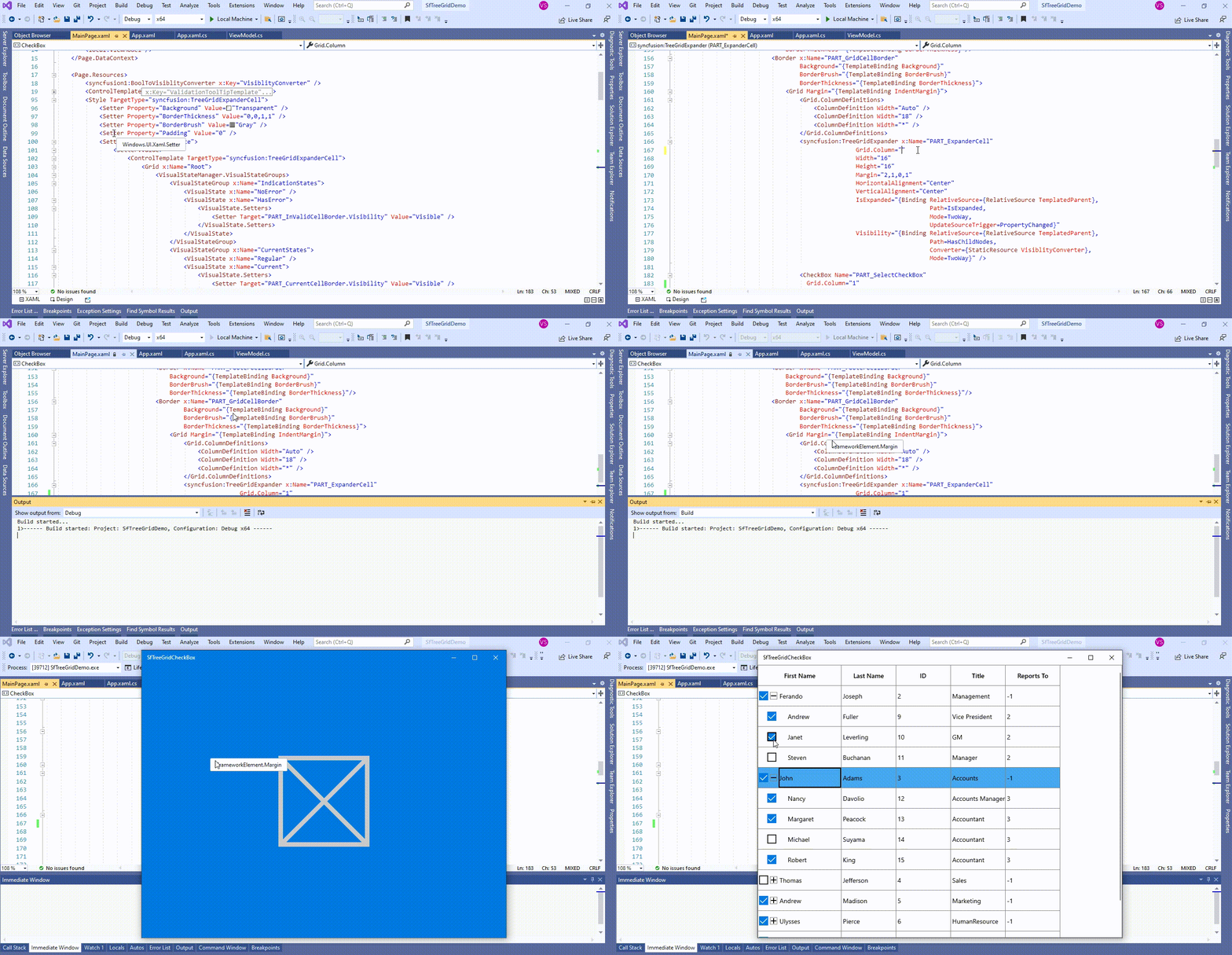
Change the checkbox position in SfTreeGrid

The following screenshot shows the position of Node checkbox changed in TreeGrid,
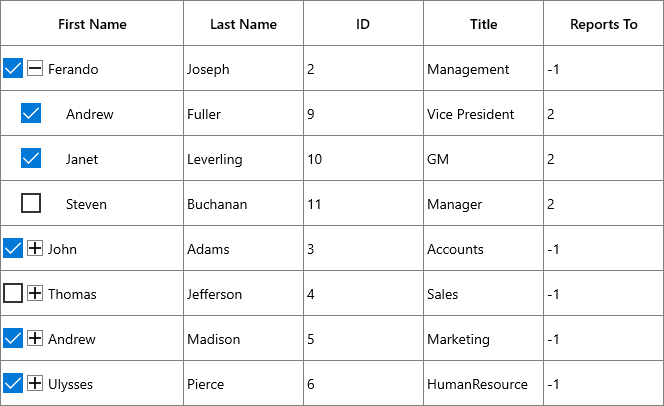
Shows the node checkbox changed in SfTreeGrid

Take a moment to peruse the UWP TreeGrid - Node CheckBox documentation, where you can find about Node CheckBox with code examples.

Requirements to run the demo

Visual Studio 2015 and above versions

Up arrow
