How To Export The Multiple Winforms Datagrid Into Single Worksheet In Excel?


excel
excel-export
export
exporting
exporttoexcel
windows-forms
winforms
winforms-datagrid
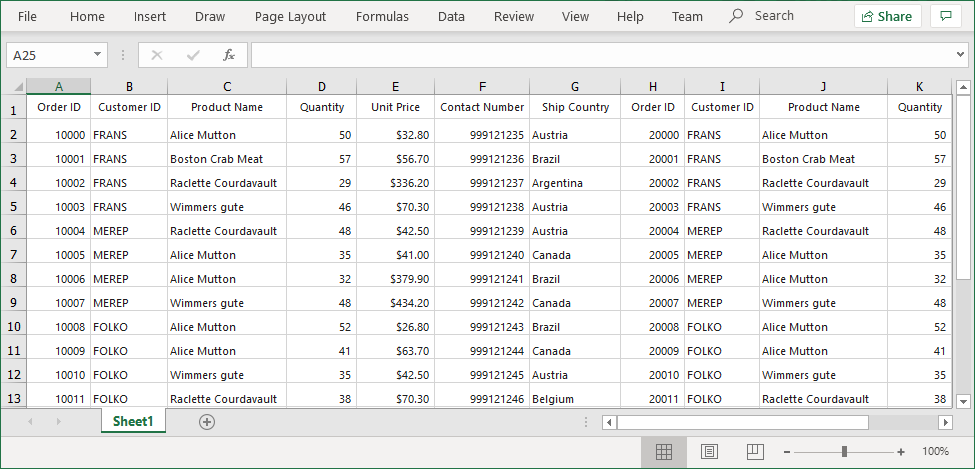
This sample illustrates how to export multiple WinForms DataGrid (SfDataGrid) into single worksheet in excel.
In DataGrid control, you can export data to Excel by using the ExportToExcel method. If you want export multiple DataGrid's to single excel sheet , you need to merge the one SfDataGrid WorkSheet into another SfDataGrid WorkSheet using Worksheet.UsedRange.CopyTo method like the below code example.
using Syncfusion.WinForms.DataGridConverter;
using Syncfusion.XlsIO;
private void OnExportButton_Click(object sender, EventArgs e)
{
    var options = new ExcelExportingOptions();

    var excelEngine = sfDataGrid1.ExportToExcel(sfDataGrid1.View, options);
    var workBook1 = excelEngine.Excel.Workbooks[0];
    var worksheet1 = workBook1.Worksheets[0];

    excelEngine = sfDataGrid2.ExportToExcel(sfDataGrid2.View, options);
    var workBook2 = excelEngine.Excel.Workbooks[0];
    var worksheet2 = workBook2.Worksheets[0];

    var columnCount = sfDataGrid2.Columns.Count;

    //Merge the One SfDataGrid WorkSheet into the other SfDataGrid WorkSheet
    worksheet2.UsedRange.CopyTo(worksheet1[1, columnCount + 1]);
    workBook1.SaveAs("sample.xlsx");
    }
}