How To Export The Multiple Winforms Datagrid Into Multiple Worksheet In Excel?


excel
excel-export
export
exporting
exporttoexcel
windows-forms
winforms
winforms-datagrid
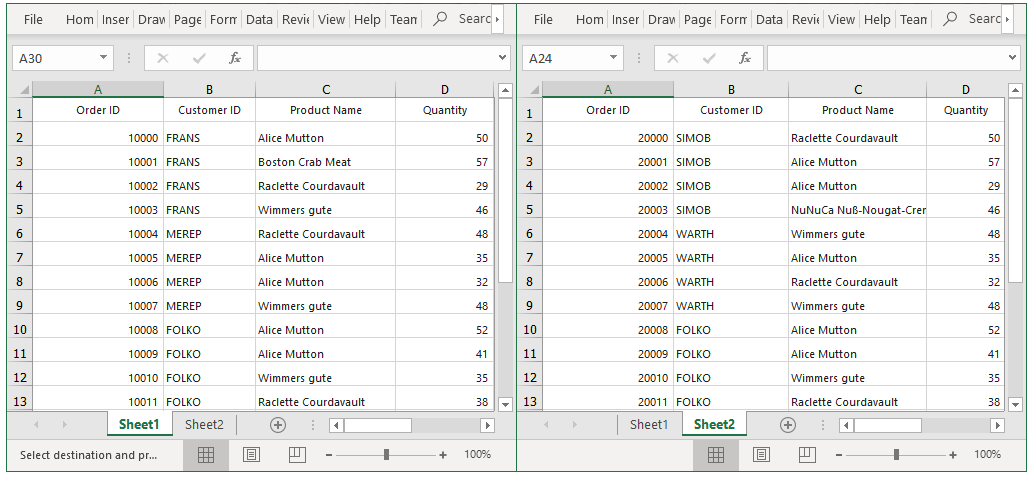
This sample illustrates how to export the data from multiple WinForms DataGrid to different worksheets in a same excel workbook.
In DataGrid, you can export the data to Excel by using the ExportToExcel method.
You can also export the data from multiple SfDataGrid to different worksheets in a same workbook by passing the worksheet to which the data need to be exported as a parameter for the ExportToExcel method.
using Syncfusion.WinForms.DataGridConverter;
using Syncfusion.XlsIO;
private void OnExportButton_Click(object sender, EventArgs e)
{
    var options = new ExcelExportingOptions();
    ExcelEngine excelEngine = new ExcelEngine();
    IWorkbook workBook = excelEngine.Excel.Workbooks.Create();

    sfDataGrid1.ExportToExcel(sfDataGrid1.View, options, workBook.Worksheets[0]);
    sfDataGrid2.ExportToExcel(sfDataGrid2.View, options, workBook.Worksheets[1]);
    workBook.Version = ExcelVersion.Excel2013;

    // Saving the workbook.
    workBook.SaveAs("sample.xlsx");
    }
}