
How To Display Rich Text In Winforms Datagrid?


datagrid
rich-text
rich-text-format
winforms
winforms-datagrid
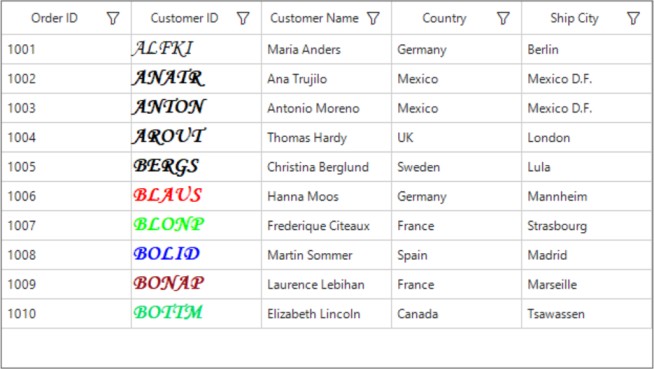
This example explains how to display rich text in WinForms DataGrid.
WinForms DataGrid (SfDataGrid) doesn't have direct support to display RichText’s in the GridTextColumn. However, it is possible to achieve this by overriding the OnRender method in GridTextBoxCellRenderer.
C
//customize the TextBoxCellRenderer
this.sfDataGrid1.CellRenderers.Remove("TextBox");
this.sfDataGrid1.CellRenderers.Add("TextBox", new GridRichTextCellRenderer());

public class GridRichTextCellRenderer : GridTextBoxCellRenderer
{
    protected override void OnRender(Graphics paint, Rectangle cellRect, string cellValue, CellStyleInfo style, DataColumnBase column, RowColumnIndex rowColumnIndex)
    {
        //here customize based on your scenario
        if (column.GridColumn.MappingName == "CustomerID")
        {   //here draw the richtex in SfDataGrid
            TextPainter.DrawRichText(paint, cellValue, cellRect);
        }
        else
            base.OnRender(paint, cellRect, cellValue, style, column, rowColumnIndex);
    }
}
VB
'customize the TextBoxCellRenderer
Me.sfDataGrid1.CellRenderers.Remove("TextBox")
Me.sfDataGrid1.CellRenderers.Add("TextBox", New GridRichTextCellRenderer())

Public Class GridRichTextCellRenderer
    Inherits GridTextBoxCellRenderer

    Protected Overrides Sub OnRender(ByVal paint As Graphics, ByVal cellRect As Rectangle, ByVal cellValue As String, ByVal style As CellStyleInfo, ByVal column As DataColumnBase, ByVal rowColumnIndex As RowColumnIndex)
        'here customize based on your scenario
        If column.GridColumn.MappingName = "CustomerID" Then 'here draw the richtex in SfDataGrid
            TextPainter.DrawRichText(paint, cellValue, cellRect)
        Else
            MyBase.OnRender(paint, cellRect, cellValue, style, column, row-ColumnIndex)
        End If
    End Sub
End Class
Requirements to run the demo
Visual Studio 2015 and above versions

