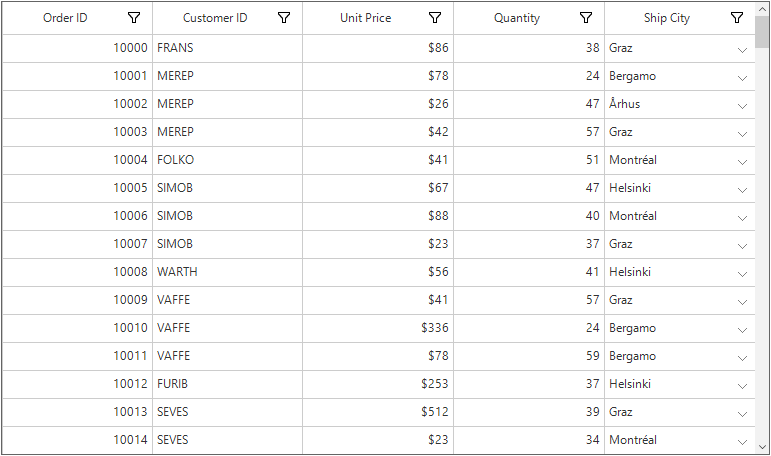
How To Differentiate Combobox Column From Other Columns In Non Editable In View In Winforms Datagrid?


comboboxcolumn
customrenderer
dropdown
windows-forms
winforms
winforms-application
winforms-datagrid
This example illustrates how to differentiate combobox column from other columns in non-editable in view in WinForms DataGrid (SfDataGrid).
Normally, the drop-down arrow for GridComboBoxColumn will be shown only in the edit mode. You can differentiate the combo box column from other columns by showing the drop-down arrow in the display mode by creating custom renderer for the combo box column in DataGrid.
C
public Form1()
{
    InitializeComponent();
    this.sfDataGrid1.CellRenderers["ComboBox"] = new CustomComboBoxCellRenderer();
}

public class CustomComboBoxCellRenderer : GridComboBoxCellRenderer
{
    protected override void OnRender(Graphics paint, Rectangle cellRect, string cellValue, CellStyleInfo style, DataColumnBase column, Syncfusion.WinForms.GridCommon.ScrollAxis.RowColumnIndex rowColumnIndex)
    {
        base.OnRender(paint, cellRect, cellValue, style, column, rowColumnIndex);
        var dropDownbuttonRect = new Rectangle(cellRect.X + cellRect.Width - 17, cellRect.Y + (cellRect.Height / 2), 8, 4);
        paint.DrawLine(new Pen(Color.Gray), dropDownbuttonRect.X, dropDownbuttonRect.Y, dropDownbuttonRect.X + (dropDownbuttonRect.Width / 2), dropDownbuttonRect.Y + dropDownbuttonRect.Height);
        paint.DrawLine(new Pen(Color.Gray), dropDownbuttonRect.X + dropDownbuttonRect.Width, dropDownbuttonRect.Y, dropDownbuttonRect.X + (dropDownbuttonRect.Width / 2), dropDownbuttonRect.Y + dropDownbuttonRect.Height);
    }
}
VB
Public Sub New()
    InitializeComponent()
    Me.sfDataGrid1.CellRenderers("ComboBox") = New CustomComboBoxCellRenderer()
End Sub

Public Class CustomComboBoxCellRenderer
    Inherits GridComboBoxCellRenderer
    Protected Overrides Sub OnRender(ByVal paint As Graphics, ByVal cellRect As Rectangle, ByVal cellValue As String, ByVal style As CellStyleInfo, ByVal column As DataColumnBase, ByVal rowColumnIndex As Syncfusion.WinForms.GridCommon.ScrollAxis.RowColumnIndex)
        MyBase.OnRender(paint, cellRect, cellValue, style, column, rowColumnIndex)
        Dim dropDownbuttonRect = New Rectangle(cellRect.X + cellRect.Width - 17, cellRect.Y + (cellRect.Height \ 2), 8, 4)
        paint.DrawLine(New Pen(Color.Gray), dropDownbuttonRect.X, dropDownbuttonRect.Y, dropDownbuttonRect.X + (dropDownbuttonRect.Width \ 2), dropDownbuttonRect.Y + dropDownbuttonRect.Height)
        paint.DrawLine(New Pen(Color.Gray), dropDownbuttonRect.X + dropDownbuttonRect.Width, dropDownbuttonRect.Y, dropDownbuttonRect.X + (dropDownbuttonRect.Width \ 2), dropDownbuttonRect.Y + dropDownbuttonRect.Height)
    End Sub
End Class