
How To Customize The Gantt Grid Row In Ganttcontrol WPF


customize-gantt-grid-row
gantt
wpf
This article explains how to customize the Gantt grid row in Syncfusion WPF Gantt control, as shown in the following image.
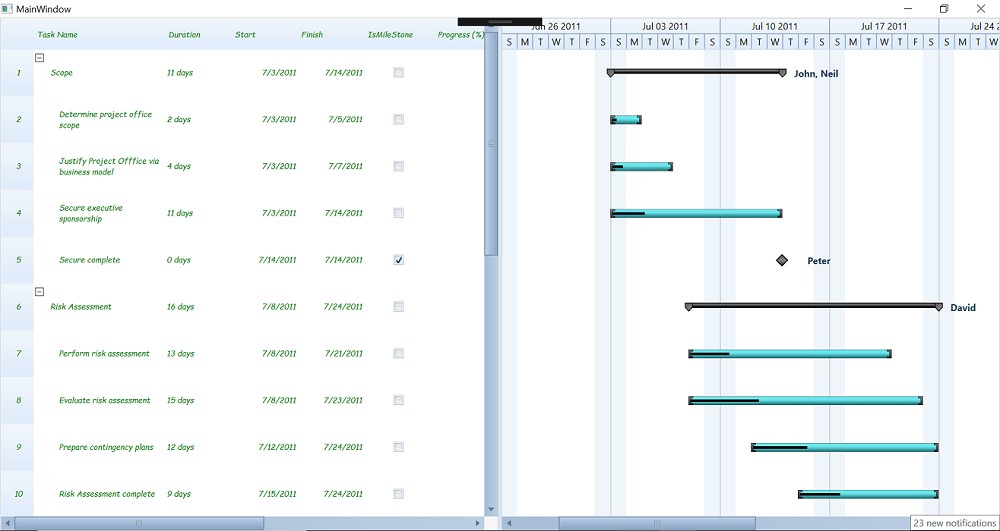
To customize the row height of the GanttGrid
This can be achieved by using the RowHeight property of the GanttControl as shown in the following code sample.
[C#]
            ganttControl = new GanttControl
            {
                ItemsSource = (this.DataContext as ViewModel).TaskDetails,
                RowHeight = 60
            };
To hide the Gantt grid row lines
By using the QueryCellInfo event, we can set the border color of the event argument Style as per in the below code snippet.
[C#]
        …

        ganttControl.Loaded += GanttControl_Loaded;

       …

        private void GanttControl_Loaded(object sender, RoutedEventArgs e)
        {
            ganttControl.GanttGrid.Model.QueryCellInfo += this.Model_QueryCellInfo;
            ganttControl.GanttGrid.InternalGrid.InvalidateCells();
        }

        private void Model_QueryCellInfo(object sender, GridQueryCellInfoEventArgs e)
        {
            var lightpen = new Pen (e.Style.Background, 0);
            e.Style.Borders.Right = lightpen;
            e.Style.Borders.Left = lightpen;
            e.Style.Borders.Bottom = lightpen;
            e.Style.Borders.Top = lightpen;
         }
To customize the Gantt grid font style
This can be achieved by setting the font style in the QueryCellInfo event argument as per in below code snippet.
[C#]
        private void Model_QueryCellInfo(object sender, GridQueryCellInfoEventArgs e)
        {

            e.Style.Foreground = new SolidColorBrush(Colors.Green);

            System.Windows.Media.FontFamily fontFamily = new System.Windows.Media.FontFamily("Comic Sans MS");

            e.Style.Font = new GridFontInfo() { FontSize = 10, FontFamily = fontFamily, FontStyle = FontStyles.Italic };

        }
KB article - How-to-customize-the-Gantt-grid-row-in-GanttControl-WPF
See also
How to add custom tooltip to Gantt
How to define your own schedule for Gantt to track the progress of projects

