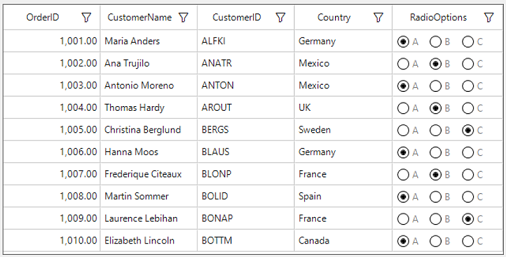
How To Add The Radiobutton Column In Winforms Datagrid?


columns
customcolumn
customization
radiobutton
windows-forms
winforms
winforms-datagrid
This example illustrates how to add the radio button column in WinForms DataGrid (SfDataGrid).
By default, DataGrid doesn't have a build in RadioButtonColumn, but we can create the GridRadioButtonColumn by customizing the GridColumn, RadioButtonAdv and GridCellRendererBase in SfDataGrid.
[ToolboxItem(false)]
public partial class GridCellRadioButton : RadioButtonAdv
{
    public GridCellRadioButton()
    {
    }

    /// <summary>
    /// Draws  check mark of the radio button.
    /// </summary>
    /// <param name="g">Graphics object</param>
    public void DrawSelectedCheckMark(Graphics g, Rectangle mrectBox, RadioButtonAdv radio, Color circleBackColor, Color iconColor)
    {
        Rectangle rect = mrectBox;
        rect.Inflate((int)DpiAware.LogicalToDeviceUnits(-5), (int)DpiAware.LogicalToDeviceUnits(-5));

        using (Pen pen = new Pen(circleBackColor))
        {
            g.DrawEllipse(pen, rect);
        }

        rect.Inflate(-1, -1);

        using (GraphicsPath path = this.GetCheckMarkPath(rect))
        {
            using (PathGradientBrush brush = new PathGradientBrush(path))
            {
                brush.CenterColor = iconColor;
                brush.CenterPoint = new PointF((float)rect.X + 1, (float)rect.Y + 1);
                brush.SurroundColors = new Color[] { iconColor };
                SmoothingMode mode = SmoothingMode.AntiAlias;
                g.SmoothingMode = mode;
                g.FillPath(brush, path);
            }
        }

        using (GraphicsPath path = this.GetCheckMarkBorderPath(rect))
        {
            using (Pen pen = new Pen(iconColor))
            {
                g.DrawPath(pen, path);
            }
        }
    }

    internal GraphicsPath GetCheckMarkBorderPath(Rectangle rect)
    {
        GraphicsPath path = new GraphicsPath();

        #region Fortouch
        path.AddEllipse(rect);
        path.CloseFigure();
        #endregion
        return path;
    }

    internal GraphicsPath GetCheckMarkPath(Rectangle rect)
    {
        GraphicsPath path = new GraphicsPath();
        path.AddEllipse(rect);
        path.CloseFigure();
        return path;
    }

    public void DrawBorder(Graphics g, Color borderColor, Rectangle mrectBox, RadioButtonAdv radioButtonAdv)
    {
        Rectangle rect = mrectBox;
        rect.Inflate(-1, -1);
        g.SmoothingMode = SmoothingMode.AntiAlias;
        g.CompositingQuality = CompositingQuality.AssumeLinear;

        using (Pen pen = new Pen(borderColor))
        {
            pen.Width = 1;
            g.DrawEllipse(pen, rect);
        }
    }
}
public class GridRadioButtonCellRender : GridCellRendererBase
{
    public GridRadioButtonCellRender(SfDataGrid dataGrid, Options options)
    {
        IsEditable = true;
        DataGrid = dataGrid;
        RadioOptions = options;
    }

    protected Options RadioOptions { get; set; }

    protected List<GridCellRadioButton> RadioButtonCollection { get; set; }

    /// <summary>
    /// Gets or Sets to specifies the datagrid.
    /// </summary>
    protected SfDataGrid DataGrid { get; set; }

    protected override void OnRender(Graphics paint, Rectangle cellRect, string cellValue, CellStyleInfo style, DataColumnBase column, RowColumnIndex rowColumnIndex)
    {
        int starHeight, starWidth;
        Rectangle drawArea;

        var padding = 5;
        starWidth = 16;
        starHeight = 16;

        var RadioButtonColumn = column.GridColumn as GridRadioButtonColumn;
        drawArea = new Rectangle(cellRect.X + padding, cellRect.Y + ((cellRect.Height / 2) - (starHeight / 2)), starWidth, starHeight);

        RadioButtonCollection = new List<GridCellRadioButton>();
        for (int i = 0; i < RadioButtonColumn.ItemCount; i++)
        {
            var radioButton = new GridCellRadioButton();

            radioButton.Location = new Point(drawArea.X, drawArea.Y);
            radioButton.Width = starWidth;
            radioButton.Height = starHeight;

            //Draw outer border of RadioButton
            radioButton.DrawBorder(paint, Color.Black, drawArea, radioButton);

            Point point = new Point(drawArea.X + drawArea.Width + 2, drawArea.Y);
            Font font = style.GetFont() != Control.DefaultFont ? style.GetFont() : Control.DefaultFont;

            int value = i;
            var buttonValue = ((Options)value).ToString();

            //Draw string for RadioButton
            paint.DrawString(buttonValue, font, new SolidBrush(Color.Gray), point);
            if (buttonValue.Equals(cellValue))
            {
                radioButton.DrawSelectedCheckMark(paint, drawArea, radioButton, Color.Black, Color.Black);
            }
            //Add RadioButton to Cell
            RadioButtonCollection.Add(radioButton);

            //Set the start point for next RadioButton
            Size stringlenth = TextRenderer.MeasureText((RadioOptions = 0).ToString(), font);
            drawArea.X += drawArea.Width + 10 + stringlenth.Width;
        }
    }

    protected override void OnMouseDown(DataColumnBase dataColumn, RowColumnIndex rowColumnIndex, MouseEventArgs e)
    {
        var radiobuttoncollection = (dataColumn.Renderer as GridRadioButtonCellRender).RadioButtonCollection;
        PropertyInfo dataRow = (dataColumn as DataColumnBase).GetType().GetProperty("DataRow", System.Reflection.BindingFlags.NonPublic | System.Reflection.BindingFlags.Instance);
        DataRow rowdata = (DataRow)dataRow.GetValue(dataColumn as DataColumnBase);

        for (int i = 0; i < radiobuttoncollection.Count; i++)
        {
            var rect = radiobuttoncollection[i].Bounds;
            if (e.Location.X > rect.X && e.Location.X < (rect.X + rect.Width))
            {
                radiobuttoncollection[i].Checked = true;
                (rowdata.RowData as OrderInfo).RadioOptions = (Options)i;

                DataGrid.TableControl.Invalidate(rect, true);

            }
        }
    }
}
public class GridRadioButtonColumn : GridColumn
{
    public GridRadioButtonColumn()
    {
        SetCellType("RadioButton");
    }

    private int itemCount;
    public int ItemCount
    {
        get
        {
            return itemCount;
        }
        set
        {
            itemCount = value;
        }
    }
}
this.sfDataGrid1.Columns.Add(new GridRadioButtonColumn() { MappingName = "RadioOptions", ItemCount = 3, Width = 140 });