Add WPF Treeview Items By Databinding In XML


adding
databinding
treeview
wpf
xml
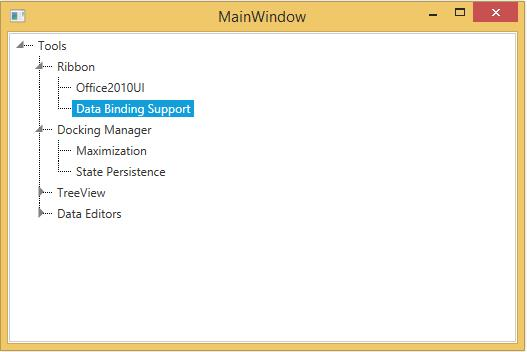
This session describes about how to add WPF TreeView (TreeViewAdv) items by databinding in XML.
XML file can also be used as ItemsSource for the TreeViewAdv. The following example illustrates this:
- Create the XML file with the following details and name it as Data.xml:
<Products>
    <Product Name="Tools" >
        <Feature Name="Ribbon" >
            <Feature Name="Office2010UI"/>
            <Feature Name="Data Binding Support"/>
        </Feature>
        <Feature Name="Docking Manager">
            <Feature Name="Maximization"/>
            <Feature Name="State Persistence"/>
        </Feature>
        <Feature Name="TreeView">
            <Feature Name="Editing"/>
            <Feature Name="Sorting"/>
        </Feature>
        <Feature Name="Data Editors" >
            <Feature Name="Watermark Text" />
            <Feature Name="Extended Value Scrolling" />
        </Feature>
    </Product>
</Products>
- Add the XmlDataProvider for the above XML document as follows:
<Window.Resources>
    <XmlDataProvider Source="Data.xml" x:Key="xmlSource" XPath="Products"/>
</Window.Resources>
- Set the
ItemsSourceproperty for theTreeViewAdvas follows:
<syncfusion:TreeViewAdv ItemsSource="{Binding Source={StaticResource xmlSource}, XPath=Product}" >
    <syncfusion:TreeViewAdv.ItemTemplate>
        <HierarchicalDataTemplate ItemsSource="{Binding XPath=Feature}">
            <TextBlock Text="{Binding XPath=@Name}" />
        </HierarchicalDataTemplate>
    </syncfusion:TreeViewAdv.ItemTemplate>
</syncfusion:TreeViewAdv>
TreeViewAdvwill be created as follows: