Welcome to the Angular feedback portal. We’re happy you’re here! If you have feedback on how to improve the Angular, we’d love to hear it!
Thanks for joining our community and helping improve Syncfusion products!
Details:
When using the Angular Standalone PDF Viewer with a multi-page PDF, a signature field on a page that is not immediately rendered duplicates after updating other form fields programmatically.
Steps to reproduce:
The signature field displays exactly as saved, without duplication.
Actual Result:
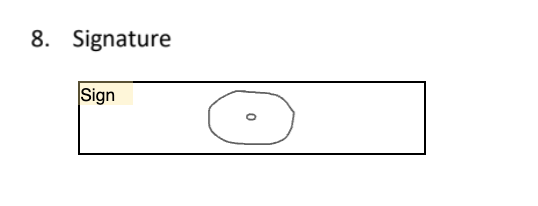
The signature is rendered twice in the same signature field:
Notes:
Code Snippets:
Reproducible code sample on StackBlitz: code sample
The sample already uses a signed document and updates the text fields "First Name" and "Last Name" after `documentLoad` event.
To reproduce the bug, simply scroll to page 4 and observe the last signature field - one circle was placed originally, but two circles are displayed (original and small duplicated one in the center)
 Bold BI
 Bold Reports
 BoldDesk