Welcome to the Angular feedback portal. We’re happy you’re here! If you have feedback on how to improve the Angular, we’d love to hear it!
Thanks for joining our community and helping improve Syncfusion products!
This enhancement aims to integrate Microsoft Excel's Notes functionality into the Spreadsheet component, offering both user interface interaction via a custom ribbon toolbar and programmatic access through a public method. Also, we should enhance the existing Notes feature to support Author and Timestamp display.
Key Features to be Implemented:
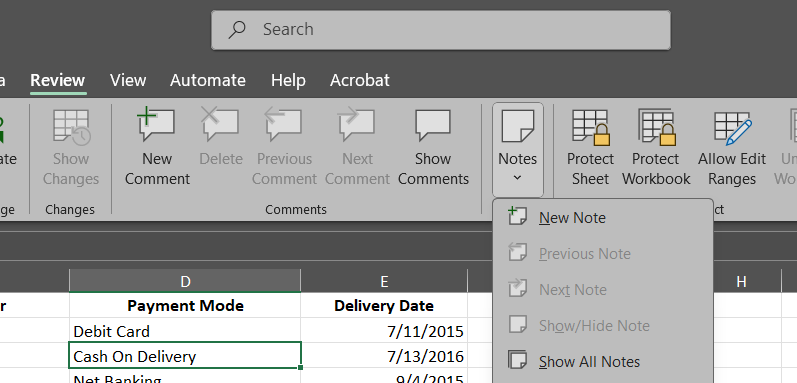
Custom Ribbon Toolbar Integration: A dedicated ribbon toolbar section will be introduced to provide the following Notes-related actions:
Please refer the screenshot mentioned below:
Public Method for Programmatic Access: A new public method will be exposed, enabling developers to programmatically add, modify, or interact with notes within the spreadsheet. This will provide greater flexibility and integration possibilities for custom applications.
Author Attribution: Since our Spreadsheet is a web component and does not inherently track user identity, we have to provide a new API that allows your application to pass the current user's name. This name will be used to tag notes with the author.
 Bold BI
 Bold Reports
 BoldDesk