Welcome to the .NET MAUI feedback portal. We’re happy you’re here! If you have feedback on how to improve the .NET MAUI, we’d love to hear it!
Thanks for joining our community and helping improve Syncfusion products!
I have a very basic SfChipGroup that has 3 elements. I simply want the first one to be selected whenever the page is loaded. (the code in here is not MVVM but i have tested it also as MVVM and got the same result);
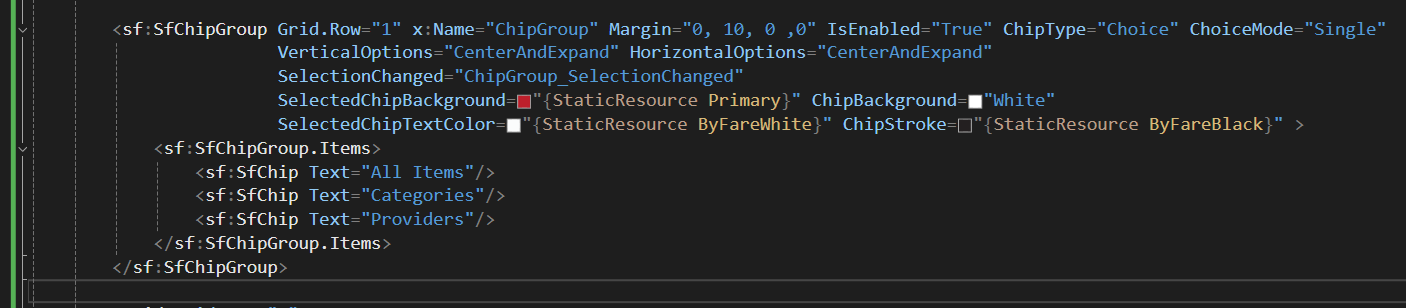
and in the page loaded event i am simply setting the selected item to the first one using "ChipGroup.SelectedItem = ChipGroup.Items[0];"
The expectation here would be that the first chip would have a red background and white text while the other two chips will remain with white background, black stroke and black text. The result however is the first chip being gray with white text, the second and third looking correctly. However once i click/tap on an another chip the selected chip will become red with a white text, the other two will become gray.
so the problems in here is that:
1- The selected style is not being applied to the chips on loaded (at least the SelectedChipBackground) and only being applied after at least 1 selection change happen (manual)
2- Once the selection changes the default style of the other chips simply changes on its own
i have even tried to manually define the background color of the first chip in the hope that on startup it will look correctly but it simply did not. It was just as the other chips and without selection.
(tested on Android)
 Bold BI
 Bold Reports
 BoldDesk